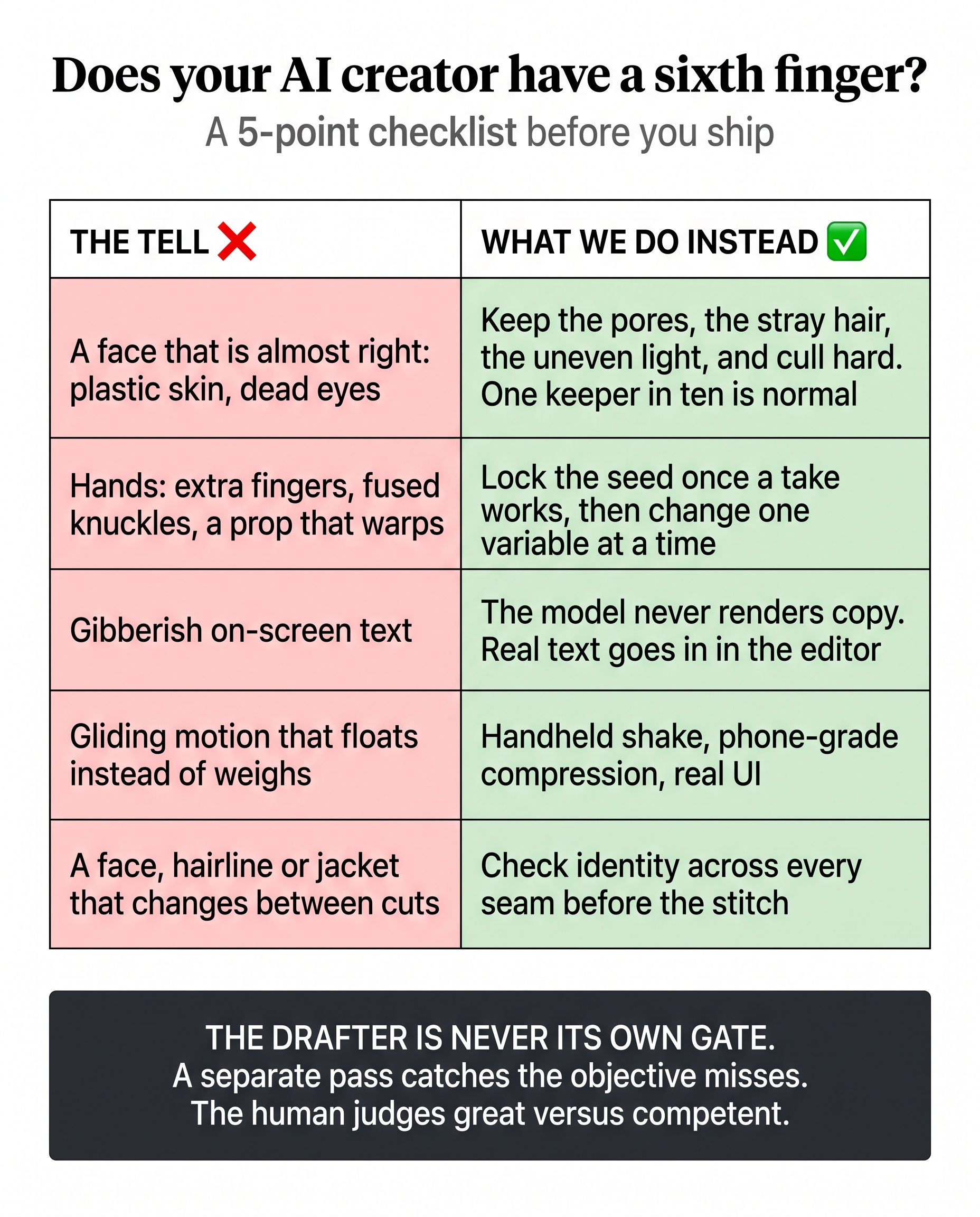
Short answer: check five things on a phone, full screen, sound on: the face, the hands, any on-screen text, the motion, and whether the person stays the same across cuts. Then follow one rule above all of them: whoever generated the clip, person or model, does not approve it. A separate pass gives a pass or a fail, and the human judges only great versus competent.
Nobody watching an AI ad says “uncanny valley”. They scroll. A buried call to action costs you a click, but a melting hand costs you the viewer’s trust in everything else the ad claims. So the tells get cut before the feed sees them.
Page Contents
What are the most common tells in AI-generated ads?
- A face that is almost right. Plastic skin, an airbrushed sheen, dead eyes. Keep the pores, the stray hair and the uneven light, and cull hard. One keeper in ten is a normal rate, not a failure.
- Hands. Extra fingers, fused knuckles, a prop that warps. Once a take works, lock the seed and change one variable at a time.
- Gibberish on-screen text. The model never writes your copy. Real text goes in, in the editor.
- Motion that glides instead of weighs. Add handheld shake, phone-grade compression and real interface screens so it reads as native to the platform.
- A face, hairline or jacket that changes between cuts. Check the person across every seam before you stitch.
Why should the person who made the ad not approve it?
Because the generator is invested in its output and blind to its flaws. In a good system one pass drafts and a different pass reviews with fresh eyes. The review catches the objective misses, such as the sixth finger, the off-spec export or a claim that does not hold, and needs no opinion to do it. Only after that does a human decide the one thing a pass cannot: whether the ad is great or just competent.
How should you review an AI ad?
- On a phone. Full screen, sound on. Most tells only show at full size.
- Against real footage, not against the other takes, which share the same flaws.
- With someone who did not make it. Show it cold and watch their face.
- Inside the safe zones. Keep text and calls to action clear of the platform’s own buttons; see creative safe zones for TikTok and Instagram.
How can you tell if an ad is AI-generated?
The same five tells give it away from the viewer’s side: skin that looks airbrushed, eyes that do not quite land, hands that misbehave, text that is nearly words, and motion that floats. Viewers rarely name them. They just feel something is off and scroll. Platforms also expect realistic AI-generated ads to carry a disclosure label, so check the live policy for each one you run on.
How do you make good quality AI video ads?
Start with the bet, not the tool: decide what the ad claims before you generate a frame. Then generate many takes and cull hard, keep imperfect texture, and put real text in in the editor. The guides linked below walk through each step.
When is a tell a reason not to use AI at all?
When the ad needs a real person to be believed. If a face has to carry trust, or the claim is regulated, the fix is a real person, not a better take. See AI actors or real UGC for where that line sits, and read our guide to AI ads that don’t look like AI and the Ultimate Guide to AI-Driven Creatives for the whole workflow.
Frequently asked questions
What makes an AI ad look fake? The usual tells are plastic skin, dead or drifting eyes, hand artifacts, gibberish on-screen text, gliding motion and a face that changes between cuts. Viewers rarely name them, they just scroll.
How many AI takes should you expect to throw away? Many. One keeper in ten is a normal rate in our process. Generate more takes and cull hard rather than fixing a weak one.
Who should approve an AI-generated ad? Not whoever generated it. A separate reviewer gives a pass or a fail on the objective misses, then a human judges great versus competent.
How do you make good quality AI video ads? Decide what the ad claims first, generate many takes and cull hard, keep imperfect texture, add real text in the editor, and have someone other than the generator review it on a phone.
How do you spot an AI-generated ad? Look for plastic skin, dead or drifting eyes, hand artifacts, gibberish text, gliding motion and a face that changes between cuts.