
Most performance teams describe the shift to AI-driven creatives as a production upgrade. “We can generate fifty variants in an afternoon.” That framing is right about what’s happening. It’s wrong about why it matters.
The promise of AI-driven creatives isn’t that you ship more ads. It’s that the winning teams test faster, learn faster. A traditional UGC cycle (concept brief, casting, talent release, shoot direction, edit, publish) runs seven to fourteen days. With AI in the production layer, the same cycle runs in one workday or less. That changes which questions you can ask the data.
When the loop was fourteen days, you tested one or two big bets per cycle and prayed. When the loop is hours, you can test the bets, the variations on the bets, and the variations on the variations. The question stops being “did this concept work” and becomes “which pieces of the concept actually did the work.”
That’s the leverage. And almost every team chasing AI creatives misses it, because they default to one of two failure modes. They ship sloppy AI fast, or they ship beautiful AI that quietly underperforms. Both failures share the same root cause: they treat AI as a strategy tool instead of a production tool, and pull humans out of the loop right when the loop needs them most.
This guide covers what stays human, what stays AI, and the chapter-by-chapter playbook for shipping AI-driven creatives that perform on Meta and TikTok in 2026.
Page Contents

Three trends that explain where the leverage actually is
Three things keep showing up across the subscription-app and gaming work we’ve done this year. They’re the reason AI is a real step-change for some teams and just a faster way to ship bad ads for others.
1. Talk to more than your obvious user
Most creative gets made for the user you can picture without trying, the one in the pitch deck. Trouble is, that’s exactly where everyone else aims too, and it’s a small room.
The growth usually hides in the users you didn’t picture. Read your reviews, talk to a few customers, look at what they actually type into search, and they show up: the reluctant convert, the person using the app for something you never intended, the switcher from an adjacent category, the millennial dad, the woman over fifty, the night-shift worker, the parent of a neurodivergent kid. Each of them needs a different ad.
This used to be too expensive to chase, because a separate ad for every little segment meant a separate shoot. AI takes that cost off the table. So the bottleneck isn’t production anymore. It’s whether you’ve actually looked hard enough at who is using the thing.
2. Don’t let one format turn into a rut
When a format works, teams tend to run it into the ground: all video and no static, all polished product shots and no UGC, all faceless and nothing on camera. It feels safe, because it’s the thing that’s winning.
But one format only reaches so far. The same idea shot as a static, or as a piece of UGC, or as a wall of text, lands in placements and in front of people your one winning format never touches. It isn’t a hack, it’s just that different formats live in different corners of the feed. And this is the part AI is genuinely good at: take one concept and have it ready in five formats by Friday.
3. Keep a human on the strategy
Everyone is generating ads with AI now, and most of it is slop, generic, no voice, no memory of the brand, nothing that makes you stop scrolling. The fix isn’t less AI. It’s putting the human back on the part that actually matters.
Let AI do the volume. Keep a person on the calls that decide whether it works: what the ad says, who it’s for, and what the hook has to do. The teams making the best AI creative haven’t shrunk their creative bench this year, they’ve leaned on it harder, just pointed at strategy instead of cranking out files by hand.
What this guide covers
- What carries over from the UGC playbook
- Why iteration speed, not production speed, is the real lever
- Start with the bet: the strategy spine
- Chapter 1: Briefing AI hooks (text, visual, verbal)
- Chapter 2: Visual elements at AI scale
- Chapter 3: Generating scripts that perform
- Chapter 4: Iterating across the eight axes
- Chapter 5: Safe zones
- Chapter 6: The AI production workflow
- Chapter 7: Humans in the loop, the drafting and curation checklist
- Chapter 8: At-scale operational discipline
- How to structure campaigns for AI-driven creative testing
- FAQ
What carries over from the UGC playbook
We’ve written the Ultimate Guide to UGC for Performance Marketing over years of UGC production. When we started shifting clients to AI-driven creatives, we expected the playbook to change.
Most of it didn’t.
| UGC Playbook Chapter | What Changes for AI-Driven Creatives |
|---|---|
| Compelling hooks (emotion, question, shock, visual) | Doesn’t change. Same hook frameworks (3C Principle, four hook layers, POV, curiosity gap). |
| Visual elements (overlays, stickers, animations, TTS) | Doesn’t change. Already half-AI in the UGC playbook. |
| Script frameworks | Different. AI accelerates production, but a model left alone fills whatever template it learned in training on autopilot, which is what produces generic scripts. The win is constraining the structure with the strategic bet and the body craft; we build on a clear shape such as Setup → Shift → Proof → Payoff. |
| Iterations (8 axes: hook copy, visual hook, format, music bed, voiceover, scene order, color palette, duration) | Explodes. UGC capped you at a handful of iterations per concept. With AI you generate 12 to 20 per concept and ship the 1 to 2 that win per format. |
| Safe zones | Identical. Platform-driven, not production-driven. |
| Remote shoot (creators, lighting, audio, frame) | Deleted. No casting, no Talent Release Agreement (TRA), no PayPal, no lighting setup. |
| Bonus templates (creator outreach emails, TRA) | Replaced by prompt templates, scene libraries, format specs. |
What we see: Three of the seven chapters carry over almost unchanged: hooks, visual elements, and safe zones. Script frameworks get tighter, not different in spirit. The remote-shoot chapter goes away entirely (no casting, no Talent Release Agreement, no lighting setup), and the bonus templates are replaced by prompt templates and scene libraries.
That leaves one chapter, iterations, that doesn’t just carry over. It explodes. That last one is where the actual leverage sits.
Why iteration speed is the real lever
Production speed is the headline number, but it isn’t the lever. The lever is what a fast loop lets you interrogate. On a multi-day loop, the unit of testing is the concept: one per cycle, maybe two with a big team, and every post-mortem is structural. Did this angle work, yes or no? Answers arrive in two-week increments.
When the iteration loop runs in hours, you stop testing concepts. You start testing axes. The same concept fans out into hook copy variants, visual hook variants, format variants, music bed variants, voiceover variants, scene order variants, color palette variants, duration variants. The post-mortem is no longer “did this angle work?” It’s “we know the angle works. Which combination of layers maximizes its lift?”
That changes which decisions are bottlenecks. Production becomes near-free. Strategy and curation become the constraints. The teams that miss this shift make one of two failures, both rooted in inverting where AI plugs in.
The first failure is sloppy AI. Generate fast, ship faster, skip the testing structure. The variant volume goes up but nothing is held constant across variants, so the conversion data is noise. The team learns nothing from the spend.
The second failure is beautiful AI. Optimize for production polish (cinematic lighting, photorealistic faces, slick transitions) instead of for the curiosity gap. The output looks like a brand campaign. CTRs are flat because nothing about it stops a thumb. The team confuses aesthetic quality with performance quality.
Both failure modes share the same root cause. The team treats AI as a strategy tool instead of a production tool, and pulls humans out of the loop at exactly the points where humans matter most. The rest of this guide is what humans do, chapter by chapter, to keep that from happening.
Free download: the AI-Driven Creatives Skill Pack
Every prompt in this guide, plus four agent-like skills (hook-maker, script-maker, visual-director, creative-curator), packaged for one-click install into Claude Code or copy-paste into any LLM. The 3C Principle, the four hook layers, the Setup/Shift/Proof/Payoff script structure, the eight iteration axes, and the three-phase curation checklist, all in one downloadable pack.
Start with the bet: the strategy spine
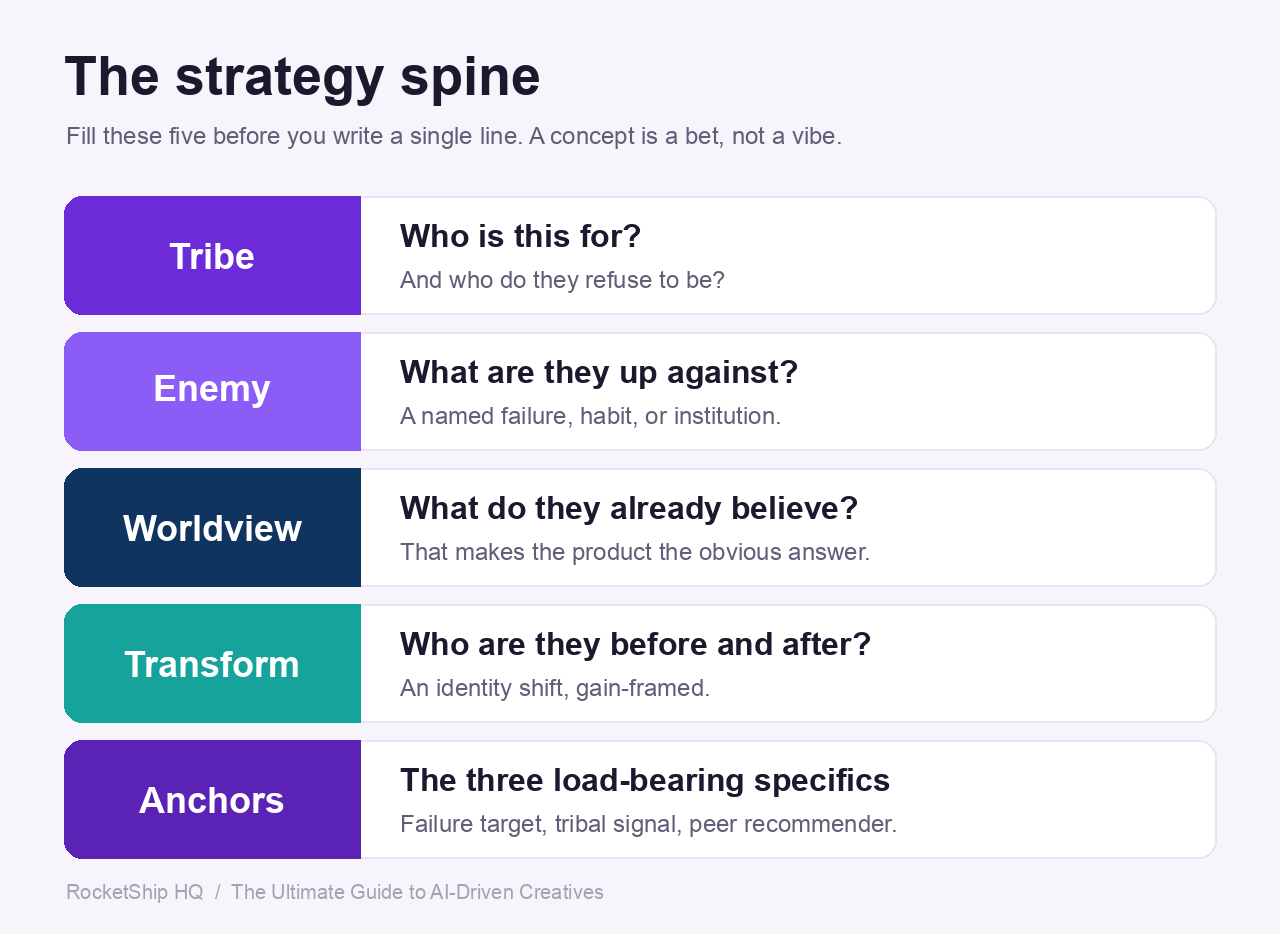
The chapters that follow are about craft: how to brief a hook, direct a visual, structure a script, iterate across the eight axes. All of it assumes you already know what bet the creative is making. Most teams don’t. They brief a vibe and hope the model finds the angle.
A concept is a bet, not a vibe. A vibe is “make a few fun ads about saving money.” A bet is a specific claim: this is for this person, who already wants this, we are against this, and we are making this move. The vibe averages toward generic, because generic is what you get when nothing specific has been decided. The bet has an edge you can win or lose on.
This matters more in the AI era, not less. The rest of this guide is about how AI makes execution cheap. Fifty variants in an afternoon. That is exactly why the strategic bet becomes the scarce input. When execution was the bottleneck, a fuzzy bet got hidden under production cost. Now that production is near-free, the bet is the only thing left that is hard. AI can execute a bet brilliantly. It cannot choose one. Ask a model to pick the angle and it will hand you the safest average of everything it has seen. Choosing the bet is the human job, and it is the job that survives the model getting cheaper. This is what we mean when we say AI is a strategy tool only in the wrong hands, and a production tool in the right ones.
The spine: five fields you fill before any line is written
Before you brief a single hook, fill these five fields in the brand’s own words, each backed by something a real user actually said. If a field is blank, every concept downstream will drift generic to fill the gap.
| Field | The question it answers | What “filled” looks like |
|---|---|---|
| Tribe | Who is this for, as an identity they recognize, and who do they refuse to be? | A self-image with a fear and a refusal, not an age bracket. “Someone who pays for the best and refuses to feel like they wasted it,” not “men 25 to 44.” |
| Enemy | What named failure are they up against: a category habit, an institution, a workaround, their own inertia? | One phrase the tribe would recognize. “Inefficiency” is not an enemy. “The spreadsheet you keep redoing by hand because the app you pay for won’t” is. |
| Worldview | What does the tribe already believe that, if true, makes the product the obvious answer? | One contestable sentence. If everyone already agrees, it is a tagline, not a worldview. |
| Transformation | Who is the viewer before, and who are they after? | An identity shift, gain-framed, that never shames the before-self. The viewer is the before-self, so do not insult them. |
| Cultural anchors | The three load-bearing specifics you can actually shoot and quote. | The named failure target, the tribal signal (the language and look that says “for people like you”), and the peer recommender the tribe actually trusts. |
The spine is generative, not documentation. You fill it to route into hooks, not to describe the brand for a deck. The enemy feeds the stakes. The transformation feeds the payoff. The cultural anchors feed the casting and the discovery moment. A sleep product, a budgeting product, a faith product, and a fitness product will each fill these fields differently, and that difference is the whole point.
Refusals are a hard gate, not a soft note
The Tribe field has a second job: it must name who the protagonist must NOT be. A faith app might refuse the seminary-trained insider. A budgeting product might refuse the user already net-positive on the math, because they have nothing to escape. These are refusals, and they are a gate, not a preference.
A concept whose protagonist matches a refusal is killed at review no matter how good the craft. On-craft and off-tribe still ships a loser. This is separate from a banned-phrasings list. Banned phrasings catch the wrong words; refusals catch the wrong person. Both are mandatory, and they fail different concepts.
The concept bet: one loop, opened and closed four ways
The spine sets the brand-level bet. Each individual concept then makes its own smaller bet, and we write it down before drafting as an angle spec. The angle spec names the one thing this concept is wagering on, and the four deliverables all have to cohere around it: the text hook, the visual hook, the body, and the text overlay.
The test is simple. The hook opens a loop, and the body, visual, and overlay all close that same loop. If the hook opens “you have been doing the app’s job, unpaid” and the body proves a different point entirely, you do not have a concept. You have four nice pieces pointed in four directions. A concept is one bet, executed four ways. This sits directly above the craft frameworks in the chapters ahead: the spine and the angle spec choose the loop, and Setup, Shift, Proof, Payoff is how the body closes it.
The engine: channel the desire that is already there
You cannot create desire. You can only channel the desire that already exists. So the bet is never “pain or aspiration” in the abstract. It is: which desire is already burning for this audience? In performance categories the honest answer is overwhelmingly a pain to escape, even in categories that feel positive. A fitness app wins more often on the dread of starting over than on the fantasy of the finish line.
So open on the wound, and close on the gain. Open on the thing that already hurts, then resolve on the win the product delivers. There is one strong variant on the open: instead of the wound, open on composure, the insider conspicuously not panicking where everyone else would. “They raised the annual fee to $695 and I didn’t flinch” works because the absence of the expected panic implies they know something you don’t, and the wound everyone else feels is sitting right underneath. Both doors lead to the same room. Whichever you open on, you still close on the gain.
Get the spine, the refusals, the angle spec, and the engine decided first, and everything in the chapters that follow gets sharper, because the model is finally executing a bet instead of guessing at one.




Chapter 1: Briefing AI Hooks
Most performance teams treat AI as a hook generator. That is the wrong job to give it.
AI is a hook variant machine, and the brief you hand it is where most of the performance is decided. The principles of what makes a hook work have not changed in fifteen years of direct response (DR), and they will not change because a model got cheaper.
What has changed is throughput.
The teams winning at AI-driven creative are not briefing looser, they are briefing tighter. They write prompts the way they used to write briefs to a senior copywriter, with constraints, framework names, and negative space.
The teams losing are typing “give me 10 hooks for my fitness app” and wondering why every variant sounds like the same LinkedIn post.
This chapter is about the framing you bring to the model. Get the brief right and you can generate variants at volume in an afternoon, a large share of which are testable.
Get it wrong and you generate the same hook over and over.
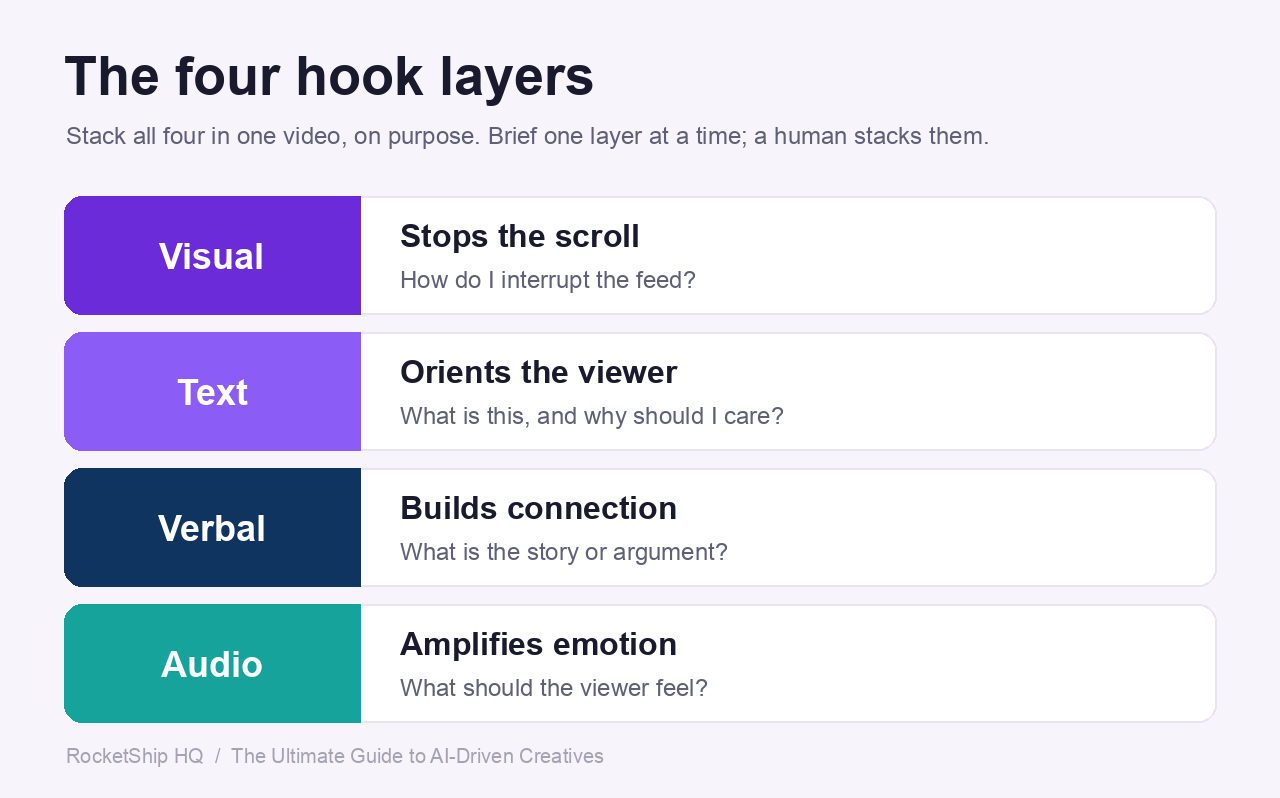
The four hook layers
When marketers say “the hook,” they collapse several different things into one word, and treating them as the same thing is the most common drafting failure on AI-generated creative. A hook actually operates across four layers at once, and the strongest creative we ship stacks all four intentionally, not accidentally.
| Layer | What it is / where it appears | Its job (the key question) |
|---|---|---|
| Visual | The first 1 to 2 second interrupt: movement, contrast, a context-rich object, unexpected imagery. Appears in the first 1 to 2 seconds of video and across the full surface of a static. | Stops the scroll. How do I interrupt the feed? |
| Text | The on-screen copy or display headline, including mockup creative (tweets, iMessage screenshots, App Store review screenshots), which is text-bearing even though it looks visual. Appears on the first frame of video and as the hero of a static. | Orients the viewer. What is this, and why should I care? |
| Verbal | The opening voice-over line, ideally before second 3. | Builds connection. What’s the story? |
| Audio | The music, sound effects, or silence under the opening. | Amplifies emotion. What should they feel? |
The layers do not map one-to-one onto the surface they sit on. A mockup of a five-star review is a visual hook that happens to use text, not a text hook. And a text overlay that says “I tried this for 30 days” is a text hook, not a verbal one, so it should not be duplicated by the VO. If the overlay says it, the verbal layer triangulates the same idea from a different angle rather than repeating it.
When you brief AI, name the layer you want, and brief one layer at a time, then have a human stack them. “Generate text overlays” and “generate VO opening lines” are different prompts and should never be combined into one. Models are bad at multi-layer coherence and good at single-layer variants, so the stacking is a human job. A meditation app hook with a calm voice-over, a gentle riser, and a high-contrast text overlay is layered. The same VO over a static talking head with no overlay is a one-layer hook, and it will lose to the layered version even if the script is identical.
The 3C Principle
Every hook, regardless of layer, has to do three things in the first second or two. We call these the 3Cs.
If a hook is missing any one of them, it fails.
- Context. Who is this for, what category does it sit in. The brain has to categorize the content instantly or it scrolls. A hook for a sleep tracking app needs to communicate “this is about sleep” inside the first beat, even if the literal word “sleep” never appears.
- Clarity. What is this video about, why is it worth watching the next two seconds. Precision increases retention. Vague hooks (“you won’t believe what happened”) test worse than specific ones every time.
- Curiosity. An open loop. Tension, a contrarian angle, an implied mistake, an unresolved outcome. Without an open loop the viewer has no reason to keep watching, even if the first two Cs are perfect.
When you brief AI, you have to demand all three, by name. Models will happily generate hooks with curiosity and no clarity, or clarity and no context.
Telling the model “must satisfy all three of Context, Clarity, Curiosity” inside the prompt noticeably reduces rejects on the first pass.
The withhold test (the single sharpest hook check)
If you only run one check on a hook, run this one: you cannot complete the thought from the hook alone. A real hook names that something is wrong, surprising, or hidden, and then withholds the answer, so the only way to resolve it is to keep watching.
The tell of a slogan: the viewer can finish the thought. If they can land on the ending themselves, even a clever one, you wrote a slogan, not a hook. The job is to name the mistake or the mystery, then withhold the answer.
A few generic illustrations of lines that pass:
- Named mistake, answer withheld. “I’d been doing my quiet time at the wrong time of day.” (faith app) The viewer cannot supply the right time. That is what pulls them in.
- “How I found out,” fix withheld. “How I found out my best window to focus isn’t the morning.” (productivity app) The line names that there is a better window and refuses to say when.
- Counterintuitive question, answer withheld. “What if your healthiest-looking snack is the one spiking you?” (nutrition app) It raises a suspect without naming the cause.
The trap: stating the answer. A hook that reveals the fix or the mechanism, even a counterintuitive one, closes its own loop. “The reason your healthy snack spikes you is the hidden starches” answers itself and dies. “Your healthy snack might be spiking you, and it isn’t the sugar” withholds, so the viewer has to stay for the cause. Tease the hidden mechanism, never name it in the hook.
Text hook rules
These rules apply whether the human or the AI is drafting. They are non-negotiable inputs to the prompt.
- First-person POV. Write as the user, not about the user. “I tracked my sleep for 30 nights and one number changed everything” beats “Users who track their sleep see results.”
- Conversational, not staccato. “No notes, no typing, I just listen” reads like a person. “No notes. No typing. I just listen.” reads like a robot. AI defaults to fragments. Forbid them in the prompt.
- Curiosity gap. Withhold the answer. The hook is the setup, not the reveal. “There’s a reason I stopped using my budgeting app at 11pm” beats “Budgeting at night made me overspend.”
- Specific numbers and stakes. “I lost 14 pounds and gained back 9” outperforms “I lost weight and gained some back.” Specificity reads as true.
- Length cap. Text overlays under 15 words, readable in ~1.5 seconds. Anything longer is an infographic, not a hook. As a refinement, the punchiest hooks run tighter still: text and overlay lines land best at roughly 3 to 7 words, with 10 as a hard cap, while spoken lines have room to breathe at around 14 to 20 words.
- Natural speech texture. Contractions, fillers cut, but rhythm intact. “I’d been on three dating apps for a year” not “I had been using three dating applications for one year.”
- Pair with the verbal hook, do not duplicate it. If the overlay says it, the VO should not repeat it. The two layers should triangulate the same idea from different angles.
- Setup, never reveal. The hook opens the loop. The body closes it. A hook that gives the answer (“This app helped me sleep better”) has nothing to keep the viewer watching.
Hook moves that work (an open list)
This is an open, growing list of moves that actually win across accounts, not a closed taxonomy. Some are templates for the line, some are jobs the hook does to the scrolling viewer, and the two overlap on purpose. Use them as scaffolding, not fill-in-the-blank Mad Libs: adapt the surface, keep the move.
The real test is not which box a hook fits. It is the bars every hook clears: it opens a loop it does not close, and it does at least one scroll-stop job. These are open examples of how, never the full set of what is allowed. If a hook wins through a move that is not here, capture it as a new one. Never force a line into a box. Ask what it does to the scrolling viewer.
- Confession. Admit a specific embarrassing behavior or situation. “I was the one paying $35 to get my own paycheck two days early.” (budgeting app)
- “I’ll show you how to [surprising action].” Promise an outcome the viewer assumed was impossible. “I’ll show you how to learn a language without studying grammar.” (language app)
- Impossible thing, surprising result. “I [did impossible thing] and [surprising result].” “I have ADHD and I have the cleanest meeting notes on my team.” (productivity app)
- Credential, then contradiction. A one-line credential, then a line that should not be true given it. “Certified personal trainer. Hated every workout app I tried.” (fitness app)
- Counterintuitive inversion. Contradict what the viewer expects to be true. “Can going to bed early actually leave you more tired?” (sleep app)
- A personal-diagnostic number. Imply the product knows something precise about you. “They told me I had 25 hours of sleep debt.” (sleep app) A precise, personal number builds curiosity and trust at once.
- “How I found out.” Reveal you were doing something wrong, withhold the fix. “How I found out my perfect bedtime was 9:45 p.m.” (sleep app)
- Identity transformation. Name who the viewer becomes. “Here’s how I became a morning person in one week.” (fitness app)
- Name the enemy. Take the viewer’s side against a system or behavior, never a named rival. “Getting paid biweekly is a scam.” (budgeting app)
- Hyper-specific timing or number. Concrete facts do the math for the viewer. “Rent’s on the 1st. My paycheck’s on the 3rd.” (budgeting app)
- Peer gap. Someone got more from the same thing. “My friend on the exact same plan lost twice what I did.” (fitness app)
- Cancel-reverse. You were about to quit, then didn’t. “I almost canceled my $300 membership, until I saw what I’d been leaving on the table.” (fitness app)
- Authority-figure frustration. Open on the moment an authority lets the viewer down. “When your therapist tells you to journal but you can’t sit still…” (mental health app)
- Relatable frustration, implied solution. “If you’ve ever [frustration], [implied fix].” “If you’ve ever opened a meditation app and felt more anxious, this is why.” (meditation app)
- POV realization. Drop the viewer into the moment they realize something. “POV: you just realized your sleep app has been lying to you for a year.” (sleep app)
Sample copy-paste prompts for AI hook generation
These are the prompts. Substitute the placeholders, paste into Claude or ChatGPT, and you get hooks that need light editing instead of full rewrites.
Prompt 1: Text overlays for video ads
You are writing first-frame text overlays for a paid social video ad.

Product: [YOUR APP], a subscription app for [YOUR CATEGORY, e.g. sleep tracking].
User problem: [YOUR USER PROBLEM, e.g. people don't trust their sleep score and don't know what to change].

Generate 10 text overlay variants that follow these rules, no exceptions:
- First-person POV. Write as the user, not about the user.
- Curiosity gap. The overlay is the setup, never the reveal. Withhold the key fact (the what, why, or how).
- Under 15 words each, readable in ~1.5 seconds.
- No fragment stacking. No "One tap. That's it. No phone." rhythm.
- No product name in the overlay.
- No generic CTAs ("Download now", "Try free").
- Each must satisfy the 3C Principle: Context (category is recognizable), Clarity (worth watching the next 2 seconds), Curiosity (open loop).

Use a mix of these patterns, no more than 2 of any one pattern:
incomplete revelation, contrast/contradiction, teased outcome, "POV:" framing, direct challenge, question.

Output as a numbered list. After each overlay, in parentheses, name the pattern used.
Prompt 2: Verbal opening lines (first VO line)
You are writing the first spoken line of a paid social video ad. This is the verbal hook, not the on-screen text.

Product: [YOUR APP], a subscription app for [YOUR CATEGORY].
User problem: [YOUR USER PROBLEM].
Speaker persona: [e.g. 32-year-old woman, casual, talking to camera].

Generate 8 opening VO lines that follow these rules:
- First-person, conversational, sounds like talking to a friend.
- Flowing sentences, not staccato fragments. "No notes, no typing, I just listen" beats "No notes. No typing. I just listen."
- Length: 6 to 14 words. Must be deliverable in roughly 2 to 3 seconds at natural pace.
- Curiosity gap inside the first sentence. The viewer should think "wait, what?" before the second line.
- No "Hey guys," no "What's up," no filler openers.
- Do not name the product in the opening line. The product enters later in the script.
- Structure target: Audience + Problem or Desire + Unexpected Angle + Implied Outcome.

Output as a numbered list. After each line, in parentheses, note which element is doing the curiosity work (contradiction, withheld answer, surprising stat, etc.).
Prompt 3: Hooks for static display ads (single-frame)
You are writing hero text for a static (single-image) display ad on Meta or TikTok.

Product: [YOUR APP], a subscription app for [YOUR CATEGORY].
User problem: [YOUR USER PROBLEM].
Visual context: the ad will pair this text with [DESCRIBE PLANNED VISUAL, e.g. a phone screen showing a chart, a destruction-theme image, a mockup of a 5-star review].

Generate 7 hero text variants that follow these rules:
- Text must work without sound, without sequence, and without a payoff frame. The static is the entire ad.
- First-person POV where natural, second-person ("you") allowed for direct challenges.
- Under 15 words, readable in ~1.5 seconds. Must be legible at thumb-stop distance on a phone.
- The text should pair with the visual to create a single curiosity gap. If the visual shows a result, the text raises the question. If the visual asks the question, the text complicates it.
- Do not name the product. The logo/CTA does that job at the bottom of the creative.
- No stacked fragments. No "infographic copy" (e.g. "$2,015 → 0 results").
- Must have all three of Context, Clarity, Curiosity.

Output as a numbered list. After each line, note in parentheses what the paired visual would need to do for this text to work.
Prompt 4: “Credential + Contradiction” pattern hooks
You are writing hooks in one specific direct-response pattern: "[Credential or identity]. [Contradiction]."

The structure: a one-line credential or identity statement, followed by a one-line contradiction that should not logically be true given the credential. The contradiction creates the curiosity gap.

Examples of the pattern (from other categories, do not reuse):
- "Certified personal trainer. Hated every workout app I tried."
- "I'm the worst writer in my office. My boss thinks I take the best notes."

Product: [YOUR APP], a subscription app for [YOUR CATEGORY].
User problem: [YOUR USER PROBLEM].
Possible user identities/credentials: [LIST 3 TO 5, e.g. "20-year meditator", "ICU nurse", "former insomniac", "marathon runner"].

Generate 10 hooks in this exact pattern, drawing from those identities. Rules:
- Two short sentences, total under 18 words.
- The credential must be specific and high-authority for the category.
- The contradiction must be a real, surprising tension, not a manufactured one. "Marathon runner. Can't sleep through the night." works. "Marathon runner. Likes our app." does not.
- First person, conversational.
- No product name.
- The contradiction is the setup, the body of the ad is the reveal. Do not give the answer.

Output as a numbered list. For each, note in parentheses which identity it uses and what the implied gap is (i.e. why the contradiction creates curiosity).
What NOT to do (text hook anti-patterns)
The reject pile from any AI hook generation pass is full of the same six failures. Train yourself to spot them on the first read.
- Fragment stacking. “One app. One tap. That’s it.” Reads like a robot. Rewrite as one flowing sentence.
- Statement that gives the answer. “This app helped me lose 14 pounds.” Loop is closed, no reason to watch. Rewrite as setup: “I lost 14 pounds and the thing that worked wasn’t the diet.”
- General or third-person. “Users who track their sleep see better results.” Nobody talks like this. Move to first person.
- Vague. “You won’t believe what happened when I tried this.” No context, no clarity. The viewer cannot categorize what they are watching.
- Over-engineered, infographic-style. “$2,015 → 0 results captured” reads like a Powerpoint slide, not a hook. Hooks are sentences, not data viz.
- Product-named in the hook. “I tried [App Name] for 30 days.” The product enters later. Naming it in the hook collapses the curiosity gap before it opens.
Chapter 2: Visual Elements at AI Scale
Most teams think AI image and video tools mean they finally get to skip the “what visual works” question. They don’t.
AI doesn’t change which visual elements work on a paid feed. It changes how cheaply you can produce them, and that means the cost of picking the wrong format is now higher, not lower.
If you brief a model badly, you don’t get one bad ad, you get forty bad ads in an afternoon.
The teams pulling ahead right now are doing the opposite of what you’d expect: they spend more time upfront on format choice and visual hook taxonomy, then use AI to flood the variant slot. Pick the format for the message first, brief the AI second, render at volume third.
The 5 visual hook techniques
The visual hook is the first subconscious interrupt in a feed. It does not need to be cinematic.
It needs to be noticeable. There are five techniques that consistently produce stop-the-scroll output, and each one has a different relationship with AI generation.
1. Dynamic Movement.
Formula: Static Shot + Sudden Zoom (0.3 to 0.8s) = Immediate Pattern Break. A static talking head is low interruption.
The same talking head with a quick zoom and a hand motion in the first second is significantly stronger. AI generation here is the easiest win of the five: image-to-video tools (Runway Gen-4, Sora 2, Pika, Kling) are explicitly built around camera moves.
You can take a single still and generate a push-in, pull-back, or whip pan in under a minute. Brief the camera move directly in the prompt.
2. Color & Contrast.
Formula: Base Visual + 15 to 25% More Contrast + Slight Saturation Boost = Increased Feed Standout. Feeds are visually similar by default.
You stand out by punching saturation, increasing brightness, or planting one bold color element in frame. AI is good at this if you ask.
Most marketers don’t ask. Add “high contrast, saturated, single bold color element (red phone, yellow sticky note, neon green dollar sign) against muted background” to every prompt and your hit rate climbs.
3. Context-Rich Objects.
Formula: High-Meaning Object + Close Framing + Movement = High-Clarity Visual Hook. Objects that carry built-in narrative weight: cards, statements, phones showing dashboards, receipts, premium items, things that signal money or status.
AI image models render these well, but they hallucinate text on screens, garble logos, and warp small UI elements. Plan for object-only framing (the back of the phone, the edge of the card) or composite the screen content in post.
4. Unexpected Imagery.
Visual confusion that makes viewers think “what is happening” and stay. AI is the cheat code for this technique.
The whole point of generative models is that they produce imagery that doesn’t exist in stock libraries. Lean in.
Surreal scale, impossible compositions, an everyday object in the wrong context: cheap to produce, high to interrupt.
5. The Visual Hook Multiplier.
Stack the previous four. Zoom-In + High Contrast + Curiosity Object + Audio Cue = High Interruption Probability.
Brief the AI to produce all four at once: a saturated, close-cropped shot of a context-rich object with a built-in camera move. Then layer audio (notification ping, riser, hard cut to silence) in post.
Six static format conventions that work
These are the six static and short-form video formats that consistently work for subscription apps. AI is a force multiplier for all six, but each has a different production pipeline.
| # | Format | What It Is | When to Use | Example Tagline |
|---|---|---|---|---|
| 1 | Discovery | First-person revelation. “I learned X about myself.” | When the value prop is insight or self-understanding the user didn’t know they needed. | “I learned my sleep was wrecking my mood, not my workload.” |
| 2 | Transformation | Personal arc. “How I went from X to Y.” | When the product produces a clear before-and-after a viewer can mentally project onto themselves. | “How I went from 4 hours of doomscrolling to one focused study block a day.” |
| 3 | Progression | Show the timeline. “Week 1, Week 4, Week 8.” | When the result compounds and the emotional payoff is in the slope, not the endpoint. | “Week 1: I burned the rice. Week 8: I’m meal-prepping for four.” |
| 4 | Split screen | Side-by-side comparison. Old way vs new way. | When the contrast is the message. Two states, two outcomes, one frame. | “Old way: 12 tabs and a notebook. New way: one screen.” |
| 5 | Listicle | Numbered list. “3 things you didn’t know about X.” | When the content is informational and the curiosity gap is the missing item. | “3 settings on your language app most people never touch.” |
| 6 | Wall of text | Information-dense static: tweet screenshot, notepad, article block. The text is the visual. | When the message needs density and credibility, and a face would weaken it. | A notepad-style screenshot reading “Things I stopped doing once I started journaling daily.” |
The deeper principle: most apps get trapped in one format because it’s winning. All video, no static.
All product mockup, no UGC. Breaking format unlocks new audience segments, even when the underlying message stays the same.
Visual elements you can layer in
Once you’ve picked the format, these are the layers that compound on top. Each one used to be a production line item.
Most are now near-free.
- Text overlays. Still the highest-leverage layer. AI doesn’t help much in production (Figma, CapCut, native editors are faster), but Claude or GPT can generate twenty overlay variants from a single body script in seconds.
- Stickers and emojis. Native-feeling visual texture. Free. Use them to break up a wall of text or to punctuate a transition.
- GIFs. Pre-AI workhorse, still works as a reaction beat in the middle of a video. Giphy is fine. No AI needed.
- Animations and AR. AI image models now produce frame-coherent short loops via Runway, Sora, and Kling. AR effects (Spark, Lens Studio) still require manual setup, but the assets that go inside them are AI-generated.
- Green-screen scene swap. Used to be a half-day editing job. Runway and Sora do background replacement in minutes. Brief the new background as its own prompt, composite, done.
- TTS. ElevenLabs voices are now near-indistinguishable for most reads at a conversational pace, and they cost cents per render. Use TTS for variant testing where you want to swap one phrase across thirty videos without re-recording.
Sample copy-paste prompts for AI visual generation
These are production prompts. Paste them, render, ship.
Adjust the bracketed variables for your vertical.
(a) Discovery-format static (Midjourney or Gemini 3 Pro Image)
A cinematic close-up photograph of a young woman's hands wrapped around a ceramic coffee mug at a sunlit kitchen table, soft morning light streaming through a window, shallow depth of field, the mug fogged with steam. Her face is intentionally out of frame (cropped above the chin) so no facial features are visible. On the table next to the mug: a half-open paper journal with handwriting blurred, a pair of reading glasses, a small potted plant. Color palette: warm cream, soft beige, muted terracotta, with a single bold mustard-yellow napkin folded on the right side of the frame for color punch. Style: modern editorial lifestyle photography, Kinfolk magazine aesthetic, natural film grain, 35mm look. Aspect ratio 4:5 (Instagram and Meta feed). High resolution, sharp focus on the mug, soft bokeh on background. Leave the upper third of the frame as clean negative space (slightly out-of-focus wall) for a text overlay to be added in post. No faces, no logos, no text in the image, no people fully visible, no phones or screens. Quality: photoreal, magazine-grade.
(b) Transformation-format short video (Runway Gen-4 or Sora 2, image-to-video)
Image-to-video transition. Start state: an overhead shot of a cluttered home desk, papers scattered, three coffee cups, a closed laptop covered in sticky notes, dim afternoon light, desaturated cool tones (muted blues and grays), a sense of overwhelm. End state: same desk, same angle, but cleared and organized, one open notebook with neat handwriting, a single mug of fresh coffee, a small green plant added, warm golden-hour light, saturated warm tones (cream, gold, soft green). Transition: smooth match-cut morph over 4 seconds, with subtle camera push-in toward the notebook in the final second. Total duration: 6 seconds. Pacing: contemplative, not frantic. Music style: minimal piano with a soft uplift at the 4-second mark, no vocals, royalty-free indie folk feel. Aspect ratio 9:16 (vertical for Reels and TikTok). No people in frame, no faces, no on-screen text (text added in post). High realism, cinematic color grade.
(c) Context-rich object visual (destruction theme, fictional finance app, Midjourney or Gemini 3 Pro Image)
A cinematic still-life photograph of a ceramic pink piggy bank smashed in half on a dark walnut wood floor, coins (pennies, nickels, dimes) scattered around it, one coin still spinning on its edge in the foreground (motion blur on that single coin only). Side lighting from a window-left, deep shadows, dramatic chiaroscuro. The piggy bank's broken edges are clean and sharp, ceramic shards visible. A single crumpled receipt lies next to the pieces, slightly out of focus. Color palette: deep walnut brown, dusty pink, copper, with one bright element (a folded twenty-dollar bill peeking from under the wreckage) for visual punch. Style: still-life editorial photography, dramatic and slightly somber, like a Wall Street Journal feature image. Aspect ratio 1:1 (square). Sharp foreground focus, soft background bokeh. Leave the top quarter of the frame as clean dark negative space for a text overlay. No faces, no hands, no people, no logos, no text in the image, no brand marks on the coins or bill. Photoreal, high detail on ceramic texture and coin metal.
(d) Wall-of-Text static (Figma + AI text generation, with optional Midjourney background)
Build in Figma. Canvas: 1080 x 1350 px (4:5 Meta feed).
Background: a slightly off-white paper texture (download from Midjourney with the prompt: "lined yellow legal pad page, top-down flat-lay photograph, slightly worn edges, soft natural shadow, no text, no writing, ultra-realistic paper grain, 1080x1350, no people, no hands"). Place this image as the full background.
Foreground text: handwritten-style font (use Caveat, Kalam, or Patrick Hand from Google Fonts) at approximately 48pt, dark navy ink color (#1a2540), left-aligned with a 120px margin from the left edge.
Text content (generate with Claude or GPT using this prompt: "Write a 6-line handwritten-style note from a [vertical, e.g., language-learning app] user listing things they stopped doing once the app became a habit. Each line under 8 words. Conversational, first-person, slightly self-aware tone. No product name. No em dashes. Number each line."):
   1. Stopped pretending I'd "start tomorrow"
   2. Stopped buying textbooks I'd never open
   3. Stopped feeling guilty on my commute
   4. Stopped lying about my level
   5. Stopped translating in my head
   6. Started actually thinking in it
Add a small subtle doodle (an arrow, a star, an underline) next to line 6 in the same ink color. Add one realistic coffee-cup stain ring in the bottom-right corner (5% opacity). Export as PNG. No faces, no people, no logos, no product name in the text.
Format portability: the at-scale principle
Once a concept wins in one format, you don’t reinvent it. You remix it.
Same message, different format, different audience segment. A Discovery-format video that wins on TikTok becomes a Wall-of-text static for Meta, a Listicle carousel for LinkedIn, a Split-screen for YouTube Shorts.
The thesis stays constant. The container changes.
AI makes this remix loop close in days instead of weeks, because the prompt for each new format is a one-line tweak away from the prompt that made the original. The teams that win don’t have more ideas, they have more containers per idea.
Visual hook checklist (pre-publish)
Before approving any creative, run through these seven questions. If three or more are weak, rewrite the hook.
- [ ] Does something move in the first second?
- [ ] Is there visual contrast or color strength?
- [ ] Is context clear within 1 to 2 seconds?
- [ ] Is there a defined audience?
- [ ] Is there an open loop?
- [ ] Is text readable and native?
- [ ] Is audio clean and supportive?

Chapter 3: Generating Scripts That Perform
Most teams using AI to write ad scripts get sloppy output, and they blame the model. The model isn’t really the problem, and neither is any one framework. When you prompt Claude or ChatGPT for “a Facebook ad script,” it reaches for the most familiar template it saw in training (PAS, BAB, AIDA, the patterns every copywriting blog has recycled for two decades) and fills it in on autopilot. The trouble isn’t that those frameworks are uniquely bad. It’s that a template filled generically, any template, produces a generic script. What’s missing is the strategic bet and the craft, not a secret structure.
The win is not a better model, and it is not a magic framework your competitors don’t have. The win is making the model build on a default structure and then constraining each beat with the bet and the body craft, instead of letting it autocomplete a familiar shape.
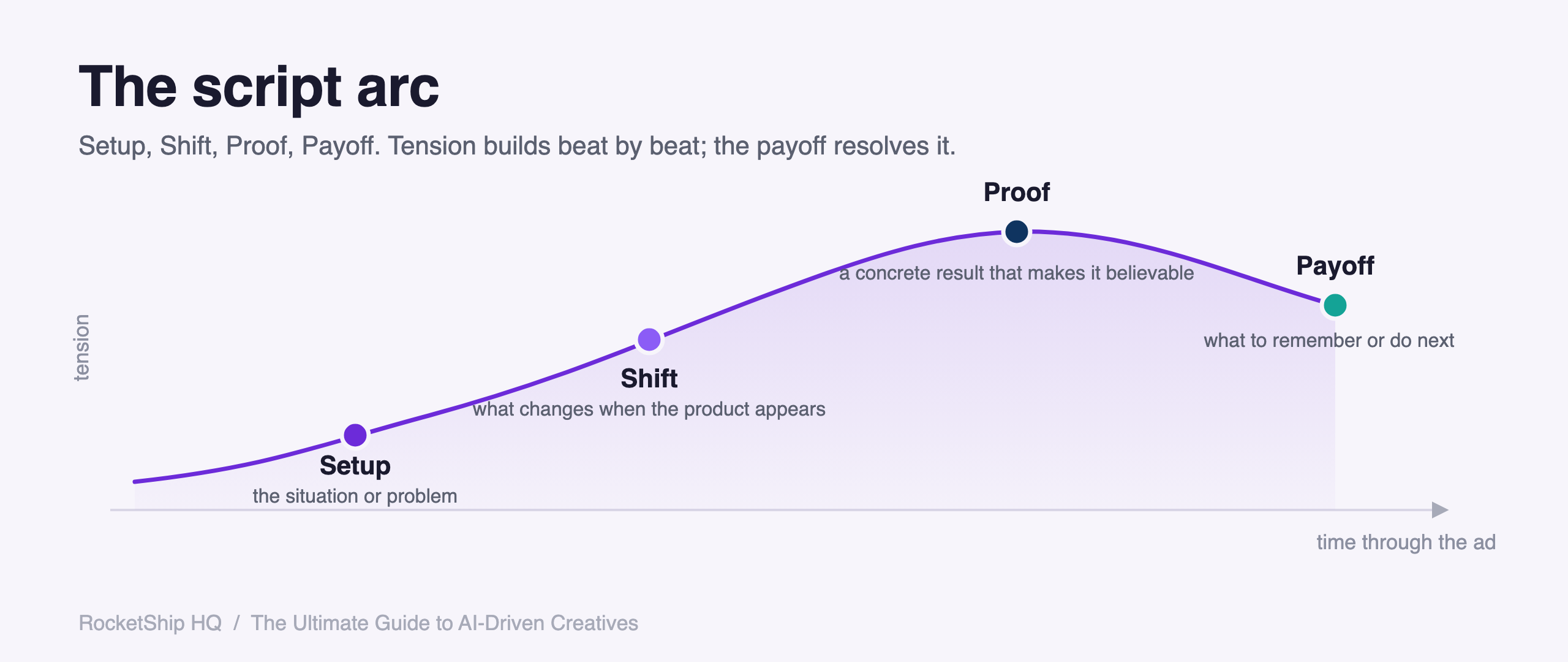
Our default structure is Setup, Shift, Proof, Payoff. It is the set of beats we build on for most scripts we ship. It is not categorically better than PAS or AIDA; it earns its keep because we then constrain it with the bet (who this is for, what it is against) and the body craft (open on the pain, one concrete situation, a visible mechanism). The structure is the skeleton; the bet and the craft are what make it perform.
A reliable script shape: Setup → Shift → Proof → Payoff
There is no one required structure. What matters is that you name your beats and each one sets up the next, so the viewer always knows how you got from one moment to the next, and that the shape fits the specific ad. Setup → Shift → Proof → Payoff is the shape we reach for most often because it travels well across categories, so it is the running example below, not a law to follow. If a different shape serves the ad better, use it, as long as the beats are named and each one earns the next.
Four beats, in order:
- Setup (the opening): The situation, problem, or discovery moment that opens the ad.
- Shift (the change): What changes once the product or method appears.
- Proof (the evidence): A concrete screen, behavior, or result that makes the promise believable.
- Payoff (the close): What the viewer should remember or do next.
Here’s how it reads for a productivity app that records and transcribes meetings:
- Setup: “I used to spend 20 minutes after every meeting trying to remember what was said.”
- Shift: “Now I just hit record on my phone and slip it in my pocket.”
- Proof: “It transcribes everything and gives me a perfect summary.”
- Payoff: “My coworkers think I have a photographic memory. I don’t correct them.”
Same structure for a budgeting app:
- Setup: “I’d open my banking app on Sunday night and feel my chest tighten.”
- Shift: “Then I started letting one app pull every transaction in automatically.”
- Proof: “Every Sunday I get a one-screen view of where my money actually went.”
- Payoff: “I haven’t dreaded a Sunday night in six months.”
And once more, for a meditation app:
- Setup: “I’d lie in bed at 1 a.m. doing breathing exercises I’d read about on Reddit.”
- Shift: “A friend told me to stop guessing and just press play on something.”
- Proof: “I queue up a 12-minute session and I’m out before it ends.”
- Payoff: “I have not finished a single one. That’s the point.”
The structure is simple. The discipline is in not skipping a beat.
Setup / Shift / Proof / Payoff gives you the skeleton. It puts the beats in a followable order, which is most of the job. But a script can hit all four beats and still fall flat. The next three sections are the craft that makes the skeleton actually persuade: the engine you write to, the bars every script has to clear, and the passes that take a competent script to a great one.
Apply the engine: open on the pain, close on the gain
The engine, the desire you write to, is covered in full in the strategy spine above: you can only channel the desire that is already burning, and in performance categories that desire is almost always a pain the viewer is trying to escape. Here is just the application to the script.
Open on the pain that this segment actually feels. You have two doors into it: lead with the wound directly, or lead with composure, the insider conspicuously not panicking where everyone else would (“They raised the annual fee and everyone freaked out. I didn’t.”). Both doors lead to the same room. Whichever you open on, close on the gain, the win the product delivers. A script that opens on the wound and also ends on the wound is a complaint, not an ad.
The bars every script must clear
Setup / Shift / Proof / Payoff tells you the order of the beats. These bars tell you whether the beats are any good. Run every script against the checklist before it ships:
- Continue the hook. Don’t re-explain the product from scratch. Pick the story up after the hook lands. If the Setup restates what the hook just said, you’ve spent your opening on nothing.
- Move through a real change. A belief, a behavior, a discovery, a comparison, or a result. The viewer has to move from one state to another. A script that changes nothing is a description, not an ad.
- Go deep on ONE concrete situation. Don’t list several. A single scene, mined for its specific detail, beats three named in passing. “A sticky note, a phone reminder, a spreadsheet tab” is broad and shallow, three things, none of them actually seen. “The index card I re-laminated every quarter and checked at the register like a coupon” is one thing, deep. One specific lived detail beats three named in passing.
- Make the mechanism visible. Show why the product changes the outcome, not just that it does. “It watches the reset dates I never remember and pings me the day before, so the credit gets used instead of expiring” is a visible mechanism. “It helps you stay on top of everything” is an assertion.
- Sound like a person with a point of view. Not a brand explaining itself, and not a stack of clipped fragments. “No card, no grid, no spreadsheet” is a robot tic. “I don’t carry the cheat sheet anymore” is a person. Read it aloud. If it sounds like a list of phrases, rewrite it into flowing sentences.
- Pay off exactly the loop the hook opened. That loop, no more, no less. If the hook promised a memory trick and the Payoff lands on saving money, the script pays off the wrong loop.
- Proof proportionate to the claim. A big claim needs hard proof: a number, a screen, a behavior, a contrast, or a believable mechanism. A small claim can run on lived texture alone. Charming copy whose proof is too weak for its claim fails, however well it reads.
- Write to the clock. A video script is spoken in real time. A roughly 30-second ad is only about 75 to 90 words of voiceover, and past about 45 seconds the feed has already moved on. Draft first, then cut every line that doesn’t earn its second.
Make a good script great: three passes, in order
A script that clears the bars is good. Great is two more passes on top, and the order matters: sequence, then intensify, then compress. Intensify before the sequence is clean and you get vivid chaos. Compress before you intensify and you cut the wrong things.
- Sequence. Get the beats clean and followable first. Beat 1 sets up beat 2 sets up beat 3. The viewer should always know how you got from the last moment to this one. Two failures to kill: jumping straight from the wound to “then I found this app” with no bridge (the turn has to land, not cut), and scrambling the order (revealing the after before the before). This is the skeleton, and Setup / Shift / Proof / Payoff is one clean way to sequence it.
- Intensify. Now push each beat into lived experience and raise the stakes. Replace anything a stranger could have written with the exact moment as the person actually lived it. “It saves time on notes” is abstract. “I used to retype my scribbled notes for twenty minutes after every call and still get half the action items wrong” is lived. Show actions and behaviors, not role identity: “I almost canceled it” beats “I’m a frustrated customer.” And intensify the resolution as much as the open, the product’s moment has to be as concrete as the wound that opened it, one scene, never a feature list.
- Compress. Cut to the clock. Intensity and brevity are not opposed. The goal is maximum vividness per second. Compress by removing whole beats and ideas, not by chopping sentences into fragments, which just leaves a staccato clip-stack that reads like a robot. Cut the idea, then write what remains as speech. Run the read-aloud test last, after compressing.
Vividness is selection, not accumulation. One un-fakeable detail beats five stacked ones. The most vivid script is the single specific detail that survives the cut, not the most details piled on. The test for whether a detail earns its place: could only this one person, who actually lived this, have written it? If a competitor could paste their logo onto the line unchanged, it isn’t specific enough yet.
Body copy rules that don’t change with AI
These rules predate AI and survive it.
- Length: 20 to 25 seconds when read aloud. Typically 45 to 65 words. Never over 70.
- Tone: Conversational, first-person. Sounds like someone telling a friend, not reading a script. No corporate-speak, no filler.
- Flow: Flowing sentences, not choppy two and three word fragments.
The read-aloud test (mandatory). Before any script ships, read it out loud at natural pace.
If you stumble, rewrite. Four things to catch:
- Dangling phrases. “Every action item, pulled out.” reads incomplete. “It pulls out every action item.” flows.
- Fragments that don’t connect. “One app. One tap.” reads choppy. “One app, one tap” flows.
- Missing context. “5 minutes after” leaves you asking after what. “Five minutes later” is complete.
- Stacked short fragments. “No notes. No typing. I just listen.” reads like a robot. “No notes, no typing, I just listen” reads like a person.
What to avoid. AI-sounding fragments (“One tap. That’s it. No phone. No laptop.”), generic claims without specificity, product feature lists disguised as stories, and sentences that start with the product name. If your script opens with “[App Name] helps you…”, scrap it.
Hooks for video scripts (the verbal hook)
The verbal hook is the first VO line. It does the same job a headline does in display: stops the scroll and forces a “wait, what?”
The structure:
Audience + Problem/Desire + Unexpected Angle + Implied Outcome
Examples across verticals:
- “If you’re running Meta ads and your CPA keeps rising, this creative mistake is probably why.”
- “If you keep starting language apps and quitting in week two, the streak isn’t the problem.”
- “If you’ve trained five days a week for a year and still don’t see your abs, your kitchen is.”
- “If you check your bank balance before every coffee, you have a visibility problem.”
Patterns that work for spoken delivery, adapted from our hook table:
| Pattern | Verbal example |
|---|---|
| “I’ll show you how to [surprising action]” | “I’ll show you how to fall asleep without ever finishing a meditation.” |
| “I [did impossible thing] and [surprising result]” | “I have ADHD and I’m the most organized person on my team.” |
| “[Credential/identity]. [Contradiction].” | “I’m a personal trainer. I haven’t been to a gym in four months.” |
| “When your [authority figure] [does frustrating thing]…” | “When your bank app makes you log in three times to see one number…” |
| “If you’ve ever [relatable frustration], [implied solution]” | “If you’ve ever opened your budgeting app and immediately closed it, this is for you.” |
Delivery rules: start immediately, no “Hey guys,” confident pacing, no filler. Record five to ten variations of any hook.
Hooks are variables, not finals.
Sample copy-paste prompts for AI script generation
These are the centerpiece. Paste into Claude or ChatGPT, fill the bracketed placeholders, ship.
Prompt A: Generate 3 Setup / Shift / Proof / Payoff scripts from one concept brief
You are a direct response (DR) copywriter for a subscription app called [YOUR APP].
The user problem you solve: [YOUR USER PROBLEM]
The angle for this concept: [ANGLE / EMOTIONAL HOOK]
The target audience: [AUDIENCE DESCRIPTION]

Write 3 video ad script variants using this exact four-part structure, in order:
1. Setup: the situation, problem, or discovery moment that opens the ad
2. Shift: what changes once the product or method appears
3. Proof: a concrete screen, behavior, or result that makes the promise believable
4. Payoff: what the viewer should remember or do next

Constraints:
- 45 to 65 words per script. Never exceed 70.
- Conversational, first-person. Sounds like someone telling a friend.
- Flowing sentences. No stacked two and three word fragments.
- No sentence starts with the product name.
- No generic claims ("save time", "feel better"). Be specific.
- No feature lists. Tell a story.
- Open on the pain the audience already feels, and close on the gain.
- Go deep on ONE concrete situation. Do not list several.
- Make the mechanism visible: show why it works, not just that it does.
- Do not autocomplete a familiar copywriting template (PAS, AIDA, BAB) on autopilot. Build on the Setup / Shift / Proof / Payoff beats, and constrain each beat with the angle above and the craft rules in this list (open on the pain, one concrete situation, a visible mechanism).
- Do not use em dashes or en dashes.
- Each script must pass a read-aloud test: no dangling phrases, no broken fragments, no missing context.

Output the 3 variants numbered, with each beat labeled (Setup / Shift / Proof / Payoff).
Prompt B: Generate 5 verbal hooks for one concept
You are writing the opening VO line (verbal hook) for a video ad for [YOUR APP].
Concept: [CONCEPT NAME, ONE SENTENCE]
Audience: [AUDIENCE]
Core tension or surprising angle: [ANGLE]

Write 5 verbal hook options, each 1 sentence, each under 15 words. Use this structure:
Audience + Problem/Desire + Unexpected Angle + Implied Outcome

Vary the 5 across these patterns (one per hook):
1. "If you've ever [relatable frustration], [implied solution]"
2. "I [credential/identity]. [contradiction]."
3. "I'll show you how to [surprising action]"
4. "When your [authority figure] [does frustrating thing]..."
5. "I [did impossible thing] and [surprising result]"

Constraints:
- No "Hey guys", no "Did you know", no "What if I told you".
- Do not name the product in the hook.
- Each hook must open a curiosity gap. The viewer should think "wait, what?" or "how?"
- No em dashes or en dashes.
- Read aloud test: each must sound natural in 3 seconds.

Output 5 numbered hooks, labeled with the pattern used.
Prompt C: Rewrite a flat AI-generated script
Below is a draft ad script that reads like generic AI output. Rewrite it.

Apply this exact four-part structure: Setup (the opening situation or problem), Shift (what changes once the product appears), Proof (a concrete screen, behavior, or result), Payoff (what to remember or do next).

Fix all of the following:
- Choppy two and three word fragments. Replace with flowing sentences.
- Dangling phrases that read incomplete.
- Stacked short fragments that read like a robot.
- Missing context (e.g., "5 minutes after" with no anchor).
- Sentences that start with the product name.
- Generic claims with no specificity.
- Feature list framing instead of story framing.
- A resolution that lists features instead of showing one lived moment.
- Several situations named in passing instead of one situation gone deep.

Constraints:
- 45 to 65 words. Never over 70.
- Conversational, first-person.
- Open on the pain, close on the gain.
- Keep only the one un-fakeable detail that does the most work. Cut the rest.
- Do not fall back to a familiar template (PAS, AIDA, BAB) on autopilot. Build on the Setup / Shift / Proof / Payoff beats, with the bet and craft constraining each beat.
- No em dashes or en dashes.
- Must pass a read-aloud test at natural pace.

Original draft:
[PASTE FLAT SCRIPT HERE]

Output the rewritten script, with each beat labeled, plus a one-line note on what you changed and why.
Prompt D: 3 audience segment variants of the same concept
You are writing 3 ad script variants for [YOUR APP] using the same product and angle but 3 different audience segments. The audiences are:

1. New user: [DESCRIBE NEW-USER STATE]
2. Switcher (coming from a competing approach or app): [DESCRIBE SWITCHER STATE]
3. Power user: [DESCRIBE POWER-USER STATE]

For each audience, write one script using this exact structure:
- Setup (specific to that segment's pre-product situation)
- Shift (what changes once the product appears, specific to that segment)
- Proof (the concrete result or behavior, specific to that segment)
- Payoff (segment-relevant close)

The Shift / Proof / Payoff can be similar across segments. The Setup must be sharply different. That's the point of the exercise.

Constraints:
- 45 to 65 words each.
- Conversational first-person.
- Open on the pain that segment feels, close on the gain.
- No sentence starts with the product name.
- Do not fall back to a familiar template (PAS, AIDA, BAB) on autopilot. Build on the Setup / Shift / Proof / Payoff beats, and constrain each beat with the segment's pain and the craft rules.
- No em dashes or en dashes.
- Read-aloud tested.

Output 3 scripts, labeled by segment.
Three common mistakes teams make with AI scripts
-
Asking the AI to write the script before locking the angle and Setup. AI is not a strategist.
If you hand it a vague brief (“write 3 ads for our fitness app”), you get vague output. The angle, the audience, and the specific Setup are human decisions.
Lock them, then prompt. The quality ceiling of the output is set the moment you write the brief.
-
Accepting the first output instead of running the read-aloud test. AI scripts read fine on the page.
They fall apart out loud. Stacked fragments, dangling phrases, robotic transitions, the model ships them constantly because it’s optimizing for plausible written English, not natural spoken English.
Read every variant aloud. Cut what stumbles.
This single step lifts script quality more than any prompt tweak.
-
Letting the AI autocomplete its most familiar template. Without an explicit constraint, the model fills in whatever shape it saw most in training (PAS, AIDA, or a generic feature list) on autopilot.
It will do this even if you ask for “something different.” The fix is not just to name a different framework. Name the Setup / Shift / Proof / Payoff beats, define each one, and constrain each beat with the bet and the craft (open on the pain, one concrete situation, a visible mechanism).
Autopilot template-filling is the gravity well, not any one framework. A structure alone won’t save you, so push the model out of generic-fill every prompt with the strategic bet and the body craft.
Chapter 4: Iterating Across the Eight Axes
This is the chapter that gets ten times bigger with AI. The UGC playbook listed eight axes you could iterate on for any winning concept.
UGC let you cover three or four of them per testing cycle. AI lets you cover all eight, sometimes in a single afternoon.
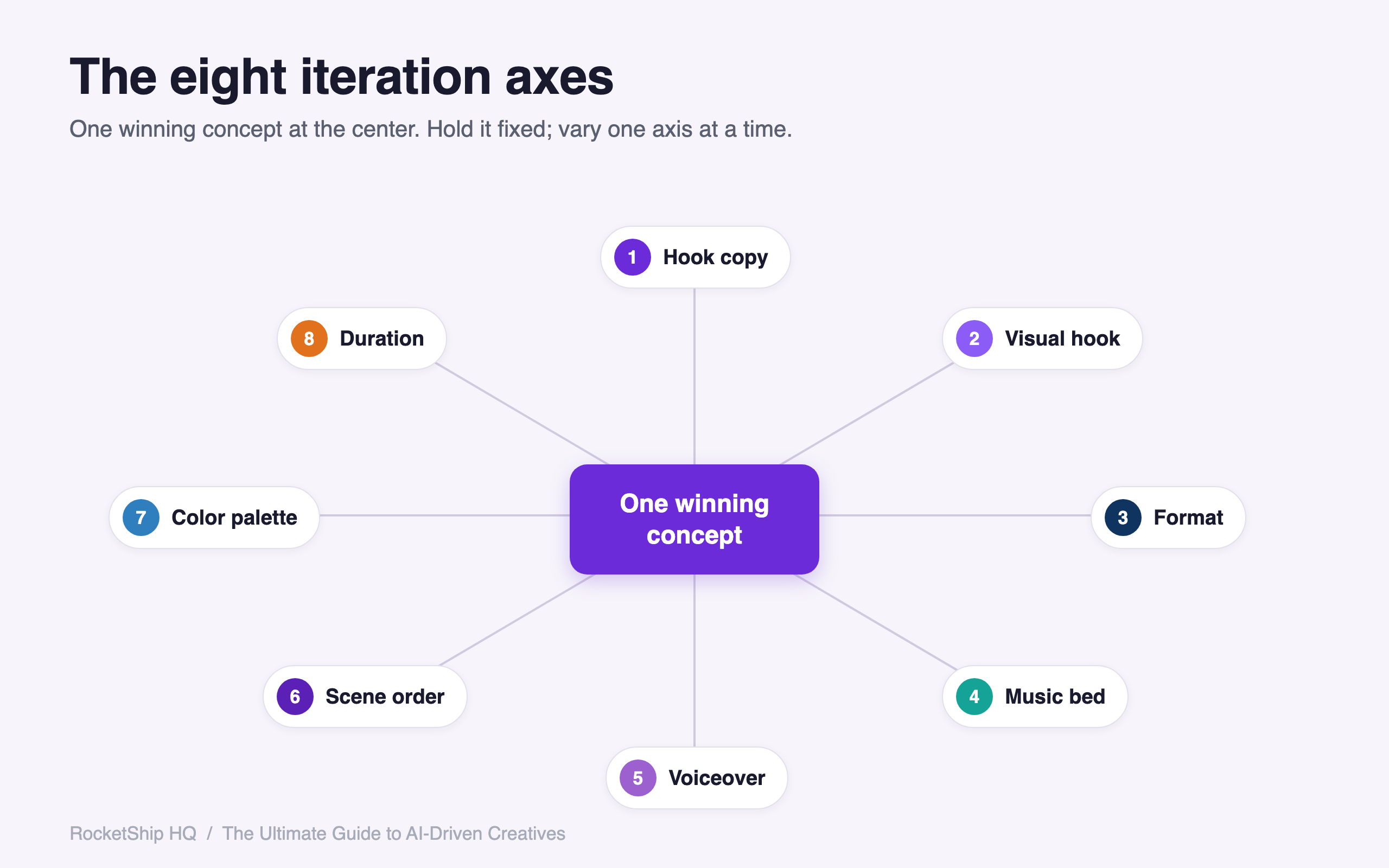
The eight axes
- Hook copy. Text overlay variants, first VO line alternatives, comment-style hooks, question hooks. Same script, different framing on the first frame. Keep text overlays under 15 words.
- Visual hook. Theme variant, prop substitution, the opening visual that stops the scroll. Often the single biggest lever on three-second hold rate.
- Format. The container the script runs in: Discovery vs. Transformation vs. Wall of Text and the like. The same script lands differently in a different format.
- Music bed. Uplifting, suspense, ASMR-style, no-music. The track is the emotional spine. A meditative track on a bombastic script feels broken; an urgent track on a calm script feels fake.
- Voiceover. TTS, AI-cloned voice, original human, no VO at all. Each option tests differently with different audience segments.
- Scene order. Which beat opens the script, which closes it. Reordering Setup/Shift/Proof/Payoff as Proof/Setup/Shift/Payoff gives a different curiosity gap entirely.
- Color palette. Overlay color, video background tone, app-screen vignette, brand-accent choice. Often underestimated. A change from cool blue to warm cream on the same composition can shift CTR.
- Duration. 10s, 15s, 20s, 30s for video. Aspect ratio swap for static (1:1, 4:5, 9:16). Different durations attract different placements.
How a concept fans out
Once a concept wins, the variant tree can run into the hundreds. A representative fan-out across the eight axes:
- Five hook copy variants
- three visual hooks
- two formats
- two music beds
- two voiceover options
- two scene orders
- two color palettes
- two durations.
Multiply through and a single concept supports hundreds of permutations.
You don’t ship all of them. You ship a strategically sampled subset that covers the dimensions you want to test, while holding everything else constant.
Generate 12 to 20 variants per concept, then ship 1 to 2 per format into active rotation. Beyond that, you’re diluting learning, not gathering it.
Test design for AI variants
The sound core stays: isolate one variable per test, and never run 80-variable tests where everything moves at once. Set up your test groups so each one changes exactly one axis:
- Hook copy group. Same visual, same format, same script. Only the text overlay or first VO line varies. Tests which hook framing wins.
- Visual hook group. Same hook copy, same format, same script. Only the visual treatment varies. Tests which theme wins.
- Format group. Same hook copy, same visual treatment. Different format (Discovery vs. Transformation vs. Wall of Text). Tests which container wins.
Hold the strategy layer constant within a group. Vary the production layer only. That’s the discipline that makes the data readable.
Where idealized A/B thinking breaks on a live ad account, and how to run it for real:
- The delivery algorithm is not a neutral splitter. Advantage+ / CBO on Meta and the TikTok algorithm concentrate spend on one or two variants within hours and starve the rest. You will rarely get a clean, even read across every variant in a test group, so don’t design as if you will.
- Parallel tests multiply the budget. Each test group needs enough spend to clear the learning phase and hit meaningful conversion volume. Running three groups at once roughly triples that floor. If the budget can’t fund clean parallel reads, sequence the tests instead: run the hook copy test, lock the winner, then run the visual hook test, and so on.
- Judge on early signal plus your own read, not on assumed even delivery. Watch three-second hold, hook rate, and cost per result on the variants the algorithm actually funds, and use craft judgment on the ones it starved rather than calling them losers.
- Single-variable winners do not additively combine. The best hook plus the best visual plus the best format is not automatically the best ad. Once you have winners on each axis, re-test them in combination before you treat the stack as your champion.
After enough spend at meaningful conversion volume, the verified winners combine into the next iteration’s brief.
Within four to five cycles, a strong concept compounds into a top performer.
The teams that don’t run this discipline end up running 80-variable tests where every variable shifts at once. The data tells them nothing, even though the spend looks “rigorous.”
Disciplined test design is what separates iteration from churn.
Not sure how many variants your budget actually supports? Our free creative volume calculator turns your budget, CPA, and significance threshold into the number of variants you can validate.
Chapter 5: Safe Zones
This chapter is mostly unchanged from UGC. AI doesn’t change platform overlay rules.
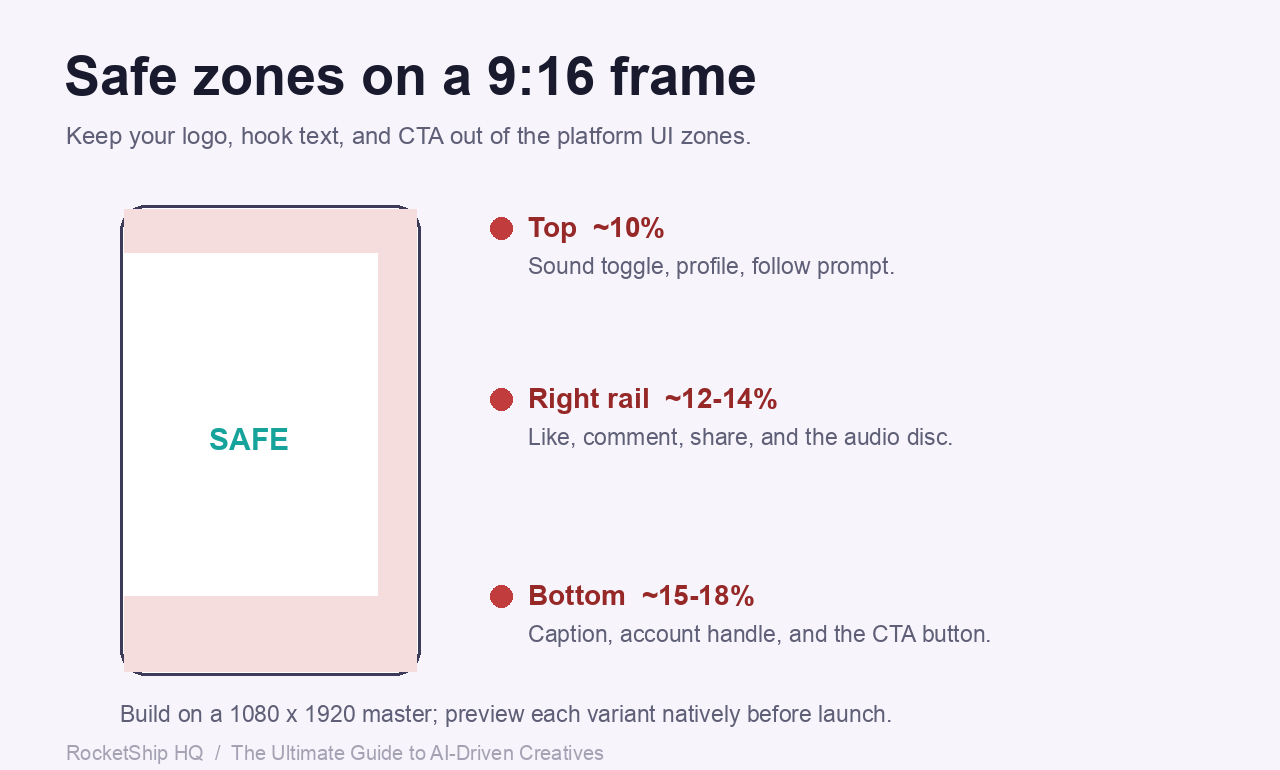
TikTok, Instagram Reels, Instagram Stories, and YouTube Shorts all render interface chrome on top of your video: a right-side action rail (like / comment / share), a bottom caption and handle block, and a top row of profile, sound, and follow prompts. Critical text or your logo placed under any of these gets covered or cropped, and the video looks broken.
Fix the safe zones at brief time. Work on a 1080×1920, 9:16 master and keep anything load-bearing (headline, key result, logo, CTA) clear of these edges:
- Right action rail: keep critical elements out of roughly the right 12% of width (about 130 px). This is where like / comment / share stack.
- Bottom caption / handle: keep the bottom ~15 to 18% clear (about 290 to 345 px) for the caption, handle, and CTA button.
- Top: keep the top ~10% clear (about 190 px) for profile, sound, and follow prompts.
Clearances shift by platform. Treat these as working floors on the 1080×1920 master:
| Platform | Bottom clearance | Right rail | Top |
|---|---|---|---|
| TikTok | ~18% (~340 px) | ~12% (~130 px) | ~10% (~190 px) |
| Instagram Reels | ~15% (~250 px) | ~12% (~130 px) | ~10% (~190 px) |
| YouTube Shorts | ~12% (~230 px) | ~12% (~130 px) | ~10% (~190 px) |
Keep the center band, roughly the middle 60% of the frame, for the message. Preview each variant natively before launch in the platform’s own preview tool, because the only reliable check is seeing your overlay sit behind the real interface. The free safe-zone templates from the original UGC playbook still work; the AI-driven workflow uses the same templates.
Preview before you ship. The fastest way to catch a clipped hook or a buried CTA is to drop your frame into the real interface. Our free ad-preview tools show exactly where each platform’s chrome lands: TikTok, Instagram, Meta, YouTube, Pinterest, AppLovin, and Snapchat.
Chapter 6: The AI Production Workflow
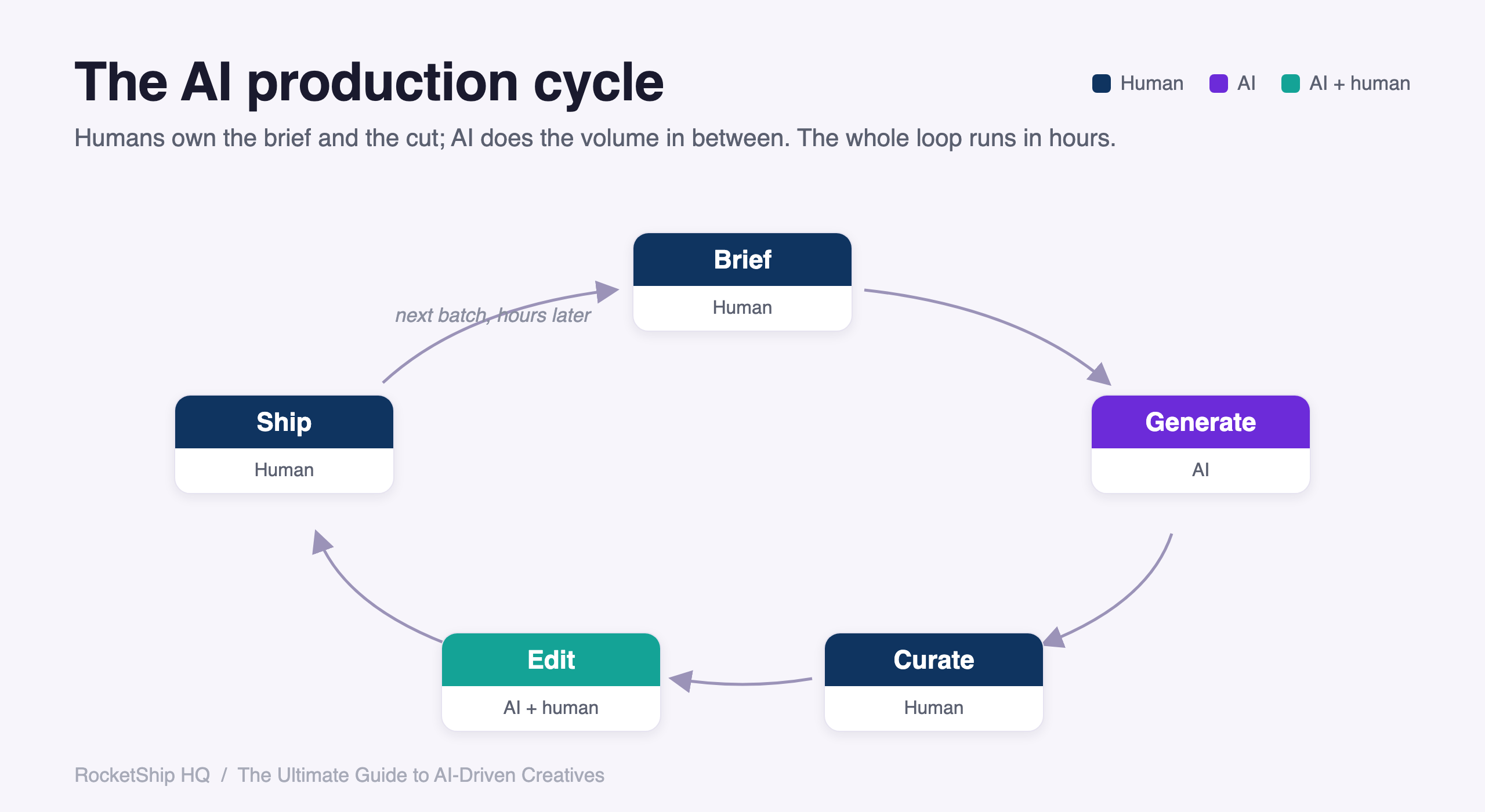
The chapter the UGC playbook spent ten pages on, planning and directing a remote shoot, gets replaced by something equally rigorous, just structurally different. There is no casting call.
There is no shoot day. There are no creators on a Zoom waiting for direction.
Instead there is a tool stack, a prompt library, an edit-versus-regenerate decision tree, and a curation step. The shape of the work is different, but the discipline required is the same.
If anything, it is harder, because the cost of a bad iteration drops to almost zero, and that is exactly what makes most teams sloppy. When generation is cheap, curation becomes the only thing that matters.
This chapter is the operator’s manual for that loop: which tool to open for which job, how to prompt it so the output is shippable instead of slop, when to fight a bad seed with edits, when to start over, and how the same concept fans out into 12 to 20 variants in an afternoon. Read this once with a notebook open.
The five sample prompts at the end are meant to be pasted, not admired.
The shape of an AI-driven production cycle
Here is the loop, end to end, in five stages. Each stage has a job and a decision point.
BRIEF (human) -> GENERATION (AI) -> CURATION (human) -> EDIT (AI-assisted) -> SHIP
-
Brief (human). A one-paragraph concept that names the angle, the hook layer, the format, and the negative space (what the visual must NOT show).
Decision point: is this brief specific enough that two different operators would generate the same kind of output? If not, rewrite the brief.
-
Generation (AI). Image, video, voiceover, music, copy, in whichever order makes sense for the format. Plan on 12 to 20 generated per concept.
Decision point: did the model understand the brief, or did it fill in defaults you did not ask for? If defaults leaked in, the brief was vague.
-
Curation (human). Sort the outputs into ship, edit, or trash piles.
Decision point: would I run this against my best historical creative? If no, kill it.
Most teams skip this step and ship everything that rendered.
-
Edit (AI-assisted). Inpainting, color correction, copy fixes, audio leveling.
Decision point: can this be fixed with a five-minute edit, or am I about to spend two hours trying to rescue a fundamentally broken seed?
-
Ship. Push to ad account, label with concept ID, batch ID, and variant ID so you can read the report later.
The whole loop should run in hours, not days. If it is taking days, you are stuck inside one of the two human stages and it is not the AI’s fault.
Tools by use case (as of 2026)
The tool stack changes every quarter. The categories do not.
Here is what to open for what job.
Images and stills. Visual hooks, app mockup hero shots, static format compositions, character generation if you absolutely need a person.
- Midjourney v7. Best for stylized, painterly, brand-feel work. Color palettes feel intentional. Composition leans cinematic by default. Fails at: precise text rendering inside the image, exact product replication, photoreal faces with eye contact. Right call when: you want a destruction-theme hook for a finance app, or a mood-piece visual for a meditation brand. Style first, accuracy second.
- Gemini 3 Pro Image. Best for fast, near-photorealistic scene generation with strong prompt adherence. If you describe a cluttered desk with seven specific objects, it gets six of them right. Fails at: stylization, painterly looks, anything that needs an art direction beyond photo-real. Right call when: you need a context-rich product-in-the-world shot for a productivity app, or a top-down flatlay for a fitness vertical.
- Sora 2 (still mode) and DALL-E equivalents. Best for image-to-image edits, inpainting, and scene extension. You generated a great hero shot but the overlay zone has a distracting object: this is the tool. Fails at: generating from scratch with the same finesse as Midjourney or Gemini. Right call when: you are 90% there and need to surgically fix one element.
Video. Motion visual hooks, scene transitions, b-roll clips, short generative segments to splice between app screen recordings.
- Sora 2. Short generative clips up to roughly ten seconds, with strong scene composition and physics. Fails at: long takes, consistent character across multiple shots, exact lip-sync for VO. Right call when: you need a six-second transformation visual or a scene transition that bridges two app screen recordings.
- Runway Gen-4 (latest gen). Best for image-to-video with motion control and camera moves. You have a static mockup and you want a slow push-in, a parallax slide, or a subtle camera dolly: this is the tool. Fails at: generating wildly novel scenes from text alone. Right call when: animating a phone mockup, animating a product still, adding subtle motion to a hero shot.
- Pika. Best for stylized animation, character motion, and looser, more illustrative motion work. Fails at: photorealistic motion, precise camera control. Right call when: you are doing an animated explainer-style hook for a language learning or education vertical.
Audio. Voiceover and music.
The voice and the track decide whether the ad feels native or feels like an ad.
- ElevenLabs. Cloned voiceover, multilingual TTS, emotional register control (warm, urgent, conspiratorial, deadpan). Fails at: extreme emotional range like genuine crying or screaming, very long single takes without pacing drift. Right call when: you need a 25-second VO in a specific tone, or you need the same voice across ten variants for consistency.
- Suno. Stylized music tracks, including vocals, in named genres and moods. Fails at: rights clearance for specific paid placements (read the terms), and matching an exact reference track. Right call when: you want a custom track that does not sound like the same five royalty-free loops every other ad uses.
- Platform-native libraries (TikTok Commercial Music Library, Meta’s audio library). The safe, cleared-for-ad-use music option. Fails at: standing out, since every advertiser has access to the same catalog. Right call when: you need to ship today and you do not want to deal with rights questions.
Copy. Hooks, scripts, body copy variants, brief writing, negative-space construction.
- Claude Opus and Sonnet. Best for rule-following at length, body copy that respects guidelines, and brief writing where you want the model to honor a long list of constraints. Fails at: rapid-fire one-line ideation if you are not steering it. Right call when: writing a 25-second VO script that has to follow a Setup → Shift → Proof → Payoff structure, or generating ten body copy variants that all respect a do-not-say list.
- ChatGPT. Best for fast variant generation, brainstorming, and A/B prompt iteration. Fails at: holding a long, complex rule set across many turns. Right call when: you have a working hook and you want twenty quick rewrites in different tones.
The reader rule: open Midjourney for mood, Gemini for accuracy, Sora for motion, Runway for animating stills, ElevenLabs for voice, Claude for rules, ChatGPT for speed.
The negative space rule (the prompting principle that separates shippable from slop)
Most prompting advice talks about specificity. Specificity is half the answer.
The other half, the half that separates shippable from slop, is what you forbid.
AI rewards specificity AND it rewards constraints. Tell the model what NOT to do, in plain language, in the same prompt.
Examples of negative space that should appear in almost every prompt:
- no faces
- no hands (unless hands are critical and you are willing to inpaint later)
- no actor looking shocked or surprised
- no generic stock-photo backgrounds
- no stock-music-sounding tracks
- no invented statistics
- no on-screen text the model will mangle
- no logos other than the one I provide
- no AI artifact tells like extra fingers or melted text.
The negative space is where the strategy lives. A meditation app’s brief that says “calm, peaceful, soft lighting” gets the same output every other meditation app gets.
A brief that says “calm, peaceful, soft lighting, no spa imagery, no stock yoga poses, no white candles, no bare feet on hardwood, no lavender” forces the model to find a fresher visual. The forbidden list is the brief.
If your prompt does not have a “do NOT include” section, you are leaving the most strategic part of the work to the model’s defaults. The model’s defaults are everyone else’s defaults.
Sample copy-paste prompts for visual generation
Five prompts. Pasteable today.
Substitute your vertical and your specifics.
(a) Midjourney prompt, destruction-theme visual hook
A premium fitness watch with a deeply cracked screen, lying face-up on a dark slate surface, faint shards of glass scattered around it, a single shaft of cold blue light cutting across the frame, cinematic lighting, shallow depth of field, hyper-detailed product photography, moody and editorial in the style of a high-end magazine still life, dark background --ar 4:5 --no faces, hands, human presence, logos, text, stock-photo gradients, studio softbox look --style raw --v 7
(b) Gemini 3 Pro Image prompt, cluttered-desk pain-point shot
Top-down photograph of a chaotic home office desk at 11pm, lit by a single warm desk lamp from the upper left and the cool blue glow of a smartphone screen showing 47 unread notifications. On the desk: a half-drunk cup of coffee with a ring stain on a paper napkin, three crumpled sticky notes with handwriting, an open laptop with too many browser tabs, a stack of unopened bills, a tangled phone charger, a closed paper planner. Realistic textures, slight motion blur on the steam from the coffee, photo-real lighting, 1080x1920 vertical aspect ratio. Do NOT include: any human, any hands, any face, any logos, any readable brand names, any clean minimalist desk aesthetic, any plants, any stock-photo styling, any soft pastel palette.
(c) Sora 2 prompt, six-second transformation video
A six-second vertical 9:16 video. First three seconds: a tense woman seen only from behind, hunched at a cluttered desk in a dim apartment, shoulders tight, the warm-cool color clash of a desk lamp and a laptop screen on her face (face never visible), papers and a phone vibrating on the desk. Camera holds steady on a medium shot. At the three-second mark, a smooth match-cut to: the same woman from behind, now standing at a tall window in soft natural morning light, shoulders relaxed, holding a plain ceramic mug, looking out at out-of-focus trees. Camera pushes in slowly over the final three seconds. Pacing: hold-cut-push. Cinematic, naturalistic, color graded warm. Do NOT include: visible face, on-screen text, music suggestions, any meditation app UI, any other people, any stock-yoga imagery, any spa cliches, any candles or incense.
(d) Runway Gen-4 image-to-video prompt, animating a static phone mockup
Input: the attached static 9:16 phone mockup image. Animate as a five-second clip. The phone holds steady in frame for the first half second. Then the phone screen content slides smoothly from screen one to screen two to screen three, each screen visible for roughly 1.2 seconds, with a soft horizontal swipe transition between them. While the screens slide, the camera does a subtle slow push-in on the phone, roughly 8 percent zoom over the full duration. Keep the phone bezel and background plate completely static. Lighting should match the source image. Motion should feel intentional and product-demo clean, not floaty or AI-drifty. Do NOT add: any text overlays, any hands holding the phone, any background motion, any color shift, any reflections that were not in the source.
(e) ElevenLabs prompt, 25-second voice-cloned VO take for a sleep tracking app
Voice settings: cloned voice, emotional direction, “warm, conspiratorial, slightly amused, like a friend telling a secret over coffee, low and steady, never urgent.”
- Stability around 40
- similarity around 75
- style exaggeration low.
Read the script below at a relaxed pace, with a clear breath before the final line.
You know that thing where you wake up at 3 a.m. and your brain is suddenly running a TED talk about an email from last Tuesday? Yeah. For two years I thought I was just bad at sleeping. Turns out I was bad at knowing what was wrecking my sleep. The screen time, the late coffee, the room that was three degrees too warm. Once I could see the pattern, I could actually fix it. Took about a week. The app does not put you to sleep. It just shows you why you are not sleeping. Most people figure it out in their first three nights.
Edit vs. regenerate: the decision tree
Most teams over-regenerate. They get a render that is 90% right, the overlay zone has a slight conflict, and they hit generate again, hoping the next roll of the dice fixes it.
It usually does not. It usually breaks something else that was working.
Then they roll again. Three hours later they are further from shippable than they were at minute fifteen.
The discipline is the opposite. Edit until you cannot, then regenerate.
Regenerate if: the subject is wrong, the scene is wrong, the tone is wrong, the model fundamentally misunderstood the brief, the composition is unusable, or the style is off in a way that no edit can rescue. These are seed problems.
A new seed is the only fix.
Edit if: 90% is right and one element is wrong. The overlay overlaps the like-zone on TikTok.
The accent color is off-brand. The dollar value or stat in the on-screen text is wrong.
A hand position is unnatural. A logo is in the wrong place.
A piece of clutter is distracting. There is one extra finger.
The color grade is half a stop too cool.
Tools for edits. Inpainting in Sora or DALL-E for surgical content swaps.
Photoshop or Figma for color correction, layout, and overlay placement. After Effects or CapCut for video compositing, trims, speed ramps, and adding the platform-native UI cues that make the ad feel native.
ElevenLabs for re-cutting a single line of VO without redoing the whole take.
The rule of thumb: if the fix is fifteen minutes of editing or less, edit. If the fix would take longer than regenerating, regenerate, but with a sharper brief than the one that produced the broken seed.
Common failure modes when prompting AI tools
- Vague subject. The prompt says “a woman in a kitchen.” The fix: specify exact subject, scene, props, lighting, mood, time of day, camera angle, and lens feel.
- Missing negative space. The prompt only says what to include. The fix: every prompt gets a “do NOT include” section. List the cliches, the artifacts, the off-brand elements.
- Asking the model to do too many things in one prompt. Hero shot plus three product features plus on-screen text plus a logo. The fix: split into multiple prompts and composite the layers in Photoshop or After Effects.
- Defaulting to “cinematic” or “photorealistic” without specifying style. The model picks an average. The fix: name a reference style, a film stock, a director, a photographer, a magazine editorial look. Specificity over genre.
- Skipping the aspect ratio. The model defaults to square or 16:9. The fix: specify 4:5, 9:16, or 1:1 in every prompt, every time.
- Letting AI generate faces when not needed. AI faces still fail eye contact in direct response (DR) placements, and the uncanny valley costs you the first second. The fix: brief faceless visual hooks. Hands, products, environments, over-the-shoulder shots, scenes without people.
- Using AI footage where stock or app screen recordings would be cheaper and stronger. A real screen recording of your app beats a generated approximation every time. The fix: only use AI for what cannot be filmed or screen-recorded.
- Not specifying duration or pacing for video. “A short clip” gets you a default. The fix: name the seconds, name the cuts, name where the camera moves and where it holds.
A worked example: one concept, three formats, twenty variants
Pick a sleep tracking app. The concept brief, written in one paragraph: “Angle: most people think they are bad at sleeping, but they are actually bad at knowing what is wrecking their sleep (screens, caffeine timing, room temperature).
Hook layer: pattern interrupt with a relatable 3 a.m. moment, then a reveal that the cause is diagnosable. Format: vertical 9:16, 25 seconds, faceless visuals plus app screen recording, conspiratorial VO.
Negative space: no spa imagery, no people in bed, no stock yoga, no generic moon-and-stars graphics, no claims about hours of sleep gained.”
Visual generation. Open Sora 2 for the cold-open transformation clip (six seconds, tense person at desk to calm person at window, the prompt from section c above).
Open Gemini 3 Pro Image for the cluttered-desk pain-point hero shot (the prompt from b, adapted: a phone on the nightstand at 3 a.m. showing a sleep app notification, a glass of water, a half-read book, blue screen glow on the wall). Two source assets, ten minutes of generation time.
Script generation. Open Claude.
Prompt: “Write a 25-second VO script for a sleep tracking app, structured as Setup → Shift → Proof → Payoff. Tone: warm, conspiratorial, slightly amused.
Constraints: do not promise hours of sleep gained, do not name competitors, do not use the word ‘transform’, do not start with a question, do not use the phrase ‘game changer’. The hook must be a relatable 3 a.m. moment.
The reveal must be that the cause is diagnosable, not that the user is broken.” Claude returns the prompt-(e) script above on the second pass.
First pass started with a question, prompt got tightened.
Variant explosion. The same concept fans out across three formats and twenty variants.
Format one: cold-open transformation video (six versions, swapping the opening visual, the VO emotional register, and the music bed). Format two: static-image-plus-VO, using the cluttered-nightstand Gemini render and four hook copy variants over the same VO.
Format three: app-screen-recording-led, where the screen recording is the hero and the AI b-roll is the supporting layer (six versions, swapping which app feature is foregrounded). Twenty total variants, all from one concept brief, one Sora clip, one Gemini still, one Claude script, and one ElevenLabs voice.
Curation. Cut to the best ~30%.
Walk through all twenty with a fresh eye, ideally the next morning, ideally with a second person on the team. Kill the ones that do not pass the “would I run this against my best historical creative” bar.
Ship two per format, six total, into the ad account.
Total time. An afternoon.
Not a week. Not a shoot day.
One operator, one concept brief, four tools, six shipped variants, ready for the test framework in Chapter 4.
Workflow integration: where humans plug in
The brief is human. The curation is human.
The strategic decisions, what to test, what to kill, what to scale, are human. The production is the AI’s job.
The humans-in-the-loop checklist (covered in detail in Chapter 7) plugs into this workflow at exactly two stages. It plugs in at the brief-writing stage, where a human pressure-tests the angle, the negative space, and the format choice before any tokens get spent.
And it plugs in at the curation stage, where a human reads every output against the brand, the platform policy, and the brief itself, before anything ships.
Everything in between, the generation, the variant explosion, the inpainting, the audio leveling, the upscaling, is the AI’s job. The mistake most teams make is inverting this.
They let the AI write the brief by defaulting to its training data, and they skip the curation because generation was so cheap it felt wasteful to throw outputs away. Both inversions kill performance.
The brief is where strategy lives. The curation is where taste lives.
AI cannot do either of those well, and the teams that win are the ones that protect those two stages from automation, while automating everything else aggressively.
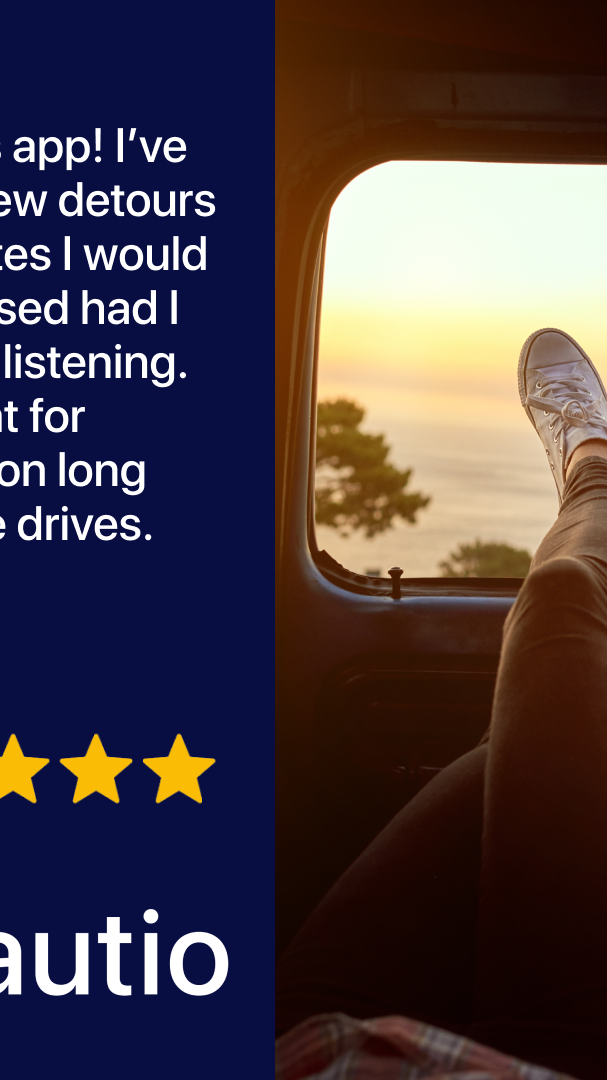

Chapter 7: Humans in the Loop, the Drafting and Curation Checklist
The work AI eliminates is production work. The work AI does not eliminate is strategy work and curation work.
In an AI-driven workflow, those two layers carry more weight than they did in UGC, because the iteration volume is so much higher.
This is the checklist we run for every AI-driven creative concept. Three phases: drafting (before any AI generation), production (during generation), and curation (after generation, before shipping).
Drafting (human, before any AI generation)
- Lock the angle. Most subscription apps support three to five messaging pillars. These are illustrative, not a fixed taxonomy: for a fitness app, the pillars might be body transformation, mental discipline, convenience, social accountability, and identity shift. Every concept maps to one. Without this lock, the AI generates angle-less variants.
- Specify the hook layers separately. Text hook, visual hook, spoken hook. Each does different work. Conflating them is the most common drafting failure.
- Write the text hook to spec. First-person POV. Conversational. Curiosity gap. Specific numbers and stakes. Setup, not reveal. Keep on-screen text overlays under 15 words.
- Specify the visual hook as a theme, not a single image. Themes survive iteration; single images run out after one test.
- Pick a fixed format up front. Discovery, Transformation, Progression, Split-screen, Listicle, or Wall of Text. Format is set at brief time, not generation time.
- Write the body copy to spec. Setup → Shift → Proof → Payoff. 45 to 65 words. Conversational, first-person. Read-aloud tested.
- List the negative space. What the AI is not allowed to do. No faces. No “actor looking shocked.” No invented stats. No stock-music-sounding tracks. No off-brand props or palette. The negative space is where the strategy lives.
Production (AI does the work, human supervises)
- Generate on the eight axes simultaneously. Hook copy, visual hook, format, music bed, voiceover, scene order, color palette, duration.
- Generate scripts using the script framework, not training-data defaults. Explicitly forbid PAS, BAB, AIDA in the prompt. Constrain to Setup → Shift → Proof → Payoff.
- Hold the strategy layer constant across variants. Vary the production layer only. This is what makes test results readable.
- Stop generating when you have enough comparable variants. 12 to 20 generated per concept, across two or three formats, is usually the right ceiling.
Curation (human, before shipping)
- Read each variant aloud. If it sounds like ad copy, kill it. AI-generated copy fails this test more often than it passes.
- Check the hook layers for redundancy. If the text hook and the spoken hook reveal the same fact, kill one.
- Verify no fabricated specifics. AI invents stat percentages, customer counts, and dollar amounts when it has nothing else to say. Every number has to be defensible.
- Check faces, if any. AI faces still fail eye contact in a way that reads uncanny in direct-response (DR) placements. Most of the AI-driven work that performs is faceless for this reason.
- Check the safe zone. If the headline overlaps the like button, it gets cropped on screen.
- Cut hard. Most AI output is graveyard. Ship the best 1 to 2 variants per format per concept. Kill the rest before they touch an ad account.
The reason humans matter at all three phases is that the AI does not know the brand, does not know what’s failed in past tests, and does not know which DR principles are non-negotiable. It produces variants.
Humans decide which variants represent the brand and which ones don’t.
Chapter 8: At-Scale Operational Discipline
Volume is the foundation. Twenty to forty creative variants per week is the threshold below which the three trends from earlier (audience diversity, format diversity, human-in-the-loop) can’t compound.
AI makes the production side of that volume cheap. The operational discipline to make the volume useful is the part most teams miss.
Five operational habits separate the teams that scale AI-driven creative from the teams that ship a lot of bad ads.
-
Format portability. Once a concept wins in one format, adapt it to the others.
Don’t reinvent. Remix.
A Discovery-format video winning on TikTok becomes a Wall-of-Text static for Meta, a Listicle carousel for Instagram, a Split-screen for YouTube Shorts, a static or pin for Pinterest. Same message, different container, different audience segments engaged. (A LinkedIn cut only belongs in this loop for B2B or prosumer apps, not a consumer subscription app.)
The remix loop is what compounds learning across the format diversity trend.
-
Micro-audience targeting. Don’t ship one ad for “everyone who’d want this app.”
Ship five concepts for five micro-audiences. For a productivity app: ESL professionals, caregivers managing complex routines, freelancers, creative writers, ICU nurses.
The named audience converts at higher rates than the abstract audience. AI lets you produce per-segment creative without per-segment shoot budget.
-
Naming conventions. Every variant gets a consistent name format encoding emotion, context, audience, batch, and concept.
Without this, the data is unattributable and the test results are useless. Every file, every time.
Even when it feels excessive. Especially when it feels excessive.
-
Themed store pages. Ad creative does not exist in isolation.
The landing page or App Store Custom Product Page (CPP) must feel like a continuation of the ad. A Discovery-format ad targeting ESL learners should land on a CPP themed for ESL learners.
Break the chain between ad and landing surface, and cost per install inflates.
-
Weekly batch cadence. Pick a day for concept planning (Monday) and a day for batch sync (Friday).
Every week, the team plans what’s testing next, reviews what shipped, and reads the test results from the previous batch. The cadence locks in the iteration loop.
Without it, weeks slip.
These five habits don’t sound like creative principles. They sound like operations.
That’s because they are.
AI-driven creative at scale is an operations problem disguised as a creative problem. The teams that solve it look at their creative function as a learning machine, not a production machine.

How to structure campaigns for AI-driven creative testing
The volume from an AI-driven workflow only pays off if your ad account can tell you which variant actually won. That’s a campaign-structure problem, not a creative one. The structure below keeps testing honest and protects the winners once you find them.
Separate the testing campaign from the scaling campaign
Run two campaigns with different jobs. The testing campaign exists to read signal: a broad or Advantage+ audience, lower budget caps, and one variable isolated per cell. The scaling campaign exists to spend, and it only ever holds creative that has already proven itself in testing. Keep them apart. The moment you let an unproven variant into the scaling campaign, you contaminate the budget that’s supposed to be working.
Isolate one variable per test cell
This is the test-cell discipline from Chapter 4, applied to the account. Each ad set in the testing campaign should isolate a single axis: same concept and strategy layer, varying only hook copy, or only visual hook, or only format. If two things move at once, you can’t attribute the result. The whole point of generating on the eight axes is to learn which axis moved the number, and you only get that read if the account structure holds everything else constant.
Don’t dilute the learning phase
Resist the urge to dump every variant into one ad set. The algorithm concentrates spend on whatever it favors early, so in an overloaded ad set most variants never get a fair read and the set struggles to exit the learning phase cleanly. A tighter set of comparable variants per ad set gives each one enough delivery to mean something. Generate 12 to 20 per concept; that doesn’t mean run 12 to 20 in a single cell.
Graduate on signal plus your own read
Don’t wait for even delivery across variants, because you won’t get it. The algorithm decides where the budget goes, so a variant can post a result on a thin slice of spend. Treat early signal as a flag, then apply your own read: does the winner make sense for the audience, is the result stable or a one-day spike, would you bet more budget on it. Variants that clear that bar graduate into the scaling campaign. The rest get killed.
Map your naming convention to reporting
The naming convention from Chapter 8 is what makes all of this legible. Encode concept, format, and variant IDs in every ad name, then group your report by those fields so you can see which axis actually carried the win. Hook copy, visual hook, and format each need to be readable as their own column. Without that mapping you have a pile of results and no way to compound them into the next batch.
Two of our free tools make this concrete: the creative testing calculator sizes how many variants you can actually read per test cell, and the UA scaling calculator helps plan the move from a testing budget to a scaling budget.
FAQ
What’s the difference between AI-driven creatives and AI-generated creatives?
AI-generated creatives are produced end-to-end by AI tools. The brief is written by AI, the script is written by AI, the visual is generated by AI, and the variant ships without much human review.
AI-driven creatives use AI as the production layer only. The brief, the angle, the hook layers, the format, and the curation are still human work.
Same production speed, much higher hit rate. The short version: AI-generated tends to fail; AI-driven is the version that holds up.
Does AI creative replace UGC creators entirely?
Not entirely. For performance creative on Meta and TikTok, AI increasingly does the job. For brand work where a real human face carries authenticity that AI faces still lose to, you still want a real creator.
As of 2026, faceless visual hooks (mockups, objects, app screens) outperform AI-generated faces on most direct-response placements.
How fast does an AI creative iteration loop actually run?
Concept brief to a published variant runs in under a workday for static formats and under two days for video. UGC ran seven to fourteen days.
The bottleneck is no longer production. It’s the strategy lock and the curation step.
What does the team’s time shift to?
Brief writing (more rigorous, more negative-space rules), curation (looking at what generated, killing 90% of it), and analysis (reading test results across more variants than UGC ever supported). Production time goes near zero.
Strategic time goes up.
How many variants per concept should I be running?
For a structured concept, the variant tree easily clears 200 permutations across hook copy, visual hook, format, music, voiceover, and scene order. You don’t ship all 200.
Generate 12 to 20 per concept and keep 1 to 2 per format in active rotation, across two or three formats. The constraint isn’t generation cost.
It’s how many variants your ad account can carry without diluting learning.
Can AI generate the strategy too?
No. Or rather, it can, badly.
Strategy is the negative space. What the AI is not allowed to do, what hooks are not allowed to look like, what angles the brand can’t credibly own.
AI fills the positive space inside the rules. The rules have to come from a human strategist who has shipped enough ads to know where the dead ends are.
Which AI tool should I use to generate visuals?
Depends on the format. Midjourney for stylized stills, Gemini 3 Pro Image for fast realistic scenes, Sora for image-to-video and short clips, Runway Gen-4 for motion control on stills.
Don’t pick based on team familiarity. Pick based on what the brief is asking the visual to do.
Do I need a designer if I’m using AI tools?
Yes, more than ever. Designer time shifts from production to composition and editing.
Compositing AI-generated elements into a fixed format, color-correcting for brand consistency, fixing the 10% of an output that’s wrong rather than regenerating, polishing typography on overlays. The designer becomes a curator and finisher.
How do I prevent AI from inventing specifics?
In the brief: list every fact the variant is allowed to use, and instruct the AI to use only those. In curation: verify every number, claim, and stat against the source.
Treat AI output as draft, not source-of-truth.
What’s the cost difference vs. UGC production?
Production cost per variant collapses by roughly an order of magnitude. The savings get reallocated to strategy, curation, and analysis time.
Total program cost moves less than people expect, because the human work shifts rather than disappears. The ROI shows up in iteration speed and learning rate, not in the variable cost line.
Related Reading
- Why fully AI-generated mobile creative keeps losing (and the sequence that fixes it)
- The Sensor Tower finding that makes creative velocity a performance lever
- Why creative diversity matters for ad account health
- How to structure Meta campaigns for creative testing
- The Ultimate Guide to UGC for Performance Marketing
Want the skill pack?
Every prompt in this guide, four Claude Code skills, the Setup → Shift → Proof → Payoff script framework, the 3C Principle, and the three-phase curation checklist, in one download.
Get the AI-Driven Creatives Skill Pack on GitHub
Companion guide: this playbook covers prompting, iteration and workflow. For the craft side, how to keep generated ads from reading as AI, see How to Make AI Ads That Don’t Look Like AI.