If you manage mobile marketing campaigns, you know the morning routine. Open your MMP. Check each channel. Eyeball the numbers. Copy them into a spreadsheet. Figure out what went up, what went down, what you need to act on today.
It is tedious. It is manual. And the worst part is that by the time you spot a problem, money has already been wasted. A channel went dark three days ago and nobody caught it. A campaign scaled into a bad audience over the weekend. You only find out when the weekly report lands.
This is manageable when you have one app. Now multiply it across multiple apps, multiple channels, multiple platforms. Every single morning. It does not scale.
I wanted a better way. So I built one.
Page Contents
What I Built
I now type four words into my terminal: “Run my performance check.” In seconds, I get a scored, prioritized intelligence report. ROAS by channel. Channels that are losing money, flagged. Budget reallocation suggestions. All pulled directly from my AppsFlyer data.
No dashboard. No spreadsheet. No code. I wrote a set of instructions in plain English and an AI agent does the analysis for me.
The tool is called Claude Code, made by Anthropic. The connection to AppsFlyer is through their official MCP (Model Context Protocol). And the whole thing took me about 10 minutes to set up.
Let me show you how.
Setting It Up: Three Steps
You need a Mac or Windows computer, a Claude Pro subscription, and an AppsFlyer account. That is it.
If you are not a technical person, the terminal might look unfamiliar. That is completely fine. You are going to copy and paste a few commands. If you can do that, you can do this
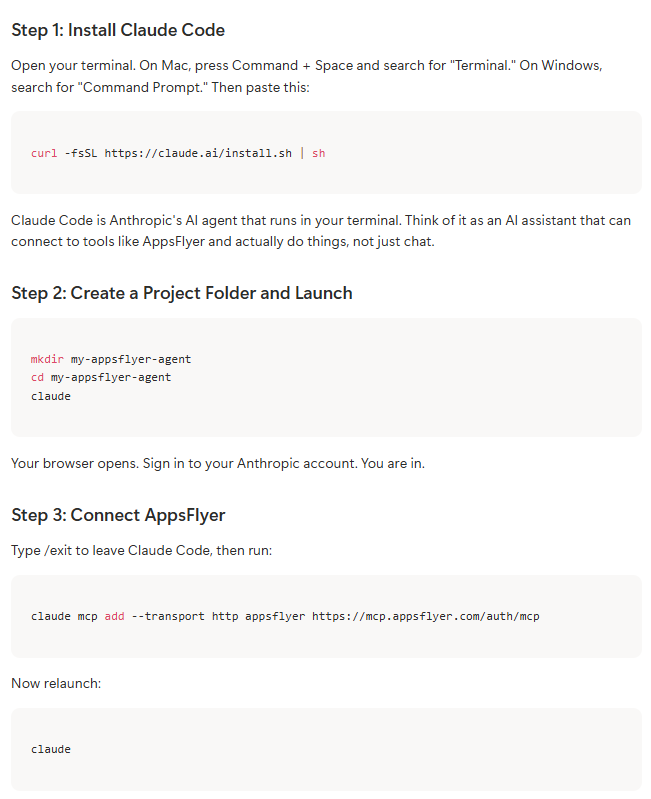
Type /mcp inside Claude Code. You will see AppsFlyer listed. Click to authenticate with your normal AppsFlyer login. Once you see “Authentication successful,” you are connected.
Three steps. A couple of minutes. Your AppsFlyer data is now accessible through Claude Code.
Asking Questions in Plain English
This is where it gets interesting. You do not need to write code. You do not need to build reports. You do not need to wrangle spreadsheets. You just ask.
I started simple:
Show me my apps
Claude found 74 apps in the demo account that AppsFlyer provided. It listed them with their platforms and status. Good. Now something more useful:
Give me spend for the last 7 days for each channel for my gaming app
Behind the scenes, Claude writes API queries and sends them to AppsFlyer through the MCP. A few seconds later, I had a full channel breakdown. Spend on iOS, spend on Android, broken out by media source. No export, no pivot table.
I kept going:
Give me revenue per install for each channel so I can measure efficiency
Revenue, installs, eCPI, revenue per install, all laid out by channel. This is the kind of analysis that normally requires an analyst pulling data into a spreadsheet. Here it took seconds.
Then I asked the question that matters:
Show me ROAS by channel and tell me which channels I should increase spend on and which ones I should decrease
ROAS by channel and platform. Increase spend recommendations. Maintain spend. Decrease spend. This is what a typical UA manager does on a daily basis, surfaced through conversational inputs in seconds.
From Questions to Intelligence
Simple queries are useful. But the real power is building an agent that applies your rules to your data automatically.
I did this with a file called CLAUDE.md. It lives in your project folder. It contains instructions that Claude Code reads every time it starts. Think of it as teaching your assistant how you want things done.
The instructions are written in plain English. Not code. Not SQL. English.
Here is what mine looks like:
When I ask for a performance check:
1. Pull last 7 days from AppsFlyer for all my apps
2. For each paid channel, calculate ROAS (revenue / cost) and cost per install
3. Flag paid channels that have the lowest ROAS
4. Rank all channels by revenue per install, best to worst
5. Compare paid vs organic: what share of installs and revenue comes from organic?
6. If any paid channel's cost per install exceeds revenue per install, flag it as LOSING MONEY
7. Recommend top 3 channels to scale budget and any channels to pause
8. End with a budget reallocation suggestion
Eight rules. Plain English. I saved the file and typed:
Run my performance check
Four words. Claude read my rules, pulled data from AppsFlyer, and gave me a scored, prioritized intelligence report. ROAS by channel. Revenue per install rankings. Channels flagged as losing money. Top channels to scale. Budget reallocation suggestions.
This is not a dashboard. This is an agent that thinks the way I think.
Making It Smarter
Here is the fun part. Making the agent smarter is just adding a sentence.
I added one line to my CLAUDE.md:
Compare performance of iOS versus Android
Saved. Ran my performance check again. The report now included a full iOS versus Android comparison. One sentence, one new capability.
You can keep adding rules. Flag any channel where spend changed more than 30% week over week. Warn if a channel is new this week. Show week-over-week trends for the top channels by spend. Each rule is one line of English. Your agent gets smarter and you write zero code.
The Difference
Before: Open the dashboard. Check each channel. Copy numbers into a spreadsheet. Build a pivot table. Try to spot what changed. Thirty minutes on a good day. And you still might miss something.
After: Four words. A scored, prioritized report with channels ranked, money-losing channels flagged, and budget suggestions. Thirty seconds.
The CLAUDE.md template and all the commands I used are below. Try it with your own apps. Write your own rules. Make them smarter. Let me know what you build.
CLAUDE.md Template
Copy this into a file called CLAUDE.md in your project folder. Customize the rules to match your own analysis needs.
When I ask for a performance check:
1. Pull last 7 days from AppsFlyer for all my apps
2. For each paid channel, calculate ROAS (revenue / cost) and cost per install
3. Flag paid channels that have the lowest ROAS
4. Rank all channels by revenue per install, best to worst
5. Compare paid vs organic: what share of installs and revenue comes from organic?
6. If any paid channel's cost per install exceeds revenue per install, flag it as LOSING MONEY
7. Recommend top 3 channels to scale budget and any channels to pause
8. End with a budget reallocation suggestion
Want to make it smarter? Add more rules. Examples:
9. Compare performance of iOS versus Android
10. Flag any channel where spend changed more than 30% week over week
11. If a channel is new this week (not present last week), highlight it
12. Show week-over-week trend for the top 3 channels by spend
Command Cheat Sheet
All commands used in the video, in order. Copy and paste these into your terminal.
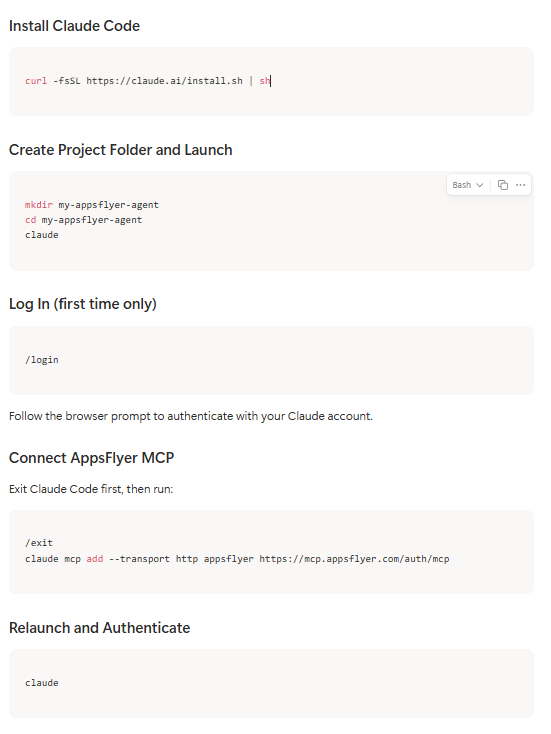
Type /mcp, click on AppsFlyer, and authenticate with your AppsFlyer login credentials.
Example Queries to Try
Show me my apps
Give me spend for the last 7 days for each channel for [App Name]
Give me revenue per install for each channel so I can measure efficiency
Show me ROAS by channel and tell me which channels to increase and decrease spend on
Run my performance check
Set Up Your CLAUDE.md
Create a file called CLAUDE.md in the my-appsflyer-agent folder. Paste the template from above. Save, then type “Run my performance check” in Claude Code.
Start Building Today
The barrier to building this kind of agent used to be technical skill. It isn’t anymore. If you can paste a command into a terminal and write a sentence in plain English, you can build your own AppsFlyer analyst today. Not next quarter when a project ships. Not after an engineering ticket clears. Today.
The setup above took me under ten minutes. It will take you about the same. Your CLAUDE.md gets smarter every time you add a rule, and the agent grows with you.
Try it with your own apps. Write rules that match how you actually think about performance. Let the agent do the morning grind you’ve been doing by hand.
Resources to Get You Started
- AppsFlyer AI Agents on GitHub — reference implementations and examples for building agents on top of AppsFlyer
- AppsFlyer’s guide to building your first agent — step-by-step walkthrough from AppsFlyer to help you hit the ground running