Before a dollar of paid spend scales, somebody should be able to trace one user from ad tap to retained user through every system that touches them, and say which numbers agree and which do not. That trace is the audit. It takes a week, it is unglamorous, and skipping it is the most expensive shortcut in mobile marketing, because every dollar spent on a broken signal teaches the ad platforms the wrong lesson.
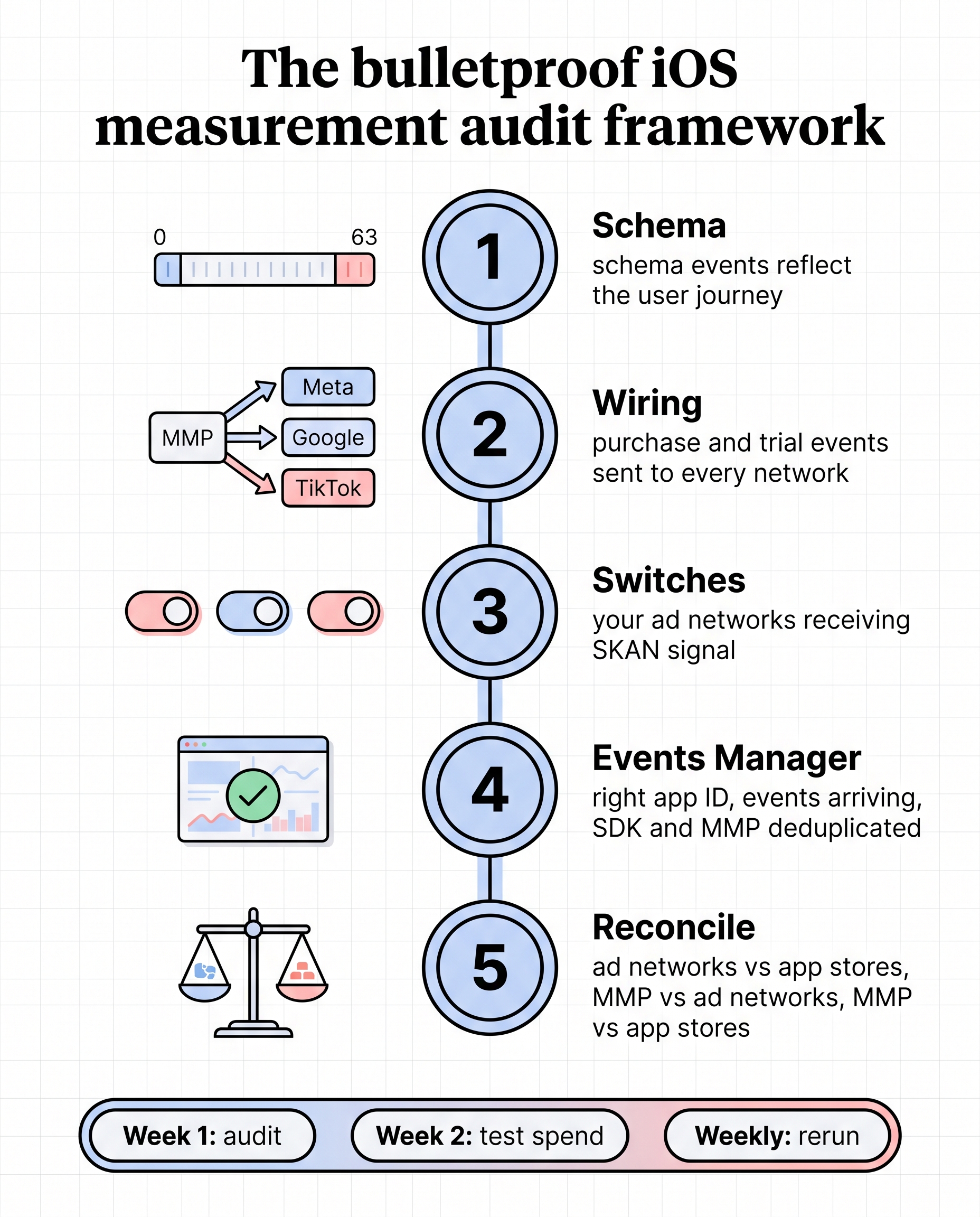
This is the checklist, in the order the data flows.
Page Contents
1. The SKAN schema
Start at the top of the chain, with what the app tells Apple.
- What does the conversion value encode? Write it down as a table: value 0 to 63, what each means. If nobody can produce that table, the schema is undocumented and probably wrong.
- Does the encoded event happen inside the postback window? The first postback covers roughly the first two days. A paid conversion after a seven-day trial does not happen in that window, so a schema built on it encodes silence. Trial starts, early sessions and day-one returns do.
- Is the full range used? 64 values, not 16. Resolution thrown away here cannot be recovered later.
- Do the coarse values map to something meaningful? Low, medium and high should correspond to real tiers of user value, because that is all you get when volume is thin.
The design choices, revenue-led versus engagement-led, are in how to fix mobile attribution on iOS.
2. The mapping from SKAN to the MMP, and from the MMP to each network
A correct schema is worthless if the postbacks never reach the systems that need them.
- Is each network’s SKAN identifier in the app? Every ad network you buy from has a
SKAdNetwork ID that must be listed in the app’s
Info.plist. Missing Google’s, for example, means Apple never reports Google-driven installs from users who opted out of tracking, and Google’s iOS numbers will look far worse than they are. - Is the MMP receiving a copy? The
NSAdvertisingAttributionReportEndpointkey sends a copy of each postback to the MMP. Without it, the MMP’s SKAN reporting is empty and you are relying entirely on what each network chooses to show you. - Are in-app events mapped to each network? In the MMP, each event you care about (trial start, day-one return, purchase) has to be mapped to the matching event on Meta, on Google, on TikTok. An event that exists in the MMP but is not mapped outward is invisible to the platform’s optimisation.
- Are attribution windows aligned? If Google counts a seven-day click and one-day view and the MMP is set to something else, the two will never reconcile and nobody will know whether the gap is a setting or a problem. Align them first, then look at gaps.
- Is on-device measurement in place where it helps? Google’s on-device conversion measurement SDK gives Google a better signal for iOS users who opted out. Optional, but worth having.
3. SKAN enabled and configured on each network
Each network has its own switch. Check that SKAN reporting is turned on in the Meta ad account, that Google’s conversion setup includes the iOS SKAN configuration, and that TikTok is receiving postbacks. It is common to find one network fully configured and another silently receiving nothing, because different people set them up at different times.
4. Events Manager
Now the Meta side specifically, because Meta is usually the largest line and the most sensitive to signal quality.
- Is the app ID correct on every campaign? A pilot ad account pointed at the wrong app ID reports nothing and optimises to nothing.
- Are events arriving? Open Events Manager and confirm each mapped event is being received, with plausible volume, from the right source (SDK, MMP, or both).
- Is the Meta SDK installed? Not essential, but it materially improves what Meta can learn from, and it is the prerequisite for optimising to in-app events rather than installs.
- Are events deduplicated? If the SDK and the MMP both send the same event, Meta should be deduplicating them. If it is not, reported conversions are doubled and CPA is halved.
5. The numbers, reconciled
Everything above is configuration. This is where you find out whether it works.
Meta against App Store Connect. Apple tags each download with the app the user came from. Filter App Store Connect to the Facebook and Instagram referrers, and you have Apple’s own count of installs and purchases from people Meta sent, with no Meta attribution in the chain. Compare it to what Meta reports. On one account we track this way, install counts matched within a few percent while Meta’s purchase capture ranged from 26% to 112% week to week. The install match tells you the systems are describing the same people; the purchase gap tells you how much to trust Meta’s iOS CPA.
Meta against Google Play. Play Console’s acquisition reports give Google’s count of installs by source. Compare to Meta’s Android numbers. Android attribution is more direct than iOS, so a large gap here usually means a configuration fault, not a modelling one.
The MMP against both stores. The MMP’s total installs should sit close to App Store Connect plus Google Play. If the MMP is well below the stores, events or SDK are missing. If it is well above, something is double-counting.
Each network against the MMP. Meta, Google and TikTok each claim installs and conversions. Sum them and compare to the MMP’s deduplicated total. The sum will exceed the total; the question is by how much and whether that overlap is stable.
Record every gap as a percentage. The number itself matters less than whether it moves.
What good looks like
- A written conversion value table.
- Every network’s SKAN ID in the app, and the MMP endpoint set.
- Every event you care about mapped outward to every network you buy on.
- Attribution windows aligned across MMP and networks.
- Install counts within a few percent between MMP, stores and networks.
- Known, stable gaps on conversions, with the capture rate written down per network.
- A weekly check that reruns the reconciliation and flags a moving gap.
The last point is the one most teams skip. A broken event does not announce itself. A weekly reconciliation catches it in days; a quarterly review catches it after the budget has gone.
How long it takes
A full audit is a week of work when access is granted promptly: App Store Connect and Google Play reporting access, the MMP, and each ad account. Most of the elapsed time is waiting for engineering to add a missing SKAN ID or install an SDK, which is why the audit produces a spec for the engineering team rather than a to-do list for the marketer. Postback data takes about five days to arrive after a change, so the verification step runs into week two.
It is also why serious engagements do not start scaling in week one. Week one is the audit. Week two is the first test spend, checked against the MMP after 24 to 48 hours and against SKAN after about five days. What that looks like commercially is in how much a user acquisition agency costs.
This post is part of our guide to how to choose a mobile UA agency.
Frequently asked questions
What is a mobile measurement audit? A trace of one user from ad tap to retained user through every system: the SKAN schema, the mapping to the MMP and each network, each network’s SKAN configuration, Events Manager, and a reconciliation of Meta, Google, the MMP, App Store Connect and Google Play against each other. Its output is a list of gaps, a fix spec for engineering, and a weekly check.
What should be in the audit checklist?
The conversion value table; each network’s SKAN ID in Info.plist; the MMP postback
endpoint; event mapping from MMP to each network; aligned attribution windows; SKAN
enabled per network; app ID, event arrival, SDK and deduplication in Events Manager; and
install and conversion reconciliation across MMP, networks and both app stores.
How do I check Meta’s iOS numbers against Apple’s? Filter App Store Connect by App Referrer to Facebook and Instagram. That gives Apple’s count of installs and purchases from Meta-referred users. Divide Meta’s reported purchases by Apple’s to get Meta’s capture rate. Expect it to vary; a stable rate is usable, a swinging one is not.
Why do my MMP and ad platform numbers not match? They never match exactly. Networks claim what they can see, including view-through and overlapping conversions, and the MMP deduplicates. The audit’s job is to make the gap known and stable, not to make it zero.
How often should the reconciliation be rerun? Weekly. A broken event or a dropped SKAN ID shows up as a moving gap within days, and weekly is often enough to catch it before a month of spend has been optimised to the wrong signal.