Getting Apple Search Ads campaign structure right from the start is one of the highest-leverage things you can do for your App Store growth. A poorly structured account wastes budget, muddles your data, and makes optimization nearly impossible.
A well-structured account gives you clean performance signals, precise budget control, and the ability to scale methodically. In this guide, we walk through the proven 4-campaign framework that we use at RocketShip HQ across accounts managing millions in Apple Search Ads spend.
Whether you are launching your first campaign or restructuring an existing account, this framework will give you the clarity and control you need to acquire users profitably.
Prerequisites: You need an active Apple Search Ads Advanced account (not Basic), a live app on the App Store, a clear understanding of your target CPA or ROAS goals, and ideally some baseline keyword research. If you have not yet done keyword research, start with our guide on guide on choosing keywords for Apple Search Ads.
Page Contents
Step 1: Understand Why Campaign Structure Matters Before You Build
Apple Search Ads gives you budget control at the campaign level, not the ad group level. This means your campaign structure directly determines how your money gets allocated across different keyword types. If you lump brand keywords and competitor keywords into the same campaign, Apple will funnel budget toward whichever gets more impressions, usually brand terms, and starve the rest.
Recognize campaign-level budget constraints
Since daily budgets are set per campaign, separating keyword themes into distinct campaigns is the only way to guarantee each theme gets its own dedicated spend. This is the foundational reason for the 4-campaign framework.
Separate by intent, not just topic
Each campaign should represent a distinct user intent: someone searching for your brand has a very different conversion probability than someone searching for a competitor or a generic category term. Mixing intents means mixing CPAs and muddying your optimization signals.
In our experience, a single campaign with mixed keyword types can produce a blended CPA that looks acceptable on the surface, while masking the fact that brand terms are converting far more efficiently than competitor terms. That blended number hides a real problem in competitor spend.
Step 2: Create Your Brand Campaign (Campaign 1 of 4)
Your brand campaign captures users searching specifically for your app name or close variations. These are your highest-intent, lowest-cost conversions. You might think you do not need to bid on your own brand, but competitors certainly will. This campaign is your defensive foundation.
Add exact match brand keywords
Include your app name, common misspellings, and any branded terms users associate with your product. Use exact match to maintain tight control over which queries trigger your ads.
Set aggressive bids but modest budgets
Brand terms typically convert at notably high tap-to-install rates, so you want to win every impression. Bids can be relatively high because the CPA will still be your lowest across all campaigns. Budget allocation is typically a small share of total spend since search volume is usually limited.
Monitor for brand cannibalization
Check whether your organic ranking for brand terms is strong. If you are already ranking #1 organically, the incremental value of the paid placement is lower, but it still blocks competitors from appearing above you.
If competitors are actively bidding on your brand terms (and they probably are), not running a brand campaign means paying a much higher CPA to acquire users through other campaigns who would have converted cheaply through brand. Learn more about competitor keyword bidding in Apple Search Ads to understand the dynamics.
Step 3: Build Your Category Campaign (Campaign 2 of 4)
The category campaign targets generic, non-branded keywords that describe what your app does. If you are a meditation app, think 'meditation app,' 'sleep sounds,' 'stress relief.' These keywords represent users with clear intent but no brand preference yet. This is where the bulk of your scale comes from.
Organize ad groups by keyword theme
Within the category campaign, create ad groups around tight keyword clusters. For a fitness app, you might have separate ad groups for 'workout app,' 'home exercise,' 'gym tracker,' and 'weight loss.' This lets you tailor bids and, crucially, pair each ad group with relevant custom product pages.
Allocate your largest budget here
Category keywords typically receive the largest share of total Apple Search Ads budget. This is your primary growth lever. CPAs will be moderate — meaningfully higher than brand CPA — but volume is significantly higher.
Use custom product pages for each ad group
Apple allows up to 35 different custom product pages per app, and you should use them. A user searching 'sleep sounds' should land on a product page featuring sleep-related screenshots, not your generic app page. In our experience, aligning creative to search intent this way can meaningfully lift conversion rates.
At RocketShip HQ, we worked with a wellness subscription app where
Step 4: Set Up Your Competitor Campaign (Campaign 3 of 4)
The competitor campaign targets the brand names of competing apps. Users searching for a competitor know what category they want and are either comparison shopping or not yet loyal to that competitor. This is an offensive play with higher CPAs but strategically valuable user acquisition.
Identify your top 10-20 competitors
Use tools like Sensor Tower or data.ai to find competitors with significant search volume. Add their brand names and common abbreviations as exact match keywords.
Create differentiation-focused custom product pages
When someone searches for a competitor, your product page needs to immediately communicate why your app is different or better. Highlight unique features, pricing advantages, or user ratings. This is where the Constraint-as-Benefit framework (reframing limitations as features) works especially well in your screenshots.
Budget at a modest percentage of total spend They are worth running for market share capture, but you need to watch ROAS carefully. Set a separate budget so overspending here does not cannibalize your more efficient category campaign.
Competitor campaigns have the most volatile performance. Tap-through rates tend to run lower than brand terms, reflecting weaker intent alignment. If a competitor's CPA exceeds your LTV threshold, pause that specific keyword rather than the whole campaign. Some competitors are worth bidding on, others are not.
Step 5: Launch Your Discovery Campaign (Campaign 4 of 4)
The discovery campaign is your keyword mining engine. It uses Search Match (Apple's automatic keyword matching) and broad match keywords to find new search terms you have not thought of. This campaign feeds new keywords into your other three campaigns over time.
Enable Search Match in a dedicated ad group
Create one ad group with Search Match turned on and no keywords. Apple will automatically match your ad to relevant searches based on your app metadata. This surfaces keywords you would never have found manually.
Add broad match keywords in a second ad group
Take your top 20-30 category keywords and add them as broad match. This casts a wider net than exact match and reveals long-tail variations. For more on this distinction, see our breakdown of broad match vs exact match.
Add negative keywords from your other campaigns
This is critical. Add all exact match keywords from your brand, category, and competitor campaigns as negative keywords in the discovery campaign. This prevents the discovery campaign from bidding on terms already covered elsewhere, which would create internal competition and inflate your costs.
Allocate a small testing budget
a small allocation of total spend is a reasonable starting point. This is an investment in finding new keywords, not a primary performance driver. Review search term reports weekly and graduate winning terms into the appropriate campaign as exact match.
In our experience, the discovery campaign consistently surfaces keywords that go on to become top performers in category campaigns. Treat it as R&D spend. We have seen cases where an unexpected long-tail term discovered here outperformed obvious category keywords on CPA by a wide margin.
Step 6: Set Your Budget Allocation Across All Four Campaigns
The typical starting allocation follows a tiered approach: allocate the majority to Category, a meaningful portion to Competitor, a smaller share to Brand, and reserve a minimal amount for Discovery. This is a starting point, not a permanent split. Your actual allocation should shift based on performance data within the first 2-4 weeks.
Start with the benchmark split
Allocate the majority of budget to category, a smaller combined share to brand and competitor, and a modest slice to discovery. Scale these proportions to your total monthly budget as a starting baseline, then adjust based on performance.
Shift budget based on marginal CPA
After two weeks of data, compare the marginal CPA of adding $100 more to each campaign. If category keywords are still converting well below your target, shift more budget there. If competitor CPAs are above LTV, reduce that allocation and redirect.
Scale brand only when needed
Brand campaigns are often limited by search volume. If you are winning a dominant impression share on brand terms, adding more budget will not help. That money is better deployed in category or discovery.
Do not over-rotate toward the lowest CPA campaign. Brand will always look best on a CPA basis, but it has a ceiling. The goal is to maximize total profitable installs, which means investing in category even though CPAs are higher. For subscription apps specifically, this balance is especially critical since brand and generic keyword balance—both are needed for sustainable growth.
Step 7: Organize Ad Groups Within Each Campaign for Maximum Control
Ad groups are where you control bids, audience targeting, and custom product page assignments. Within each campaign, group keywords by theme and intent so you can tailor your bids and landing experiences precisely.
Group by semantic theme
In your category campaign, cluster keywords that a user would expect to see similar screenshots for. 'Calorie counter' and 'food tracker' can share an ad group. 'Workout planner' and 'gym routine' go in another. Each cluster should map to a custom product page.
Separate high-volume keywords into their own ad groups
If a single keyword is dominating a campaign's spend, give it its own ad group. This lets you set a dedicated bid and track performance without it being diluted by lower-volume terms.
Use audience refinements strategically
Apple lets you target by device type, customer type (new vs returning), and demographics at the ad group level. For category campaigns, targeting new users only prevents you from paying to re-acquire existing users. In competitor campaigns, consider targeting all users since lapsed competitor users are valuable.
Leverage product page A/B testing
Beyond custom product pages for paid traffic, use App Store product page A/B testing to optimize your default page for organic traffic. The insights from those tests often inform which custom product pages to build for your ad groups.
Aim for 3-7 ad groups per campaign at launch. More than 10 ad groups usually means you are over-segmenting and will not have enough data per ad group to make meaningful optimization decisions. You can always add more as you scale.
Step 8: Know When to Expand Beyond the 4-Campaign Framework
The 4-campaign structure is your foundation, not your ceiling. As your account matures and spend grows, there are clear signals that it is time to add more campaigns for finer control.
Split category into sub-category campaigns as spend scales
If your category campaign contains ad groups with very different CPAs and is consuming a significant portion of your budget, consider splitting it. A fitness app might separate 'weight loss' keywords (higher CPA, higher LTV) from 'step tracker' keywords (lower CPA, lower LTV) into distinct campaigns with their own budgets.
Create seasonal or promotional campaigns
For major pushes around New Year, back-to-school, or app-specific events, create temporary campaigns with dedicated budgets. This lets you aggressively bid on seasonal terms without disrupting your evergreen structure.
Add geo-specific campaigns for international expansion
Apple Search Ads campaigns are set by storefront (country). When expanding internationally, replicate the 4-campaign framework per market rather than mixing countries. Keyword behavior and CPAs vary dramatically by country.
Consider a 'redownload' campaign
If your app has significant churn, targeting returning users with specific messaging in a separate campaign can be cost-effective. In our experience, redownload campaigns frequently achieve a meaningfully lower CPA than new user acquisition.
In our experience, it pays to let the 4-campaign framework stabilize before expanding. You need enough data to understand baseline performance. Expanding too early just fragments your data and slows down learning. For accounts with very high spend from day one, finer segmentation from the start can make sense.
Common Mistakes to Avoid
- Running a single campaign with all keyword types: This is the most common mistake we see. It guarantees budget misallocation because Apple optimizes within a campaign toward the highest-volume keywords (usually brand), starving your growth-driving category and competitor terms of spend. Always separate by intent.
- Forgetting negative keywords in the discovery campaign: Without adding your exact match keywords from other campaigns as negatives in discovery, you will bid against yourself. This inflates CPAs across the board and makes it impossible to attribute performance correctly. This is a setup step, not an optimization step. Do it on day one.
- Over-indexing on CPA instead of total profitable volume: Brand campaigns will always have the best CPA. But optimizing purely for CPA means you leave massive scale on the table. The right metric is total installs at or below your target CPA. A higher-CPA category keyword driving hundreds of installs per month is far more valuable than a low-CPA brand keyword driving only a handful.
- Not using custom product pages for different ad groups: Sending all traffic to your default App Store page leaves meaningful conversion improvement on the table. Each ad group theme should have a tailored product page. When you align your landing page to keyword intent and optimize for healthy conversion benchmarks—which vary by keyword type, with brand terms typically converting at a higher rate than generic terms—the compounding effect is significant.
- Scaling budget before fixing structure: Doubling spend on a poorly structured account just doubles the waste. Fix your structure first, establish baseline CPAs per campaign, then scale the campaigns that are performing within target. Structure before spend, always.
The 4-campaign framework (Brand, Category, Competitor, Discovery) with a starting budget split weighted toward Category campaigns gives you the structural foundation to run Apple Search Ads profitably at any scale.
Get this right, and every optimization you make going forward (bid adjustments, keyword additions, custom product pages, audience targeting) compounds on a clean base. Get it wrong, and you are optimizing in the dark.
Start by building all four campaigns with proper negative keyword isolation, launch with the benchmark budget allocation, and let data guide your rebalancing over the first 2-4 weeks. As your account matures and spend grows, expand into sub-category campaigns and geo-specific structures.
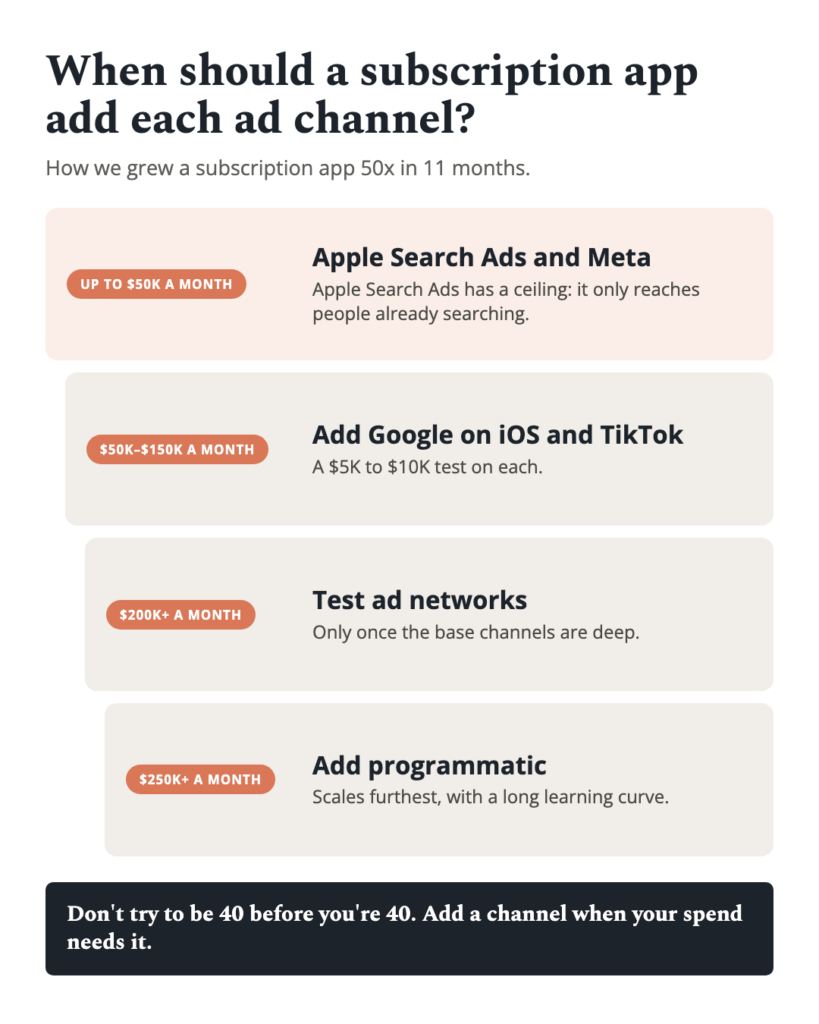
This framework is a foundational best practice for Apple Search Ads account structure, delivering cleaner data, lower CPAs, and faster scaling compared to unstructured approaches. When combined with complementary channels, the results compound: Apple Search Ads and Meta Ads together than running them independently.
Looking to scale your mobile app growth with performance creative that delivers results? Talk to RocketShip HQ to learn how our frameworks can work for your app.
Not ready yet? Get strategies and tips from the leading edge of mobile growth in a generative AI world: subscribe to our newsletter.
Related Reading
- Apple Search Ads: strategy and optimization guide (comprehensive guide)
- How to Bid on Competitor Keywords in Apple Search Ads
- Should You Use Broad Match or Exact Match in Apple Search Ads?
- How to Choose the Right Keywords for Apple Search Ads
- Custom Product Pages with Apple Search Ads