Google App Campaigns (GAC) drive over 50% of Android installs for subscription apps, according to AppsFlyer's Performance Index. This guide covers every layer: campaign structure, value-based bidding on subscription events, creative strategy, Google Play billing integration, and the nuanced optimizations that separate breakeven campaigns from profitable ones.
Prerequisites: You need an active Google Play developer account with Google Play Billing integrated, a Firebase project linked to your Google Ads account, and at least one subscription SKU live. You should also have server-side event forwarding configured through a mobile measurement partner (Adjust, AppsFlyer, or Branch) or Firebase itself. If your app is pre-launch, complete the billing integration first, as retroactive event setup creates attribution gaps that can take weeks to resolve.
Page Contents
- Step 1: How should you structure Google App Campaigns for a subscription app?
- Step 2: What subscription events should you send to Google Ads, and how?
- Step 3: How does value-based bidding work for subscription apps on Google?
- Step 4: What creative strategies drive the best subscription trial starts?
- Step 5: How do you integrate Google Play Billing for accurate subscription tracking?
- Step 6: How do you optimize the paywall experience for Google App Campaign traffic?
- Step 7: What bidding strategies and targets produce the best ROAS?
- Step 8: How do you scale Google App Campaigns without destroying ROAS?
- Step 9: How do you handle the learning phase for subscription event optimization?
- Step 10: How do you measure true incrementality of Google App Campaigns?
- Step 11: How should you use Google's asset reporting to optimize creatives?
- Step 12: How do you coordinate Google App Campaigns with other paid channels?
- Common Mistakes to Avoid
- Frequently Asked Questions
- Related Reading
Step 1: How should you structure Google App Campaigns for a subscription app?
Start with three campaigns separated by optimization goal: one targeting installs (tCPI), one targeting in-app actions like trial starts (tCPA), and one targeting value (tROAS). This mirrors how Google's algorithm learns differently at each funnel stage.
According to Google's official documentation, App campaigns use machine learning across Search, Play, YouTube, Display, and Discover. Giving the algorithm a single, clear objective per campaign is critical. Mixing goals within one campaign dilutes signal quality.
Most subscription apps should allocate 60-70% of budget to the tCPA campaign optimizing for trial starts once they have sufficient conversion volume. The install campaign serves as a top-of-funnel feeder during early learning phases or in new geos.
Key insight: One campaign per optimization goal prevents signal dilution and accelerates machine learning convergence.
- tCPI campaign: geo expansion and learning phase
- tCPA campaign: optimize for trial starts or subscriptions
- tROAS campaign: maximize revenue from high-LTV users
- Never mix optimization goals in one campaign
- Budget split: 60-70% to your best-performing goal type
| Campaign Type | Optimization Event | Typical Budget Share | When to Use |
|---|---|---|---|
| tCPI (Install) | App install | 10-20% | New geos, early learning phase |
| tCPA (Action) | Trial start or subscription | 60-70% | Primary scaling campaign |
| tROAS (Value) | Subscription revenue value | 15-25% | Mature apps with 90+ day LTV data |
How many ad groups should each campaign have?
Use 2-5 ad groups per campaign, separated by creative theme or audience angle, not by placement. Google distributes across placements automatically. Thematic separation gives the algorithm clearer audience signals.
As discussed in this breakdown of the perils of asset stuffing, dumping all creatives into a single ad group prevents the algorithm from matching the right message to the right audience segment. Separate your "productivity" angle from your "relaxation" angle into distinct ad groups.
Each ad group needs a minimum of 5 unique text assets, 10 images, and 3 videos to give the algorithm enough combinatorial variety. Google tests combinations automatically, but it needs raw material.
Pro tip: Set daily budgets at minimum 50x your target CPA per campaign. A $10 tCPA means $500/day minimum. Below this threshold, the learning phase drags on past 2 weeks and performance data becomes unreliable.
Step 2: What subscription events should you send to Google Ads, and how?
Send trial_start, subscription_purchase, subscription_renewal, and subscription_revenue as your core event set. Trial starts give the algorithm the fastest feedback loop, while purchase and renewal events enable value-based optimization.
According to RevenueCat's State of Subscription Apps 2025 report, the median trial-to-paid conversion rate for subscription apps is around 55% on iOS and 45% on Android. That gap matters: optimizing for trial starts alone on Android without accounting for the lower conversion rate will inflate your effective CPA.
The most reliable integration path is Firebase to Google Ads with server-side validation. Client-side events are vulnerable to fraud and latency. Our summary of RevenueCat's benchmark data highlights why tracking renewals (not just initial purchases) matters for accurate LTV modeling.
Key insight: Optimize for trial starts as your primary event, but send renewal data to enable value-based bidding later.
- trial_start: fastest signal, primary tCPA optimization event
- subscription_purchase: confirms paid conversion
- subscription_renewal: critical for LTV-based bidding
- Pass revenue values with every purchase event
- Server-side validation prevents fraud inflation
| Event Name | When to Fire | Include Revenue? | Use in Optimization? |
|---|---|---|---|
| trial_start | User begins free trial | No ($0 value) | Yes, primary tCPA event |
| subscription_purchase | First paid charge after trial | Yes, actual price | Yes, secondary event |
| subscription_renewal | Each subsequent billing cycle | Yes, renewal price | Yes, for tROAS |
| subscription_cancel | User cancels (still active) | No | No, use for audience signals only |
How do you handle free trial attribution windows?
Set your Google Ads conversion window to 30 days for trial starts and 90 days for subscription purchases. Most subscription apps offer 3-7 day trials, so 30 days captures late starters. The 90-day window accounts for annual subscribers who may not convert until a promotional period.
Google's algorithm uses the conversion window to calibrate bidding. If your trial is 7 days and your window is 7 days, you lose all conversions from users who install on day 6 and convert on day 14.
According to Google Ads Help, the default 30-day window works for most subscription models.
Pro tip: If you use RevenueCat or Adapty, configure their server-to-server Google Ads integration rather than building your own. Manual implementations miss 8-15% of renewal events due to billing retry logic, per common patterns observed across subscription app architectures.
Step 3: How does value-based bidding work for subscription apps on Google?
Value-based bidding (tROAS) tells Google to find users likely to generate a specific return on ad spend, not just complete an action. For subscription apps, this means passing actual subscription revenue values so the algorithm differentiates between a $4.99/month subscriber and a $49.99/year subscriber.
According to Adapty's subscription benchmark data, annual plans typically deliver 2-3x higher LTV than monthly plans due to lower churn. When you pass revenue values, Google's algorithm naturally shifts spend toward users more likely to choose annual plans.
The prerequisite is volume: you need at least 300 conversion events with revenue values over the past 30 days before tROAS bidding stabilizes, according to Google's best practices documentation. Below that threshold, stick with tCPA on trial starts.
Key insight: Value-based bidding requires 300+ revenue events monthly to outperform simple tCPA optimization.
- Pass actual subscription revenue, not proxied values
- Annual plan revenue signals are most valuable to the algorithm
- Need 300+ revenue events per month minimum
- Start with tCPA, graduate to tROAS after data accumulates
- Set initial tROAS target conservatively at 80% of observed ROAS
What tROAS target should you start with?
Start at 80% of your observed ROAS from the tCPA campaign. If your tCPA campaign generates $2 in revenue for every $1 spent (200% ROAS), set your initial tROAS target at 160%. This gives the algorithm room to explore while staying profitable.
Tighten by 10% every two weeks as the campaign stabilizes. Jumping to an aggressive target immediately causes the algorithm to restrict delivery severely, often dropping spend by 80%+ overnight.
Should you use predicted LTV or actual revenue?
Use actual revenue for the first 90 days. Predicted LTV introduces noise that confuses the algorithm during learning. Once you have 6+ months of cohort data, you can layer in a pLTV multiplier.
For example, if your D30 revenue is $8 and your historical data shows that D30 subscribers generate $22 over 12 months, you could pass $22 as the adjusted value. But only do this once cohort curves are stable.
The subscription app growth playbook covers cohort analysis frameworks for this purpose.
Pro tip: When transitioning from tCPA to tROAS, run both campaigns in parallel for 2-3 weeks rather than switching cold. The tROAS campaign needs time to learn, and pausing your tCPA campaign abruptly creates a revenue gap.
Step 4: What creative strategies drive the best subscription trial starts?
Emotional specificity consistently outperforms feature-listing in subscription app creatives. According to insights from Tactile Games' CMO Gonzalo Fasanella, Lily's Garden found success by leaning into emotions like sadness and anxiety when 90% of competitors used funny or cute tones.
For subscription apps specifically, the creative must accomplish two things: demonstrate the value proposition AND set expectations that a subscription exists. Ads that hide the subscription model drive high install rates but terrible trial-to-paid conversion because users feel ambushed.
RocketShip HQ's approach to creative angles for finance subscription apps shows that leading with the specific transformation ("save $412/month" vs. "save money") consistently lifts trial starts by making the subscription fee feel justified against a concrete benefit.
Key insight: Creatives must sell both the value and the subscription model simultaneously to avoid paywall shock.
- Lead with transformation, not features
- Mention "free trial" in the creative itself
- Use emotional specificity over generic positivity
- Show the app experience within the first 3 seconds
- Test subscription price anchoring in the ad copy
| Creative Angle | Example (Fitness App) | Typical IPM Lift vs. Generic |
|---|---|---|
| Transformation outcome | "Lost 14 lbs in 8 weeks" | +40-60% |
| Price anchoring | "Less than $1/day for your health" | +25-35% |
| Social proof | "Join 2M+ members" | +15-25% |
| Fear of missing out | "Free trial ends Sunday" | +30-50% |
| Curiosity/quiz | "What's your fitness age?" | +50-80% |
How should you structure video creatives for Google App Campaigns?
Google App Campaigns serve video across YouTube, Discover, and Display. The first 3 seconds determine whether someone watches or scrolls. Use a pattern interrupt: a bold visual, a provocative question, or unexpected motion.
For subscription apps, the optimal video length is 15-20 seconds for YouTube pre-roll and 6-10 seconds for Display/Discover. Always include the app name and CTA within the first 5 seconds since many placements are skippable.
Referencing research on player psychology for better ad creatives, Solsten found that psychographic alignment matters enormously. For Solitaire Klondike, changing copy from "train your brain" to "hardest solitaire game" based on psychological profiling improved IPM from 0.97 to 2.4, a 147% increase.
What image and HTML5 assets work best?
Upload all six required image sizes: 320×50, 320×480, 300×250, 728×90, 1200×628, and 1200×1200. Missing sizes means missing placements. The 1200×628 landscape format typically captures the most Display inventory.
Need help scaling your mobile app growth? Talk to RocketShip HQ about how we apply these strategies for apps spending $50K+/month on UA.
For subscription apps, images showing the paywall screen with the "Start Free Trial" button visible have outperformed lifestyle imagery in many tested scenarios. This pre-qualifies users: only people willing to subscribe will click through, which lowers your effective CPA even if your click-through rate drops.
Pro tip: Avoid the three pitfalls of AI-powered creative testing: generating variations without audience consideration, iterating only on past winners (local maxima trap), and underestimating the test budget needed. Every new creative variant requires $200-500 in test spend to reach statistical significance.
Step 5: How do you integrate Google Play Billing for accurate subscription tracking?
Google Play Billing Library v6+ is required for 2026 compliance and enables real-time subscription status updates through Google Play's RTDN (Real-Time Developer Notifications). This is the foundation for accurate revenue reporting back to Google Ads.
The integration chain works like this: Google Play Billing fires a purchase event, your server validates it via the Google Play Developer API, your server forwards the validated event (with revenue) to Firebase or your MMP, and that event flows into Google Ads for optimization.
Skipping server-side validation is the single biggest mistake. According to industry estimates, 3-8% of Android subscription events involve billing anomalies (refunds, payment failures, family sharing complications). Without server validation, you're optimizing on dirty data.
Key insight: Server-side purchase validation eliminates 3-8% of dirty billing data that corrupts optimization signals.
- Use Google Play Billing Library v6 or later
- Enable Real-Time Developer Notifications (RTDN)
- Always validate purchases server-side
- Forward validated events to Firebase or your MMP
- Handle grace periods and account holds explicitly
How do you handle offer tokens and promotional pricing?
Google Play's subscription offers (base plans, offers with phases) create attribution complexity. When a user starts a $0.99/month intro offer that becomes $9.99/month, pass the actual revenue per period, not the eventual full price.
If you inflate reported values during intro pricing, the algorithm learns an artificially high ROAS and overspends. The guide on promotional pricing timing covers how to manage these transitions without disrupting campaign performance.
Pro tip: Test Google Play's prepaid plan option alongside auto-renewing subscriptions. According to Google's 2024 I/O presentation, prepaid plans have shown 15-20% higher initial conversion in emerging markets where users distrust auto-renewal. You'll sacrifice renewal rates but may net positive on volume.
Step 6: How do you optimize the paywall experience for Google App Campaign traffic?
Traffic from Google App Campaigns skews toward price-sensitive Android users who expect free content. According to paywall optimization research, the median subscription app paywall conversion rate on Android is 2-4% versus 4-7% on iOS, per RevenueCat benchmarks.
The implication: your paywall must work harder on Android. Show the value before the ask. Apps that gate content immediately after install see 40-60% lower trial start rates compared to those that provide a meaningful free experience first.
The Noom quiz-to-paywall funnel is the gold standard here. By making users invest 5-10 minutes in a personalized assessment before seeing pricing, Noom creates sunk-cost psychology and demonstrates personalized value simultaneously.
Key insight: Android paywall conversion runs 2-3 percentage points lower than iOS, demanding more pre-paywall value demonstration.
- Show value before showing the paywall
- Personalize the paywall using onboarding data
- Test 3-day vs. 7-day trial lengths
- Display a money-back guarantee if applicable
- Use annual plan as the default highlighted option
| Paywall Strategy | Android Trial Start Rate (Median) | Source |
|---|---|---|
| Immediate hard paywall | 1.5-2.5% | RevenueCat 2025 benchmarks |
| Soft paywall after onboarding | 3-5% | RevenueCat 2025 benchmarks |
| Quiz funnel then paywall | 5-8% | Industry observation, Noom-style funnels |
| Metered free content + paywall | 2.5-4% | Common in news/content apps |
Should you show different paywalls based on ad creative?
Yes. If your ad creative emphasizes "save $400/month on groceries" and the paywall leads with "meal planning features," the disconnect kills conversion. Use UTM parameters or deep link payloads from your Google App Campaign to dynamically match paywall messaging to the creative angle.
Implementing paywall optimization for fitness apps with creative-matched messaging has been shown to lift trial starts meaningfully. The impact of money-back guarantees on paywalls adds another conversion lever worth testing.
Pro tip: When running a price increase test of 20-30%, Google App Campaign CPA typically rises by only 5-10% because higher prices filter for higher-intent users. The data on subscription price increases confirms that net revenue per install often rises despite CPA increases.
Step 7: What bidding strategies and targets produce the best ROAS?
For subscription apps with trial models, target CPA on trial_start is the workhorse bid strategy. According to Liftoff's 2024 mobile ad benchmark report, the median CPA for a subscription trial start on Android is $8-15 in the US for utility and health/fitness categories.
Start your tCPA target at 120-150% of your breakeven CPA to give the algorithm room. If your breakeven CPA (based on trial-to-paid rate x LTV) is $12, set your initial target at $14-18. Tighten by $1-2 every week as the campaign exits learning.
Never reduce your tCPA by more than 20% in a single adjustment. Aggressive cuts crash delivery volume and force the campaign back into the learning phase, which requires another 50+ conversions to stabilize.
Key insight: Start tCPA targets at 120-150% of breakeven and tighten by no more than 20% per adjustment.
- Breakeven CPA = (monthly sub price × avg. retention months) / trial-to-paid rate
- Start targets loose, tighten weekly
- Never cut CPA by more than 20% at once
- Budget changes should stay within 20% daily too
- Allow 7 days between bid adjustments
| App Category | Median Trial CPA (US Android) | Typical Trial-to-Paid Rate | Breakeven Monthly Sub Price |
|---|---|---|---|
| Health & Fitness | $10-16 | 40-50% | $7.99-$12.99/mo |
| Productivity | $8-14 | 35-45% | $5.99-$9.99/mo |
| Education | $6-12 | 30-40% | $9.99-$14.99/mo |
| Entertainment/Streaming | $4-8 | 50-60% | $4.99-$7.99/mo |
| Finance/Budgeting | $12-22 | 45-55% | $8.99-$14.99/mo |
Pro tip: If your campaign is stuck in "Learning" for more than 14 days, your budget is likely too low relative to the CPA target. Multiply your target CPA by 50 to find the minimum viable daily budget. A $15 tCPA needs at least $750/day.
Step 8: How do you scale Google App Campaigns without destroying ROAS?
Scaling Google App Campaigns follows a strict constraint: increase daily budget by no more than 20% every 3-5 days. Bigger jumps reset the learning phase. Going from $500/day to $1,000/day overnight typically degrades CPA by 30-50% for 1-2 weeks.
Horizontal scaling (new campaigns targeting new geos or new creative themes) is safer than vertical scaling (more budget in the same campaign).
Launch a new campaign in a secondary market like the UK, Canada, or Australia where CPAs are typically 30-40% lower than the US, according to Sensor Tower market intelligence.
The other scaling lever is creative refresh. Google's algorithm experiences creative fatigue faster than Meta's. Plan to introduce 3-5 new creative assets every 2 weeks to maintain IPM and prevent CPA creep.
Key insight: Horizontal scaling across geos is safer than vertical budget increases in the same campaign.
- Budget increases: max 20% every 3-5 days
- Horizontal scale: new geos, new creative themes
- Refresh creatives every 2 weeks minimum
- Monitor IPM as early fatigue indicator
- Clone successful campaigns for new markets
What are the best secondary markets for subscription apps?
After the US, prioritize markets with high subscription propensity and lower CPAs. According to data.ai's market intelligence, the UK, Germany, Canada, Australia, and Japan represent the strongest Android subscription markets outside the US.
Expect CPAs in these Tier 1B markets to be 40-60% of US levels while delivering 70-85% of US LTV. The math often works better than domestic scaling. For example, a $15 US trial CPA might be $7 in Germany with an LTV that's 75% of the US cohort.
Pro tip: Create a dedicated "evergreen" campaign with your top 3 performing creatives and a generous budget. Run it continuously without changes. Then run a separate "testing" campaign at 15-20% of total budget to validate new creatives before graduating winners into the evergreen campaign.
Step 9: How do you handle the learning phase for subscription event optimization?
Google requires approximately 50 conversions within the first 7 days for a campaign to exit the learning phase. For subscription apps optimizing on trial starts (not installs), this threshold can be difficult to hit without sufficient budget.
If your trial start CPA is $12 and you need 50 conversions in 7 days, that's $600 minimum in a week, or roughly $85/day. But Google recommends budgets that deliver 10x your daily conversion target, which means $120/day minimum for reliable learning.
During the learning phase, CPA will swing wildly. Expect fluctuations of 50-100% above your target. Do not touch bids or budgets during this period. Every adjustment restarts the counter. This is the most common reason subscription app campaigns fail on Google: impatient optimization.
Key insight: 50 conversions in 7 days is the minimum to exit learning; touching bids resets the counter entirely.
- 50 conversions in 7 days to exit learning
- Do not change bids during the learning phase
- Budget changes also reset learning partially
- CPA swings of 50-100% are normal during learning
- Use a proxy event (trial start) if purchase volume is too low
What if you can't hit 50 conversions in 7 days?
Move up the funnel. Instead of optimizing for subscription_purchase (which might happen 7 days after install due to trial length), optimize for trial_start, which fires immediately. If even trial starts are too sparse, optimize for a micro-conversion like "completed_onboarding" and use it as a proxy.
The tradeoff is signal quality. Optimizing for onboarding completion brings cheaper but less qualified users. You can mitigate this by running the onboarding campaign for 4-6 weeks, accumulating trial start data, then launching a new tCPA campaign on trial starts once you have historical conversion data in the account.
Pro tip: If you're launching in a small market (e.g., Nordics, Southeast Asia), consider combining 3-4 countries into a single campaign to aggregate conversion volume. A campaign targeting Norway alone might get 15 trial starts/week. Combining Norway, Sweden, Denmark, and Finland might deliver 60+, clearing the learning threshold.
Step 10: How do you measure true incrementality of Google App Campaigns?
Google App Campaigns run across Google-owned inventory (Search, YouTube, Play Store) where organic discovery is strong. According to a MobileDevMemo analysis by Eric Seufert, cannibalization of organic installs by paid App campaigns ranges from 15-30% depending on brand strength and category.
The gold standard test is a geo-holdout: run campaigns in 80% of your states/regions and hold out 20% as a control. Compare total install and subscription growth (organic + paid) in test vs. control regions over 4-6 weeks.
If your campaign claims 1,000 trial starts but organic trial starts dropped by 250 in the same period, your true incremental gain is 750. Adjust your effective CPA accordingly. An apparent $12 CPA becomes $16 effective CPA when you account for 25% cannibalization.
Key insight: Geo-holdout tests reveal that 15-30% of Google App Campaign conversions cannibalize organic installs.
- Run geo-holdout tests for 4-6 weeks minimum
- Compare total growth, not just attributed installs
- Cannibalization is higher for branded search terms
- Adjust effective CPA for cannibalization rate
- Retest incrementality quarterly as brand awareness changes
Pro tip: Exclude your brand terms from Google App Campaigns by working with your Google rep to add negative keywords (this is only available via rep support, not self-serve). Brand queries typically have 60-80% organic conversion rates, so paying for them delivers almost zero incrementality.
Step 11: How should you use Google's asset reporting to optimize creatives?
Google rates each creative asset as "Low," "Good," or "Best" based on relative performance. Replace "Low" assets within 7 days of receiving the rating. Keep "Best" assets running until their performance degrades.
The critical nuance: Google's ratings measure volume-weighted CTR and conversion rate, but they don't measure downstream subscription quality. An asset rated "Best" might drive trial starts from low-intent users who never convert to paid. Cross-reference asset performance with your MMP's cohort data.
Common pattern: UGC-style video assets earn "Best" ratings for trial starts but deliver 20-30% lower trial-to-paid rates than polished product demo videos. The algorithm loves the CTR, but the users are less committed. Always check downstream metrics.
Key insight: Google's "Best" asset rating measures volume, not subscription quality. Always cross-reference with MMP cohort data.
- Replace "Low" rated assets within 7 days
- "Best" ratings don't guarantee high LTV users
- Cross-reference with MMP trial-to-paid data
- UGC drives clicks but may underperform on retention
- Refresh 25% of assets every 2 weeks
| Asset Type | Typical Google Rating | Trial-to-Paid Rate | Recommendation |
|---|---|---|---|
| UGC testimonial video | Best | 35-40% | Scale with caution, monitor retention |
| Product demo video | Good | 50-55% | Core asset, always keep running |
| Transformation before/after | Best | 45-50% | Top performer across both metrics |
| App screenshots only | Low-Good | 55-60% | Low volume but high-quality users |
| Text-heavy explainer | Low | 40-45% | Replace unless niche audience |
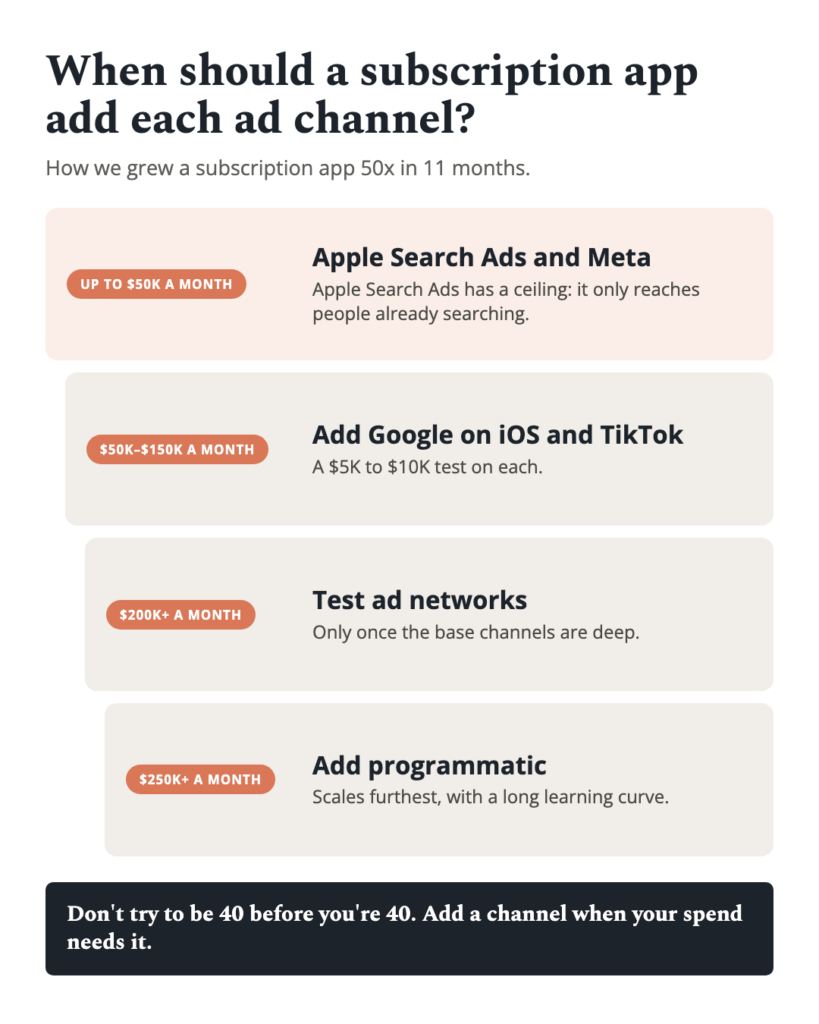
Pro tip: Export asset-level reports weekly and build a spreadsheet mapping Google's asset ID to your internal creative naming convention. Google's UI doesn't make it easy to track performance over time, and assets lose their rating history when removed. This tracking sheet becomes your creative intelligence database.
Step 12: How do you coordinate Google App Campaigns with other paid channels?
Running Google App Campaigns alongside Meta, TikTok, and Apple Search Ads creates attribution overlap. According to AppsFlyer's multi-touch attribution data, 20-35% of users who convert via a Google App Campaign also saw a Meta ad within their attribution window.
The practical solution: evaluate all channels on incremental CPA (using holdout tests) rather than last-touch CPA. Google tends to win last-touch attribution for users who searched the Play Store, even if Meta's ad drove initial awareness.
Budget allocation across channels should follow a testing framework. Allocate 50-60% to your proven best channel, 25-30% to your second-best, and 10-15% to experimental channels. For most Android subscription apps, Google captures the largest share due to Play Store integration advantages.
The comparison of creative formats across channels shows that what works on YouTube (long-form narrative) often fails on TikTok (fast-cut native content). Don't recycle creatives across platforms without reformatting.
Key insight: 20-35% of Google-attributed conversions also saw a Meta ad. Use holdout tests to measure true incremental value per channel.
- Attribution overlap is 20-35% between Google and Meta
- Evaluate channels on incremental CPA, not last-touch
- Allocate 50-60% budget to proven top channel
- Don't recycle creatives across platforms unchanged
- Run quarterly holdout tests per channel
Pro tip: If you're running Apple Search Ads for your iOS app alongside Google App Campaigns for Android, track blended CPA across both platforms. Paywall structure differences between iOS and Android mean that identical creatives produce materially different conversion economics on each OS.
Common Mistakes to Avoid
- Mistake 1: Asset stuffing, dumping all creatives into one ad group instead of separating by theme, kills audience matching.
- Mistake 2: Optimizing for installs long-term instead of graduating to trial start or subscription events within 2-4 weeks.
- Mistake 3: Adjusting bids during the learning phase, which resets the 50-conversion counter and wastes budget.
- Mistake 4: Passing inflated or predicted revenue values before cohort data stabilizes, corrupting tROAS signals.
- Mistake 5: Ignoring creative fatigue; IPM decays 15-25% every 3 weeks without fresh assets per industry patterns.
- Mistake 6: Scaling budgets by more than 20% at once, which destabilizes campaign delivery and inflates CPA by 30-50%.
- Mistake 7: Not excluding brand terms from App campaigns, paying premium CPA for users who would have converted organically.
Start with a tCPA campaign optimizing for trial starts, integrate Google Play Billing with server-side validation, and separate creatives into themed ad groups. Graduate to tROAS bidding once you accumulate 300+ monthly revenue events. Refresh creatives biweekly, scale budgets by no more than 20%
Frequently Asked Questions
Can you run Google App Campaigns for iOS subscription apps?
Google App Campaigns only support Android apps on Google Play. For iOS, use Apple Search Ads or run Google's standard web campaigns driving to an App Store landing page, though attribution is severely limited post-ATT.
How long does it take for a new Google App Campaign to become profitable?
Expect 3-6 weeks before a campaign stabilizes at target CPA, according to Google's guidelines. The learning phase takes 1-2 weeks, followed by 2-4 weeks of bid optimization. Budget for a 30-50% CPA premium during weeks 1-3.
Does Google App Campaign performance differ between subscription and one-time purchase apps?
Yes. Subscription apps benefit more from tROAS bidding because revenue accrues over time, giving the algorithm a richer signal. One-time purchase apps hit peak ROAS faster but can't leverage renewal data. According to RevenueCat, subscription apps with 12-month retention of 10%+ see the biggest tROAS advantage.
Should you use Google's automated ad suggestions for subscription creatives?
Use them as a starting point, never as your primary assets. Google auto-generates text from your Play Store listing, which rarely includes trial or pricing language. Always write custom headlines that mention "free trial" or the subscription value proposition explicitly.
How do Google App Campaigns handle users who cancel and resubscribe?
Resubscriptions are attributed to the original install campaign if within the lookback window. Revenue from a resubscribe fires as a new subscription_purchase event. Configure your MMP to deduplicate these against the original user to avoid inflating ROAS by 5-12%, a common error in subscription tracking.
What daily budget minimum do you recommend for a subscription app testing Google App Campaigns?
Minimum viable test budget is $100-150/day for 30 days ($3,000-$4,500 total). This ensures you clear the learning phase and collect enough data for one bid optimization cycle. Below $100/day with a $10+ trial CPA, the campaign never exits learning.
Can you target specific audiences or demographics in Google App Campaigns?
No. Google App Campaigns do not support audience targeting. The algorithm determines targeting based on your creative assets, app category, and conversion signals. Your only lever is creative segmentation across ad groups, which indirectly shapes which audiences Google pursues.
How do subscription app campaigns on Google compare to Meta for Android user acquisition?
Google typically delivers 15-25% lower CPAs for Android subscription trials due to Play Store integration, but Meta often delivers higher-LTV users thanks to richer targeting signals. According to AppsFlyer's Performance Index, Google leads on volume for Android while Meta leads on retention-based ROAS in many subscription categories.
Looking to scale your mobile app growth with performance creative that delivers results? Talk to RocketShip HQ to learn how our frameworks can work for your app.
Not ready yet? Get strategies and tips from the leading edge of mobile growth in a generative AI world: subscribe to our newsletter.
Related Reading
- The subscription app growth playbook (comprehensive guide)
- What ad creative angles drive the highest trial starts for personal finance subscription apps? (2026)
- Adapty Subscription App Benchmark Report: Pricing and Conversion Data (2026)
- What creative formats work for podcast subscription apps vs music streaming ads? (2026)
- How should an entertainment subscription app time its promotional pricing campaigns? (2026)