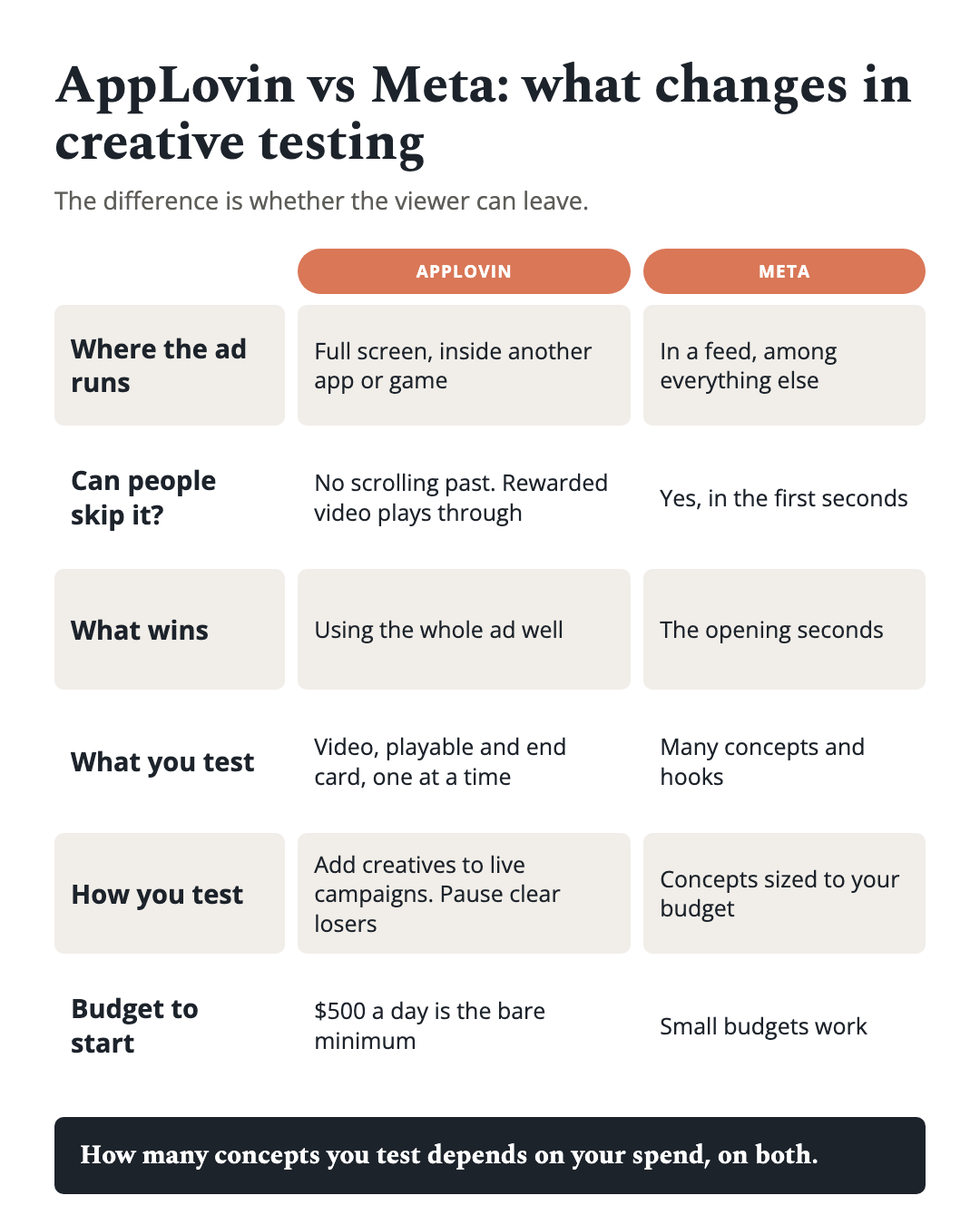
Short answer: AppLovin and Meta need different creative because they put the ad in front of people in different ways. An AppLovin ad runs full screen inside another app or game, and the person cannot scroll past it. A Meta ad sits in a feed, and people scroll past it in the first seconds. So on Meta you win or lose on the opening seconds and you need a lot of variety. On AppLovin you have the person’s attention for the whole ad, so you test the video, the playable and the end card as three separate levers. On both, the number of concepts you can test is set by how much you spend. On AppLovin you do not build separate test campaigns: you add new creatives to your existing campaigns and let Axon allocate, while pausing the ones that are clearly losing.
 I have managed over $100 million in ad spend, and the mistake I see most often is one testing routine run on both platforms. For the step-by-step mechanics of each, see how to test ad creatives on AppLovin and how to test ad creatives on Meta.
Page Contents
What is the difference between AppLovin and Meta (Facebook) ads for creative testing?
The difference is whether the viewer can leave. AppLovin ads run full screen inside other apps, usually games. A person who is playing a game sees your ad in a break or after choosing to watch it, and they cannot scroll past it. AppLovin describes its ad experience this way: an interstitial is shown at a natural break, and users “must watch at least five seconds” before they can skip. A rewarded ad is opt-in, and once the video begins it plays through its duration, up to 60 seconds.
Meta is a feed. People move through feed and Reels placements quickly, and your ad is one of many things on the screen. Whether they stop depends on the first seconds, and the rest only matters for the people who stayed.
That one difference drives most of the others. On AppLovin the ad gets the attention, so the job is to use it well. On Meta the ad has to earn the attention, so the job is to stop the scroll first.
How does that change what a good creative looks like?
On Meta, front-load. The hook, the pattern interrupt or the strongest visual belongs in the opening seconds, because that is where most viewers decide. A great second half does little if the first seconds lose the room.
On AppLovin, the viewer cannot leave, so you can build the ad rather than just open it. A rewarded video can take time to show the app in use and build to the moment that makes someone want it. The whole video gets watched, so the middle and the ending count in a way they often do not on Meta.
The same concept can travel between the two, but the cut should not. Re-edit the opening and pacing for each platform. The best framework for A/B testing ad creatives covers separating a concept from its variants.
What do you test on AppLovin besides the video?
On AppLovin, creative is more than the video. AppLovin recommends mixing video, playable and static formats and regularly introducing new creative assets. In practice you have three levers, and they can be tested separately:
- The video. Up to 60 seconds, 9:16. This is the part most teams already know how to make.
- The playable. A short interactive version of the app. AppLovin says playables attract higher-value, more engaged users, and recommends that they show the app’s key features. A playable is one self-contained HTML file, up to 5 MB, built to MRAID 2.0; its timer starts only after the first interaction, and the first tap must not go to the store.
- The end card. A 9:16 screen (at least 270 by 480) that follows the video. It is the last thing the viewer sees before deciding to install, so it deserves its own versions. See what makes a good end card.
This changes how you test. A new video, a new playable and a new end card are three different experiments, even in the same campaign. Change all three at once and you cannot tell which moved the result. Change one lever at a time to learn, and ship the full combination to scale.
How many creatives should you test on Meta vs. AppLovin?
As many as your spend can support, and that is true on both platforms. Concepts you test are a function of how much you spend. A larger budget gives more ideas enough delivery to be judged. Spreading a small one across too many ideas leaves each with too little to read.
That is why there is no weekly number here: any fixed figure is too many for a small account and too few for a large one. Ask instead how many of your live creatives are getting enough delivery to be judged. If many are not, you are running too many for your budget. To work out how many you can test at your budget, use our creative testing calculator.
Meta also needs creative variety to find what works, and the same goes for the audiences your spend reaches, so the answer is not to run fewer ideas forever. It is to match the number of ideas to a budget that can feed them.
How do you structure creative tests on AppLovin?
You do not run separate test campaigns. You add new creatives to your existing campaigns and let Axon allocate delivery across them. AppLovin’s own guidance is to upload and test new creative assets frequently and to regularly introduce new ones, so new work goes into the live campaign rather than into a sandbox.
You also still manage the account. Pause the ads that are obviously losing. If a creative has had a fair run and is clearly well behind the others, leaving it live only costs you money and clutters the campaign. Do not react to every small swing or rebuild the campaign when a day looks bad. Pause the clear losers, add fresh creative, and let the system sort the middle.
How much budget do you need on AppLovin?
$500 a day is a bare minimum to start, not a comfortable level. AppLovin’s support guidance is to set a daily budget that yields at least 15 to 20 conversions a day across the campaign. Older guidance used a lower figure of 10, so check the current page when you plan. If your budget buys fewer, the campaign is slow to learn and hard to read, so test fewer ideas. Sometimes you will also need to work directly with AppLovin’s team. Axon 2, AppLovin’s ad engine, launched in 2023, and the practical job is to give it enough conversions and enough good creative to choose between.
Should you start with AppLovin or Meta?
Start where you can feed the platform best. Fast, varied social creative and a conversion event that fires often make Meta an easy start. Playables, end cards and a budget that clears the AppLovin floor above make AppLovin worth testing, and mobile games are the common case because the ads run inside other games. Our post on how to pick ad channels for a mobile game covers the order to add channels and how to judge each one.
If you run both, keep the routines separate: tag assets by platform, cut each for the way it is shown, and judge each platform on its own results.
Frequently asked questions
What is the difference between AppLovin and Meta for creative testing? AppLovin ads run full screen inside other apps and cannot be scrolled past, so you test the video, the playable and the end card. Meta is a feed where people scroll past in the first seconds, so you win or lose on the opening and need creative variety.
How many creatives should I test on AppLovin vs Meta? As many as your spend supports. The number of concepts you can test is a function of budget on both platforms, so there is no fixed weekly count. Check how many live creatives are getting enough delivery to be judged. Our creative testing calculator works it out from your budget.
Do I need a separate test campaign on AppLovin? No. Add new creatives to your existing campaigns and let Axon allocate delivery. Pause the ads that are clearly losing.
What is the minimum budget for AppLovin? $500 a day is a bare minimum to start and not comfortable. AppLovin recommends a daily budget that yields at least 15 to 20 conversions a day across the campaign.
Are playables and end cards part of creative testing on AppLovin? Yes. AppLovin recommends mixing video, playable and static formats. Test the video, the playable and the end card as separate levers.