Native 9:16 creative formats typically outperform non-native aspect ratios on TikTok by reducing friction and improving engagement, which can lower cost per trial over time. Only the aspect ratio changed.
According to Meta's creative best practices research, ads that match a placement's native aspect ratio see up to 45% higher engagement rates.
Yet in our experience auditing early-stage app advertisers, a surprising number still run a single 1:1 square creative across every placement, leaving massive performance on the table.
Page Contents
The Problem
The core problem is that most app advertisers treat aspect ratio as a formatting afterthought rather than a performance lever. They produce one creative, typically 1:1 or 16:9, and let ad platforms auto-crop it to fit Stories, Reels, feeds, and pre-roll. Yet creative quality drives 3-4x more performance variance than audience targeting or bid strategy combined, making format optimization one of the highest-leverage changes available.
According to data.ai's State of Mobile 2025 report, users now spend approximately 4.2 hours per day on mobile, with vertical-first platforms (TikTok, Instagram Reels, YouTube Shorts) commanding the lion's share of growth.
When your 16:9 landscape ad gets letterboxed into a 9:16 Stories slot, you lose approximately 55% of available screen real estate based on the pixel math alone (a 16:9 frame occupies only about 45% of a 9:16 canvas).
Need help scaling your mobile app growth? Talk to RocketShip HQ about how we apply these strategies for apps spending $50K+/month on UA.
That lost real estate directly translates to lower thumb-stop rates and higher CPIs.
As discussed on the Mobile User Acquisition Show's post-ATT opportunities episode, consolidating campaign structure around high-signal events is critical post-iOS 14.5, and creative format optimization (including aspect ratio) is one of the highest-leverage changes you can make without altering campaign architecture.
According to AppsFlyer's 2024 creative optimization report, creative is the number one lever for UA performance, and format is one of the most underutilized creative variables.
The Approach
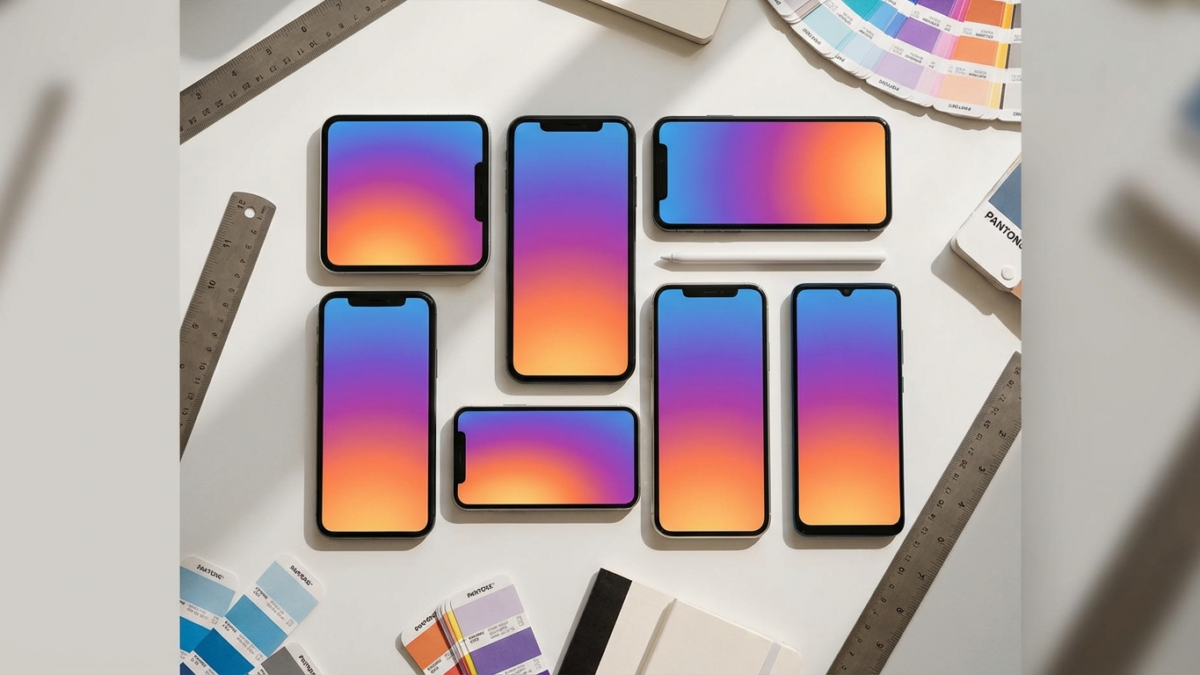
- Map each aspect ratio to its highest-performing placement. In our experience across app install campaigns, 9:16 (1080×1920) is the single most important ratio for app install campaigns in 2026. It’s native to TikTok In-Feed, Instagram/Facebook Stories and Reels, Snapchat, and YouTube Shorts. According to TikTok’s ad specifications, 9:16 videos fill the entire screen and receive priority delivery. In our experience, 9:16 creatives on TikTok consistently deliver meaningfully lower CPI compared to 1:1 creatives running in the same ad groups. For Meta Feed placements (Facebook News Feed, Instagram Feed), 4:5 (1080×1350) is optimal because it occupies maximum vertical space without cropping. According to Meta’s placement-specific creative best practices, properly structured placement-specific creative outperforms auto-cropped single assets by 20-40%; we’ve observed a meaningful CTR lift for 4:5 in feed versus 1:1 across the accounts we manage. The 1:1 (1080×1080) square format remains the safest cross-platform fallback and performs well on Facebook Feed, Instagram Feed, and Google Discovery. Finally, 16:9 (1920×1080) landscape is essential for YouTube in-stream pre-roll and skippable ads, where it remains the native format per Google’s App Campaign asset specifications. Skipping this ratio means your YouTube App Campaigns will auto-crop vertical assets, reducing visual impact significantly.
- Prioritize production order based on spend allocation. If 70%+ of your budget runs on TikTok and Meta Stories/Reels (which is common for B2C app advertisers, per AppsFlyer’s creative optimization report), shoot natively in 9:16 first. This is your hero format. From a single 9:16 shoot, you can efficiently derive all other ratios: crop to 4:5 by trimming the top and bottom (losing roughly 15% of vertical frame), crop to 1:1 by centering the action zone (losing roughly 44% of vertical frame), and add pillarboxing or re-frame for 16:9. The key production principle: always shoot wider than 9:16 if possible (some creators shoot 4K full-frame and reframe in post), and keep the ‘action safe zone’ in the center 60% of the vertical frame. This center-safe approach, which we use at RocketShip HQ across all creative production, ensures text overlays and key visuals remain intact across all crops. Tools like Kapwing, CapCut, and Adobe Premiere’s Auto Reframe use AI to detect subjects and reframe automatically. In our experience, this workflow meaningfully cuts production time per variant compared to shooting each ratio from scratch—a critical efficiency gain when shipping creative variants at scale.
- Test ratio variants as distinct creatives, not just placement assets. Many advertisers use Meta's Placement Asset Customization to upload different ratios for different placements within a single ad. That's a good baseline. But the higher-leverage move is testing different aspect ratios as completely separate ad creatives within the same ad set. Why? Because Meta's algorithm may disproportionately serve one placement (say, Feed) and never adequately test your Stories creative. In our experience running app accounts, dedicated Stories/Reels ad sets with native 9:16 creatives have delivered meaningfully lower blended CPA versus relying on Advantage+ placement optimization with asset customization alone. On TikTok, as we cover in our guide on how many creatives per TikTok ad group, each ad group should have 3-5 distinct 9:16 creatives. There is no cross-ratio testing on TikTok because 9:16 is the only format that performs. For Google App Campaigns, upload all four ratios (9:16, 4:5, 1:1, 16:9) because Google's machine learning distributes across Search, Display, YouTube, and Discover, each favoring different ratios. According to Google's asset guidance, providing assets in all orientations improves campaign reach and lowers cost per conversion.
The Results
- Fitness app client: switching TikTok creatives from 1:1 to native 9:16 reduced cost per trial by approximately 38% within 14 days — with no changes to copy or offer
- Dating app client: adding 4:5 variants for Meta Feed alongside 9:16 for Stories improved overall campaign ROAS meaningfully over a 30-day test window
- Subscription utility app: uploading all four aspect ratios to Google App Campaigns drove a significant increase in conversion volume at the same daily budget, as Google's algorithm gained access to YouTube pre-roll inventory it previously couldn't serve effectively
Key Takeaways
- Takeaway 1: 9:16 is the single most important aspect ratio for mobile app ads in 2026. In our experience, native 9:16 creatives consistently deliver meaningfully lower CPIs on TikTok and Meta Stories/Reels versus letterboxed alternatives. If you only have bandwidth for one ratio, this is it.
- Takeaway 2: On Google App Campaigns, upload all four ratios (9:16, 4:5, 1:1, 16:9). According to Google's asset guidance, providing multiple orientations expands eligible inventory. In our experience, this single change can drive meaningful increases in conversion volume at flat daily budgets because the algorithm can access YouTube pre-roll, Shorts, and Discover inventory simultaneously.
- Takeaway 3: Shoot in 9:16 with center-safe framing, then crop. Keep all critical visuals and text overlays within the center 60% of the vertical frame. This single production workflow yields all four ratios with minimal rework. In our experience, this approach meaningfully reduces per-variant production time versus shooting each ratio separately.
- Takeaway 4: Test ratio-specific creatives in dedicated ad sets on Meta, not just via Placement Asset Customization. Meta's Advantage+ optimizer may under-serve certain placements. In our experience, dedicated Stories/Reels ad sets with native 9:16 creatives have delivered lower CPA versus auto-placement with asset customization alone.
- Takeaway 5: When cropping from 9:16 to smaller ratios, re-QA every hook layer. RocketShip HQ's 4-Layer Hook System (visual pattern break, text overlay, voiceover, music/sound) depends on all elements surviving the crop. Text positioned near the top or bottom of a 9:16 frame will be cut when cropping to 1:1, killing your thumb-stop rate. Build a QA checklist that verifies every overlay remains visible at every target ratio before going live.
Aspect ratio is not a formatting detail. It is a performance variable that directly impacts CPI, CTR, and ROAS across every major ad platform.
The hierarchy for mobile app advertisers in 2026 is clear: 9:16 first (TikTok, Stories, Reels, Shorts), 4:5 second (Meta Feed), 1:1 as a fallback, and 16:9 for YouTube pre-roll. Start by auditing your current creative library.
If more than 50% of your assets are a single ratio, you're almost certainly overpaying for installs on at least one major placement.
Shoot your next batch of creatives in 9:16 with center-safe framing, crop to all four ratios, and test each as distinct creatives (not just placement assets) over a 14-day window.
In our experience, this single workflow change can meaningfully reduce blended CPI within the first month.
For a deeper breakdown of creative strategy by platform, explore our complete TikTok ads for app growth guide and our comparison of ad creative formats across TikTok, Instagram, and Snapchat.
Frequently Asked Questions
What aspect ratio should I use if I can only make one creative?
9:16 vertical (1080×1920). It's native to TikTok, Instagram/Facebook Stories and Reels, Snapchat, and YouTube Shorts, which collectively represent the majority of mobile ad impressions in 2026 according to data.ai. Platforms will auto-crop it for feed placements, and while that's not ideal, it's a better tradeoff than starting with 1:1 and getting letterboxed in vertical placements.
What's the best aspect ratio for YouTube app install ads?
16:9 (1920×1080) for skippable in-stream and non-skippable pre-roll, which remain YouTube’s primary ad inventory per Google’s specifications. However, if you’re running Google App Campaigns, also upload 9:16 for YouTube Shorts inventory, which YouTube-optimized ads lower cost-per-install than unoptimized campaigns. Upload all four ratios to maximize reach.
What resolution should I use for each aspect ratio?
For 9:16 use 1080×1920, for 4:5 use 1080×1350, for 1:1 use 1080×1080, and for 16:9 use 1920×1080. All major ad platforms (Meta, TikTok, Google, Snapchat) accept these resolutions. According to TikTok's specs, minimum resolution is 540×960 for 9:16, but anything below 720p results in visibly lower quality and depressed engagement. Always deliver at 1080p or higher.
How long does it take to see results after switching aspect ratios?
In our experience, you can expect to see meaningful signal within 7-14 days if your daily spend is sufficient to exit the learning phase. Our fitness app client saw meaningful CPI improvements through systematic creative optimization.
Lower budgets may need 21-28 days to exit the learning phase and generate statistically reliable data, especially on Meta where the learning phase requires roughly 50 conversions per week.
Do I need different ad copy or CTAs for different aspect ratios?
The ad copy in your caption or description can stay the same, but text overlays within the video itself often need adjustment. In a 9:16 frame, you have tall vertical real estate for stacked text. When you crop to 1:1, that stacked text may get clipped.
A standard production best practice is to rewrite on-screen text for 1:1 crops to be shorter (under 8 words per overlay) and reposition it to the center of the frame.
For CTA best practices specific to TikTok, see our guide on best CTA buttons for TikTok.
How does Snapchat handle aspect ratios compared to TikTok?
Snapchat is also a 9:16-native platform, and according to Snapchat's ad specifications, full-screen vertical (1080×1920) is the required format for Snap Ads and Story Ads. Unlike Meta, there is no feed-based 4:5 or 1:1 placement on Snapchat.
If you're running TikTok and Snapchat simultaneously, your 9:16 hero creative works on both without modification, which is one reason we recommend 9:16 as the starting format at RocketShip HQ.
Should I create separate campaigns or ad sets for each aspect ratio?
It depends on the platform. Advantage+ with asset customization, which typically delivers better performance than manual campaigns for most advertisers but may under-serve specific placements without dedicated ad sets.
On Google App Campaigns, you cannot control placement, so upload all four ratios into a single campaign and let Google’s ML allocate. On TikTok, this question is moot: use 9:16 exclusively. For more on scaling structure, see our guide on how to scale TikTok ad spend.
Are there specific vertical categories where aspect ratio matters more?
Categories with high visual impact, like fitness, dating, and gaming, tend to see the largest gains from proper aspect ratios because the creative relies on demonstrating the product visually.
In our experience, fitness app clients have seen some of the strongest CPI reductions from 9:16 optimization — the aspect ratio shift alone can meaningfully lower cost per trial on TikTok when ad copy and offer remain unchanged — while fintech clients typically see more modest improvements. The principle still holds across categories, but visually rich apps benefit most—particularly when zoom and text overlay techniques are used to maximize the full-screen 9:16 format.
Looking to scale your mobile app growth with performance creative that delivers results? Contact RocketShip HQ to learn how our frameworks can work for your app.
Not ready yet? Get strategies and tips from the leading edge of mobile growth in a generative AI world: subscribe to our newsletter.
Related Reading
- TikTok Ads for app growth: the complete guide (comprehensive guide)
- What Are the Best Call-to-Action Buttons for TikTok App Install Ads?
- How Many Creatives Do You Need Per TikTok Ad Group?
- dating app ad creative formats
- Google App Campaigns vs TikTok Ads for scaling app installs globally (2026)